Use and Maintenance Manual – Series X – XS E RESTYLING
5. USE INSTRUCTIONS
Before using the machine read this chapter thoroughly.
WARNING!
Follow exclusively the instructions given in the next paragraphs and the safety rules described both
hereafter and in the previous paragraphs. Read the next paragraphs carefully in order to properly
understand the on/off procedures as well as all operations and their correct use.
5.1 Platform control panel
The control panel is located on the platform. The control panel is fixed to the right rail and is used to:
▪ Turn the machine ON/OFF.
▪ Select the operating mode (lifting/lowering or drive).
▪ Move the platform during ordinary working procedures.
▪ Display some parameters (alarms, dead-man’s working, etc…).
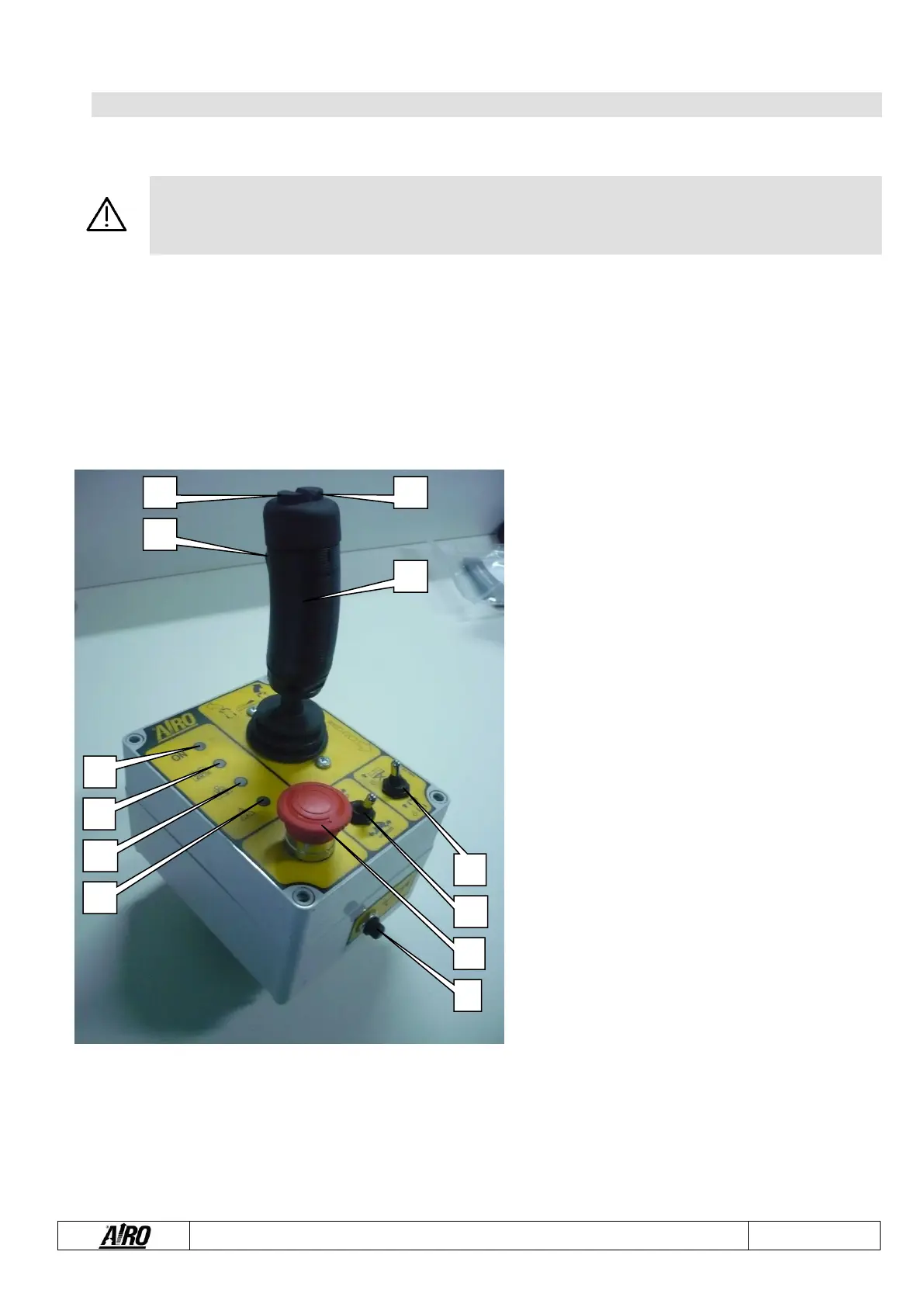
5-1: Platform control panel
A. Proportional joystick control for platform drive / lifting /
lowering
B. Switch for “RIGHT” steering
C. Switch for “LEFT” steering
D. Dead-man switch
E. Enabled control panel warning light
F. Flat battery warning light
G. Platform overload warning light
H. Danger warning light due to instability or
malfunctioning of the electric system
I. Horn switch
J. Emergency stop button
K. Drive speed selector (hare/snail)
L. Movement selector (drive or lifting/lowering)
All movements (steering excluded) are controlled by proportional joystick control; it is therefore possible to adjust movement speed
by means of the relative controls (except lowering which occurs by gravity).
To avoid sudden shakes during movements, it is advisable to operate the proportional joystick controls gradually.
For safety reasons, to operate the machine, press dead-man switch D on the front part of the proportional joystick before activating
the joystick. If the dead-man switch is accidentally released while the machine is operating, the movement is immediately stopped.
To resume the operation, release the joystick and follow the steps described above.


 To Next Page