BeHear SMARTO User Manual Page 23 of 41
Product Name: BeHear SMARTO Product No.: ABH-410 Doc. No. BHAUM202206.15
Connection
To manage the Bluetooth pairing and connection of your BeHear SMARTO amplifier with a
smartphone, tap the Settings icon at the bottom of the app screen and choose the Connection
option.
The app opens the Connection screen automatically when no BeHear device is connected to
the phone.
You can display the Connection screen at any time by tapping the Settings icon at the bottom
of the screen and choosing the Connection option.
First Time Connection
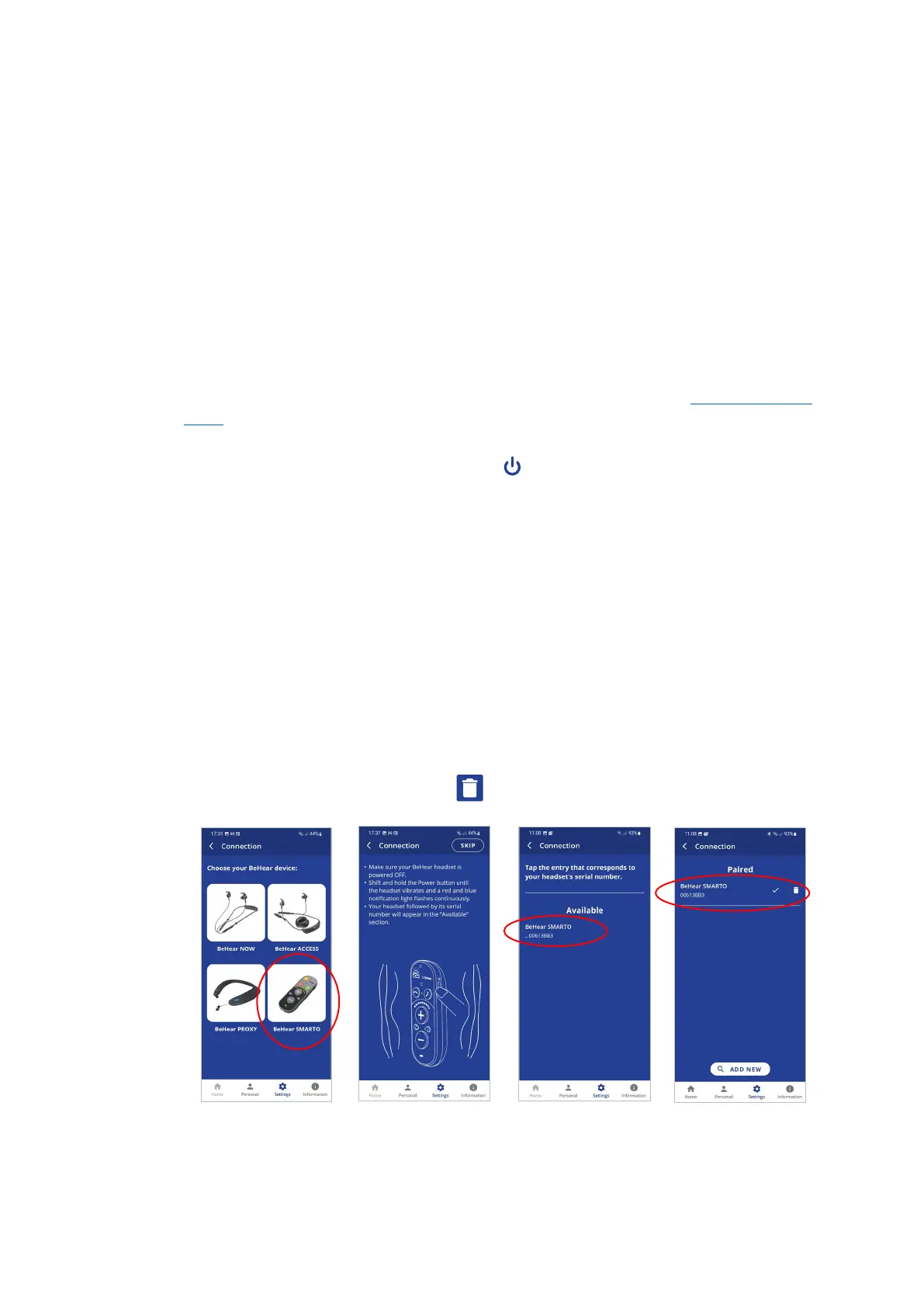
1. Tap the BeHear SMARTO icon in the Connection screen to initiate connection with your
amplifier.
2. Follow the on-screen animated instructions to place your amplifier into Bluetooth pairing
mode:
• Make sure the BeHear SMARTO amplifier is powered OFF.
• Then, shift and hold the power switch on the amplifier for up to 5 seconds, until
the notification LED alternates red/blue.
3. Wait until the list of Available devices appears in the app. It may take up to 30 seconds.
4. The product name BeHear SMARTO followed by the last several characters of the device’s
serial number will appear in the list of Available devices. You can verify the device by
checking that the serial number printed on the underside of the BeHear SMARTO body (on
the white label) matches the number in the list.
5. Select your BeHear SMARTO in the list by tapping the device name. When the pairing and
connection process is complete the amplifier will be listed in the Paired devices section,
followed by a .
6. You can manage connected devices in the Connection screen as follows:
• To connect a new BeHear device, tap ADD NEW button.
• To connect a previously paired BeHear SMARTO, tap the name of the device in the list.
• To disconnect BeHear SMARTO tap the name of the connected device in the list. To
reconnect BeHear SMARTO tap the name again.
• To unpair BeHear SMARTO tap the icon.
Upon successful connection of a new BeHear SMARTO device you will be prompted to perform
the Hearing Assessment.



 To Next Page