BeHear SMARTO User Manual Page 7 of 41
Product Name: BeHear SMARTO Product No.: ABH-410 Doc. No. BHAUM202206.15
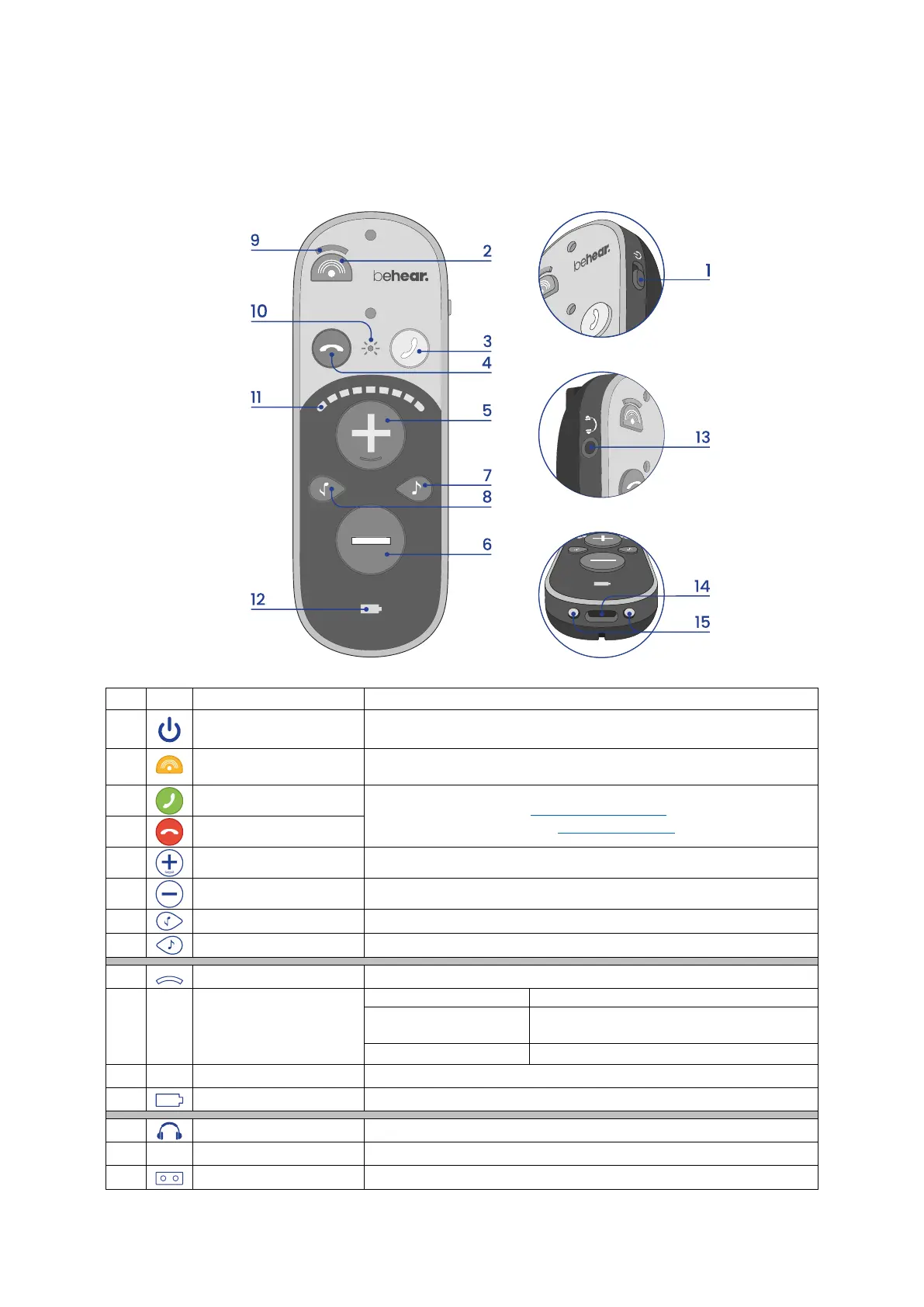
Device Overview
Main Unit
1
Power button
• Shift up and hold to turn BeHear SMARTO on and off.
• Press briefly to show battery level (when BeHear SMARTO is on).
Press to toggle between Omni (all directions) and Front microphone
modes.
3
Accept button
Handle phone calls (read Handling Phone Calls)
Manage audio listening (read Listening to Audio)
4
Cancel button
5
Volume up button
Press to increase call, audio, or ambient sound volume.
6
Volume down button
Press to decrease call, audio, or ambient sound volume.
Press to increase low frequencies (bass).
8
Tone up button
Press to increase high frequencies (treble).
Shines in amber when the Front mode of the microphone is selected.
Headset is in Bluetooth pairing mode.
Headset is connected to a Bluetooth device.
Hearing amplifier is active.
Volume, tone, or sound balance indicator
Battery level and charging status indicator
Cable port for supplied headsets
Insert the supplied cable to charge the battery.
Place this side down in the charging cradle to charge the battery.



 To Next Page