BeHear SMARTO User Manual Page 30 of 41
Product Name: BeHear SMARTO Product No.: ABH-410 Doc. No. BHAUM202206.15
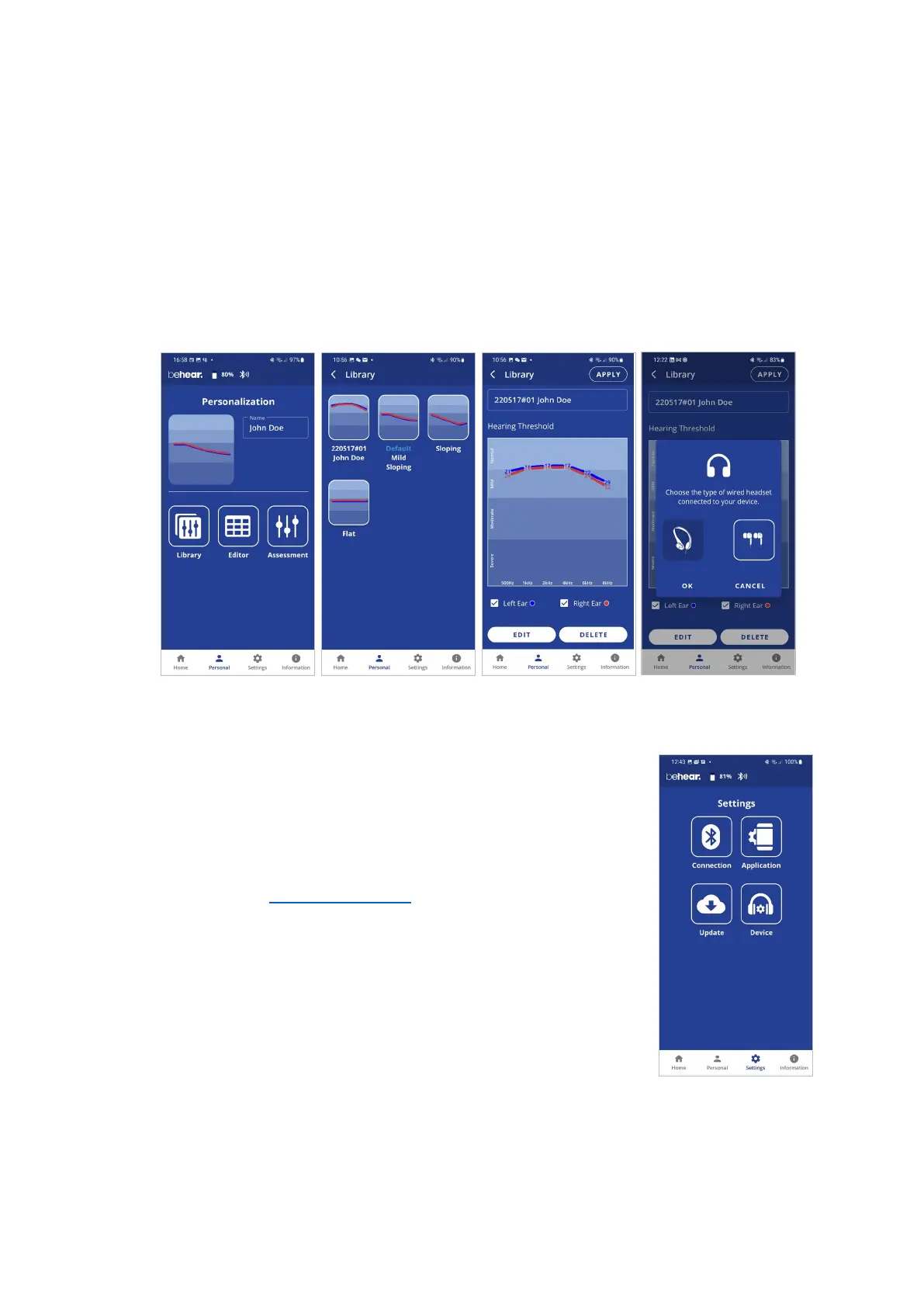
Library of Audiograms
The app library contains factory default audiograms as well as audiograms you have saved.
• Choose Library in the Personalization screen to open the gallery of audiograms.
• Tap a chart in the list to display its values in full screen.
• Tap EDIT to manually edit the existing values.
• Tap DELETE to remove this user audiogram from the library. The default audiograms
cannot be deleted.
• Tap APPLY to upload the audiogram to your connected BeHear SMARTO amplifier. You
will be prompted to choose the type of wired headset connected to the amplifier (on-ear
or in-ear).
Settings
Customization of both the headset and the app is done via the Settings
screen. Display the Settings screen by choosing the Settings icon in the
bottom menu.
Connection
Tap the Connection button to manage the Bluetooth connection of
BeHear SMARTO amplifier with the app.
Refer to the Connection section of this manual for detailed
explanations.
Application
Tap the Application button to manage app settings.
Device
Tap the Device button to configure the connected BeHear SMARTO
amplifier.
Update
Tap the Update button to manage firmware updates for the connected
BeHear device.



 To Next Page