PM266A PRO/ PM266A
46
Appendix I: Super 5.1 Channel Setup
llation procedures for 5.1 Channel Setup. Note that if your
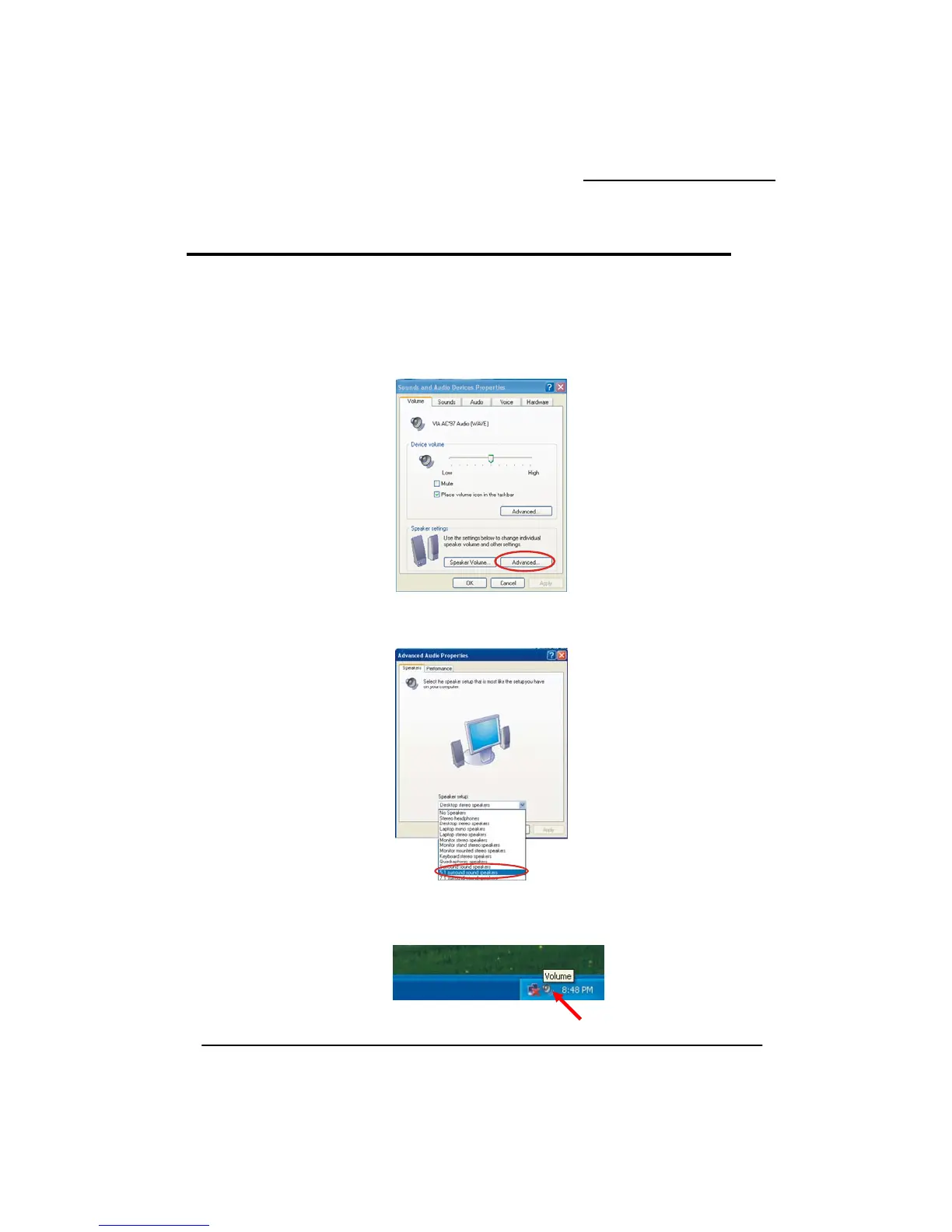
. Beginning with the “Start” button, select Setting Æ Control Panel Æ Sounds, Speech, and
Sounds and Audio Devices. The screen below will display. First check the “Place
taskbar” in the Device volume block. Then press the “Advanced…” button to
settings.
. At the “Advanced Audio wn box to select the “5.1 surround
lick “Apply” to enable the 5.1 channel audio effect.
at is on the desk bar.
ote: As described earlier, begin with this step if stem has Windows 98/ ME/
This appendix describes the insta
operating system is Windows 98/ ME/ 2000, go directly to step 3.
1
Audio Devices Æ
volume icon in the
e speakerconfigure th
2 Properties” screen use the drop-do
sound speakers”. C
3. On your desktop, double click the volume icon th
(N your sy
2000)



 To Next Page