Getting to know your telephone
1 Getting to know your telephone
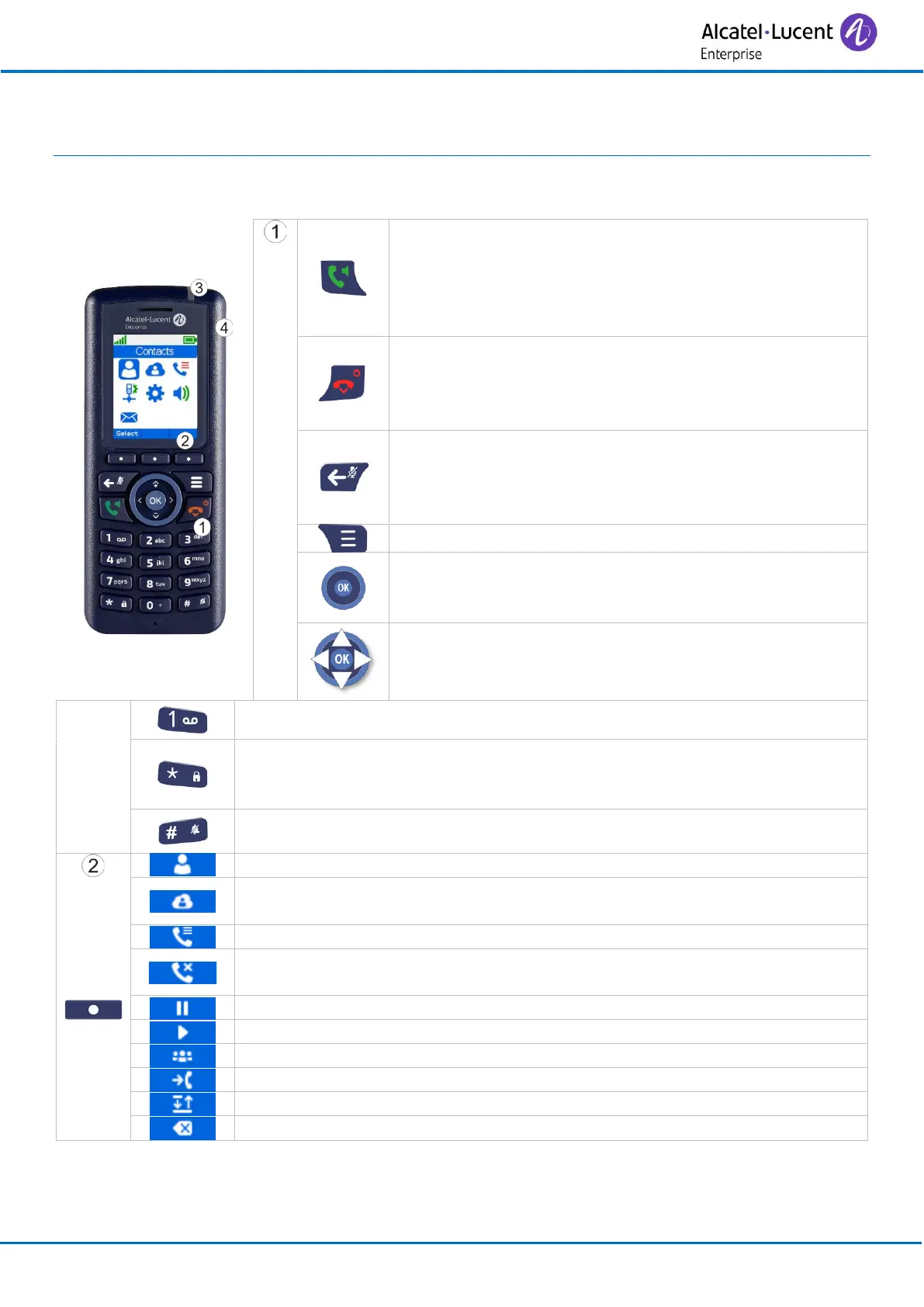
1.1 Phone description
• Answer the call.
• Make a call.
• Access the call log.
• Activate/deactivate the loudspeaker during a
conversation.
• Hang up.
• Long press (in idle mode): switch on the phone /
Switch off the phone.
• Return to previous menu.
• Return to previous menu.
• Activate/deactivate the mute feature during a
conversation.
• Erase a character.
• Confirm.
• Light up the screen.
• Open additional features menu (More).
• Navigate.
• Adjust volume level during conversation (up and
down navigation keys).
• Long press: access the voice mail.
• Long press: lock/unlock keypad.
• Long press while entering text: switch from lowercase to uppercase or
special characters.
• Long press: open settings to activate or deactivate silent mode.
• Access your personal directory.
• Access to the company directory (optional, depending on system
configuration).
• Decline the incoming call and forward it to your voicemail (if voicemail
is available).
• Recover the call on hold.
• Activate a three-way conference.
• Transfer the call to another number.
• Switching between two calls.
• Use this key to delete the last entered character.



 To Next Page