821
4 DECT Handset
SIP
Quick guide
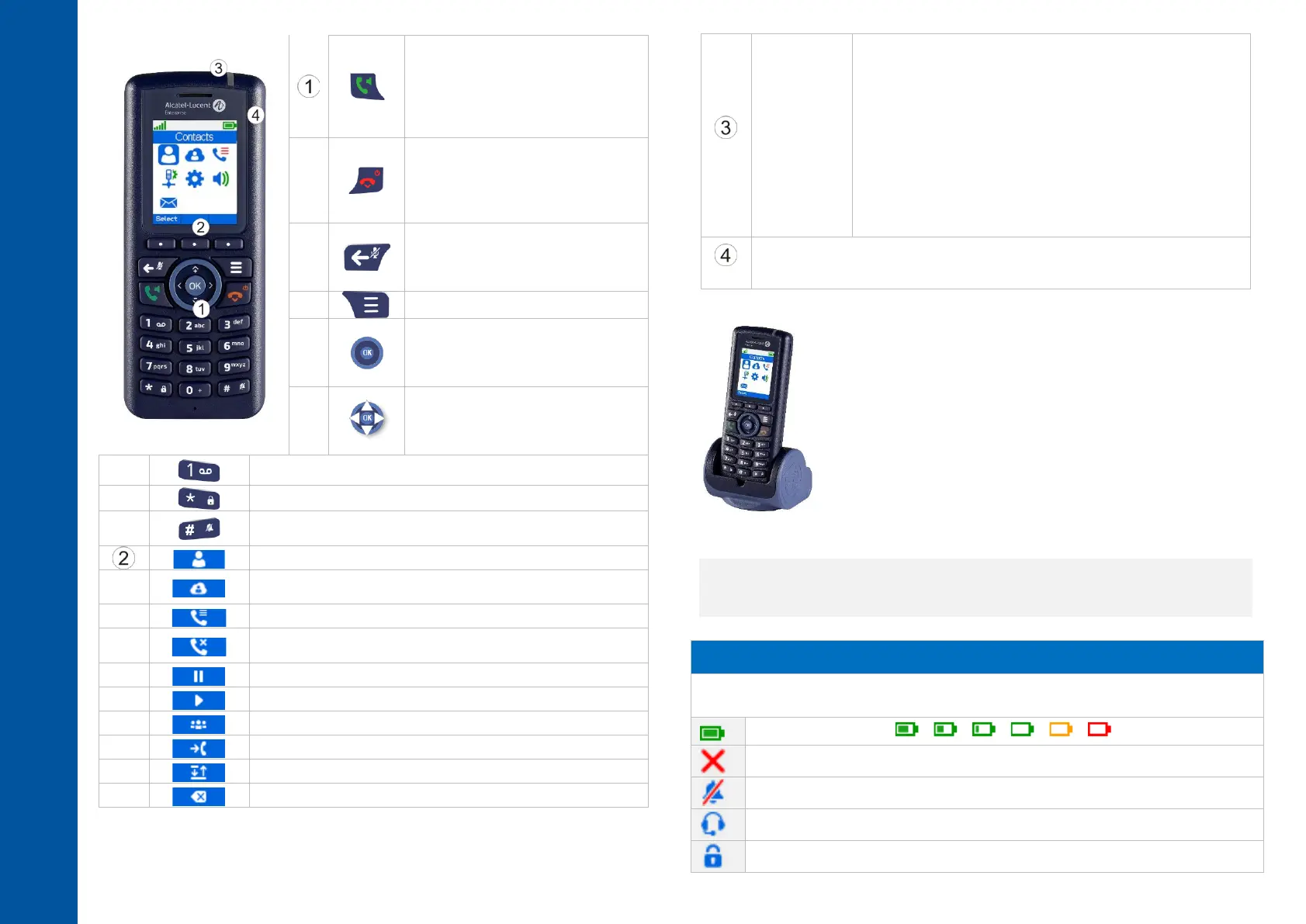
• Answer the call.
• Make a call.
• Access the call log.
• Activate/deactivate the
loudspeaker during a
conversation.
• Hang up.
• Long press (in idle mode): switch
on the phone / Switch off the
phone.
• Return to previous menu.
• Return to previous menu.
• Activate/deactivate the mute
feature during a conversation.
• Erase a character.
• Confirm.
• Light up the screen.
• Open additional features menu
(More).
• Navigate.
• Adjust volume level during
conversation (up and down
navigation keys).
• Long press: access the voice mail.
• Long press: lock/unlock keypad.
• Long press: open settings to activate or deactivate silent
mode.
• Access your personal directory.
• Access to the company directory (optional, depending on
system configuration).
• Decline the incoming call and forward it to your voicemail
(if voicemail is available).
• Recover the call on hold.
• Activate a three-way conference.
• Transfer the call to another number.
• Switching between two calls.
• Use this key to delete the last entered character.
• Some LED behaviors depend on the handset
configuration (see chapter: LED management). Define the
LED color to indicate a missed call or a new voice
message, to warn of a low battery or to activate the LED
when the handset is on the charger.
• LEDs are activated when the handset is placed in the
charger:
o Green steady: the phone is on the charger and the
battery is fully charged.
o Red steady: the phone is on the charger and the
battery is charging.
• Slow Red flashing: out of coverage.
• 3.5 mm, 4-pole jack plug for headset and maintenance (TRRS Standards:
CTIA). If your device is not compatible, you can use a 3 pole to 4 pole jack
adapter.
Charging your telephone battery
Place the handset into the support facing you. If you have a dual/rack
charger and a spare battery, place a spare battery pack in the back
slot, charging contacts down. Push the spare battery forward and
downward under the clip to keep it on charge. Plug the USB cable into
the AC/DC adaptor. Plug the AC/DC adaptor into the mains power
supply. The AC/DC adaptor is not provided with the set. Please contact
your provider for a recommended AC/DC adaptator. Depending on the
configuration of the handset, a beep is emitted when charging begins.
The battery status icon flashes and the LED lights up. Recharge your
telephone battery regularly. The telephone can be on or off when
recharging the battery. If the telephone is to remain unused or out of its charger for several
weeks, remove the battery and store it separately.
The battery charging time is usually less than 3 hours. Charging time depends on the power
source where the cable USB is plugged (computer, AC/DC adapter, …).
The charging time for the spare battery is usually 6 hours.
Status icons / Call icons
The status icons are displayed on the welcome screen and indicate the status of
the telephone.
Battery charge level ( > > > > > ).



 To Next Page