25
SPANET SV3-VH
(EVEREST,K2,CUB,FRONTIER,OASIS,ARCTIC,GLACIER,
ENTERTAINERX80,ENTERTAINERX90SPAPOOLS)
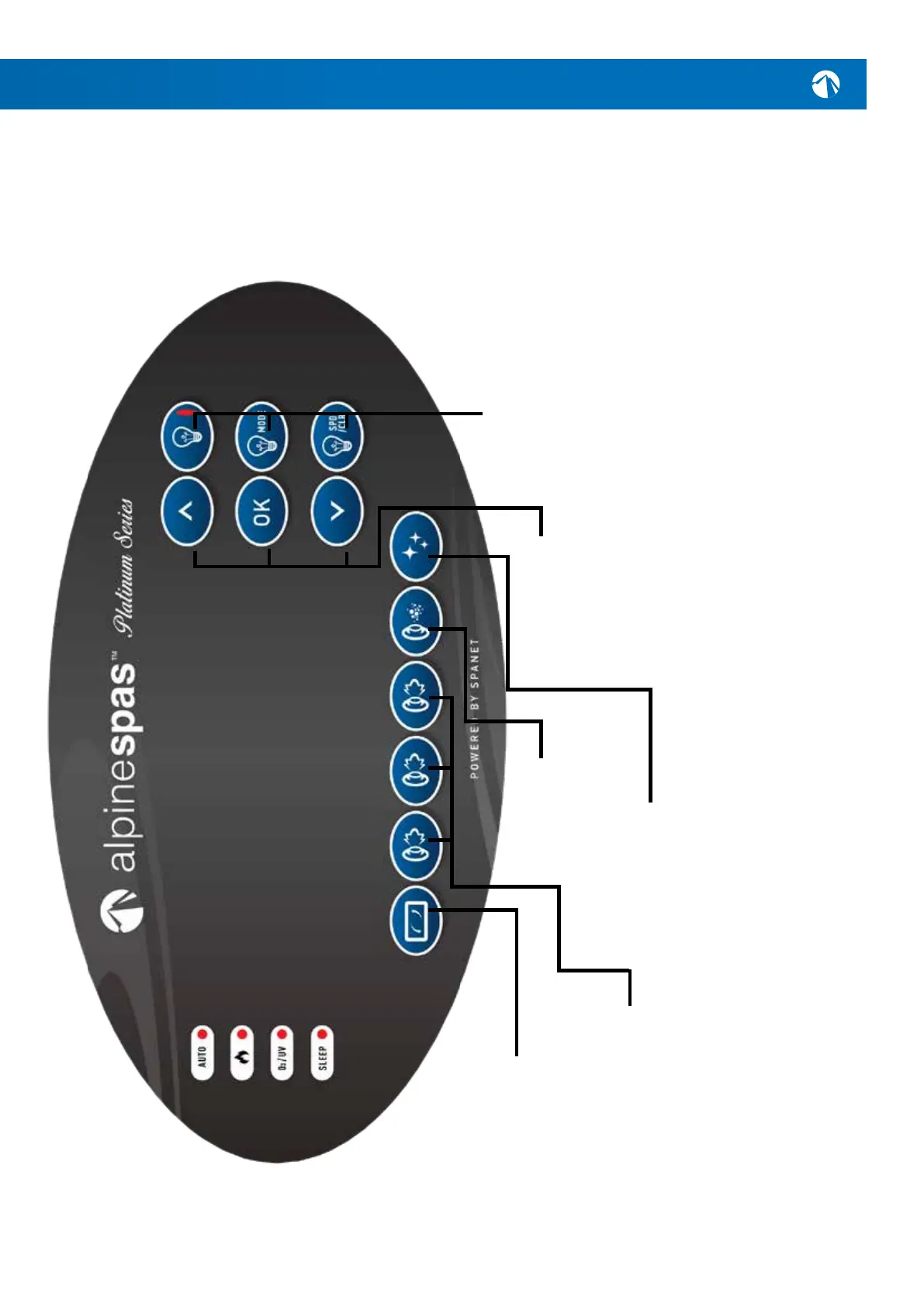
SANITIZE
Pressoncetoactivatea20minute
sanitisation&cleanupcycleto
refreshwaterqualityafterspause.A
secondpresswillcancelthecycleif
alreadyrunning.
JET PUMPS
Presstotoggleequippedpumps
on&off(somemodelsmayonly
havetwopumps).Greenlightwill
illuminatewhenrunning.
BLOWER
Press to toggle the air
blower on/off. Green
lightwillilluminatewhen
running.
INVERT/FLIP
Presstoipscreenupside
downforeasyviewingwhen
spainuse.
UP/DOWN
Shortpressesoftheup&down
buttonswilltogglethrough
threedisplaymodes:
W.TMP=WaterTemperature
S.TMP=SetTemperature
TIME=Clock.
Holdingtheupordownbuttons
will force the controller to begin
adjustingthesettemperature
inthedesireddirection.
OK
Usethisbuttontoconrmand
savesettingadjustmentsor
toentersettingadjustment
menus.
LIGHTS
Light:Presstotogglespa
lights on / off.
LightMode:Presstoactivate
lightmodemenu&usetheup
&downbuttonstoselectone
ofvedifferentlightingeffect
modes.
LightSpeed/Colour:Pressto
activatelightspeedoruser
colourselectionmenus.Use
up&downbuttonstoadjust.
HEAT RANGE
10 - 41.0
O
C



 To Next Page