26
Understanding the Display
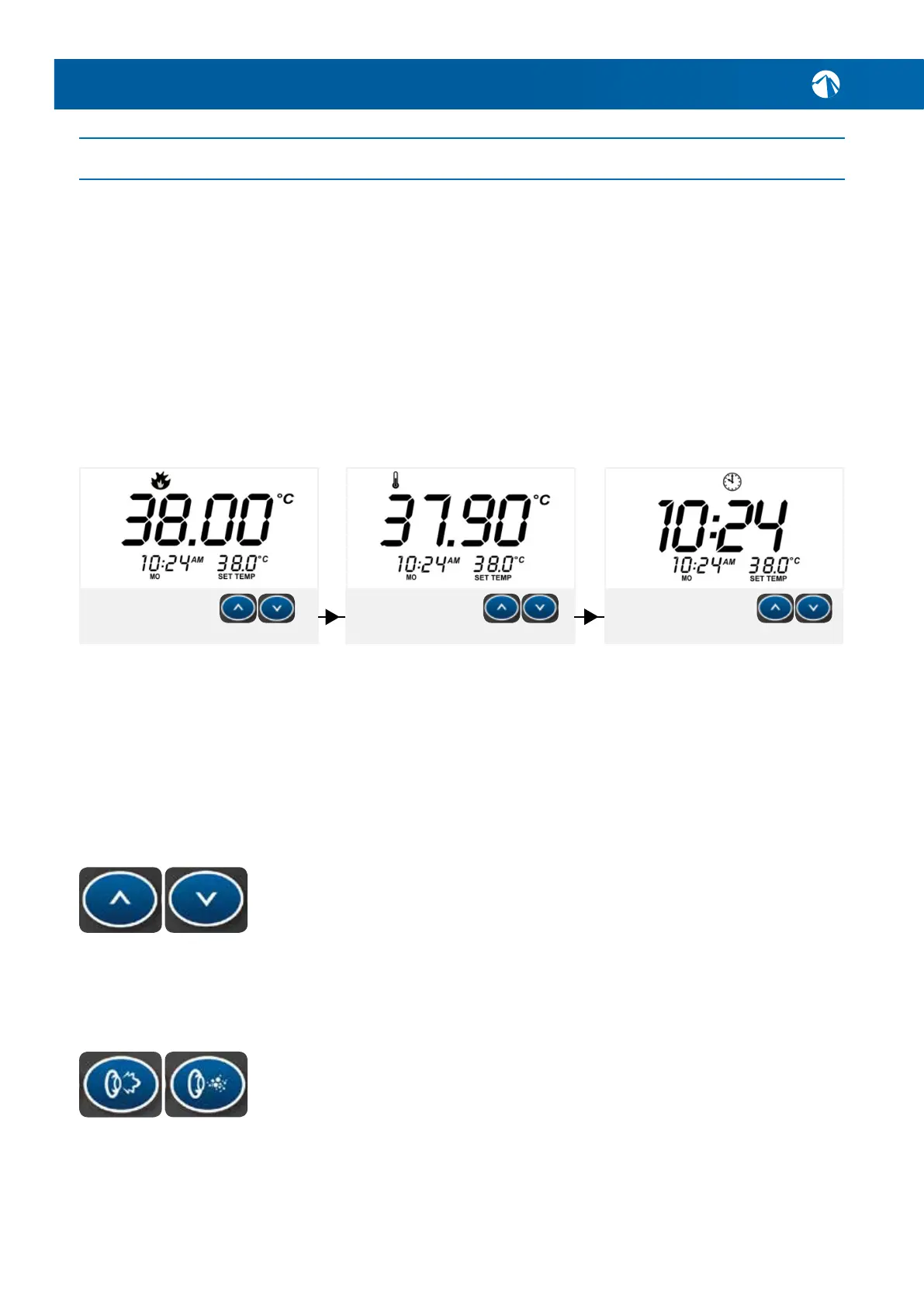
Whenthespapoolisrstpoweredandpriminghascompleted,thedefaultdisplay
willshowthecurrentwatertemperature-thisisreferredtoasW.TMP(water
temp).Youcancyclebetweenthebelowthreedisplaymodeswiththe‘UP’or
‘DOWN’buttons:
W.TMP
Shows the current water
temperature. This is the
default screen.
Cycle through to next screen
with up/down buttons.
Cycle through to next screen
with up/down buttons.
Cycle through to next screen
with up/down buttons.
S.TMP
Shows the SET water
temperature. Also shows
set temp bottom right.
TIME
Shows the current set time.
The time and date should
be set if not correct.
It’srecommendedtoleavethedisplayonW.TMPtoseeacleardifferencebetween
yoursettemperatureandyourcurrentwatertemperature.
Post Heat-up
Oncethedefault38°Cisreachedthecirculationpumpwillstopoperatingandwill
onlyre-engageifthespapoollosestemperature,altercyclehasbegun,orthe
systemispollingautomaticallytochecktemperature.
Changing the Temperature
Pressingorholdingthe‘UP’or‘DOWN’buttonswilladjustthesettemperaturein
thedirectionindicatedonthebuttoninincrementsof0.2°C.WhentheLCDstops
ashing,thespapoolwillheattothenewsettemperature(thespapoolcannot
cool the water).
The‘PUMP’buttonwillactivatethejetpumpandhighpressuredwaterwillow
fromthejetpieces.The‘BLOWER’buttonwillbubbleairtothesurfaceofthe
water,creatinga‘hottub/jacuzzi’typeeffect.
Testing the Components (Jet Pumps & Blower)
Turneachindividualjetpieceanti-clockwisetoopentheow.Thentestthejet
pump(s)andairblower(ifequipped)viathetopsidecontrolpanelbypressing:
UP
PUMP
DOWN
BLOWER
6. SPA POOL USAGE GUIDE & TIPS
SPA POOL OPERATION



 To Next Page