English
142
Audio Processor
Operation (Optional)
123
Select one of the factory preset characteristic
curves or make your own (personal) character-
istic curve. Then, display the Audio Processor
List and select "Private Memo."
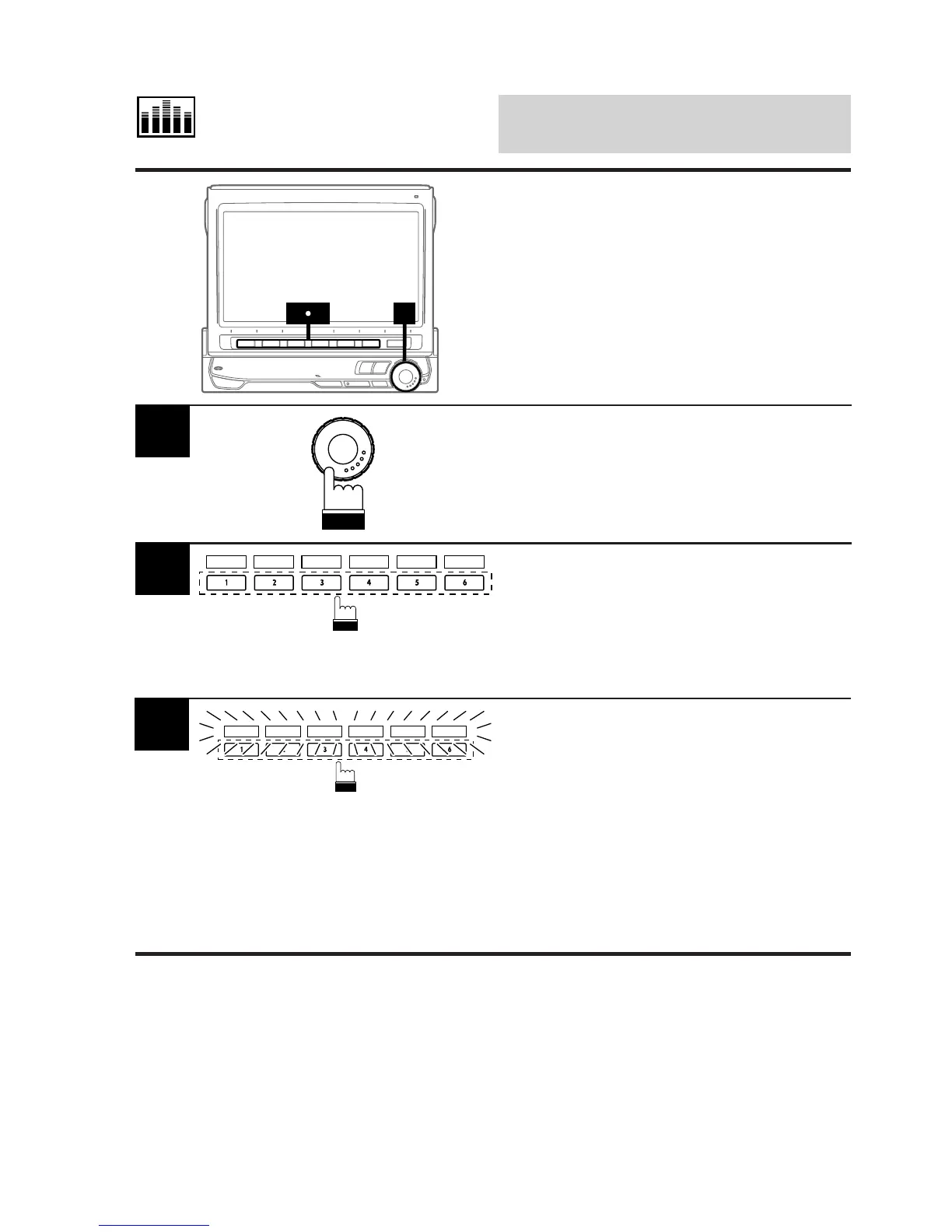
1
Press and hold any one of the Function buttons
1 (P.SET1) through 6 (P.SET6) for at least 2
seconds.
The Function Guide indicators P.SET1 through
P.SET6 in the preset mode display blink
indicating that you can memorize the character-
istic curve.
2
P.SET 1 P.SET 2 P.SET 3 P.SET 4 P.SET 5 P.SET 6
Memorizing Characteris-
tic Curves
Equalization characteristic curves created by
yourself or factory preset can be stored in
memory.
While the Function Guide indicators are
blinking, press the Function button 1 (P.SET1)
through 6 (P.SET6) into which you wish to
memorize the characteristic curve.
Now, the characteristic curve has been
memorized.
Repeat this procedure to memorize other
characteristic curves.
Note: This unit can memorize curves together
with the settings of the equalizer, DHE,
BBE and Surround Time Correction.
3
P.SET 1 P.SET 2 P.SET 3 P.SET 4 P.SET 5 P.SET 6



 To Next Page