English
206
Other Useful
Features
1
4 2
3
Setting Automatic
Background Texture/
Color Scroll
If the Automatic Background Texture/color
Scroll mode is set, the background texture/color
automatically changes to another one each time
the ignition key is turned off and turned back on
again (12 textures/colors).
Note: After carrying out the steps 1 to 3 of "To
switch to the display mode screen or to
the picture mode" explained on page
192, perform the operation described
below.
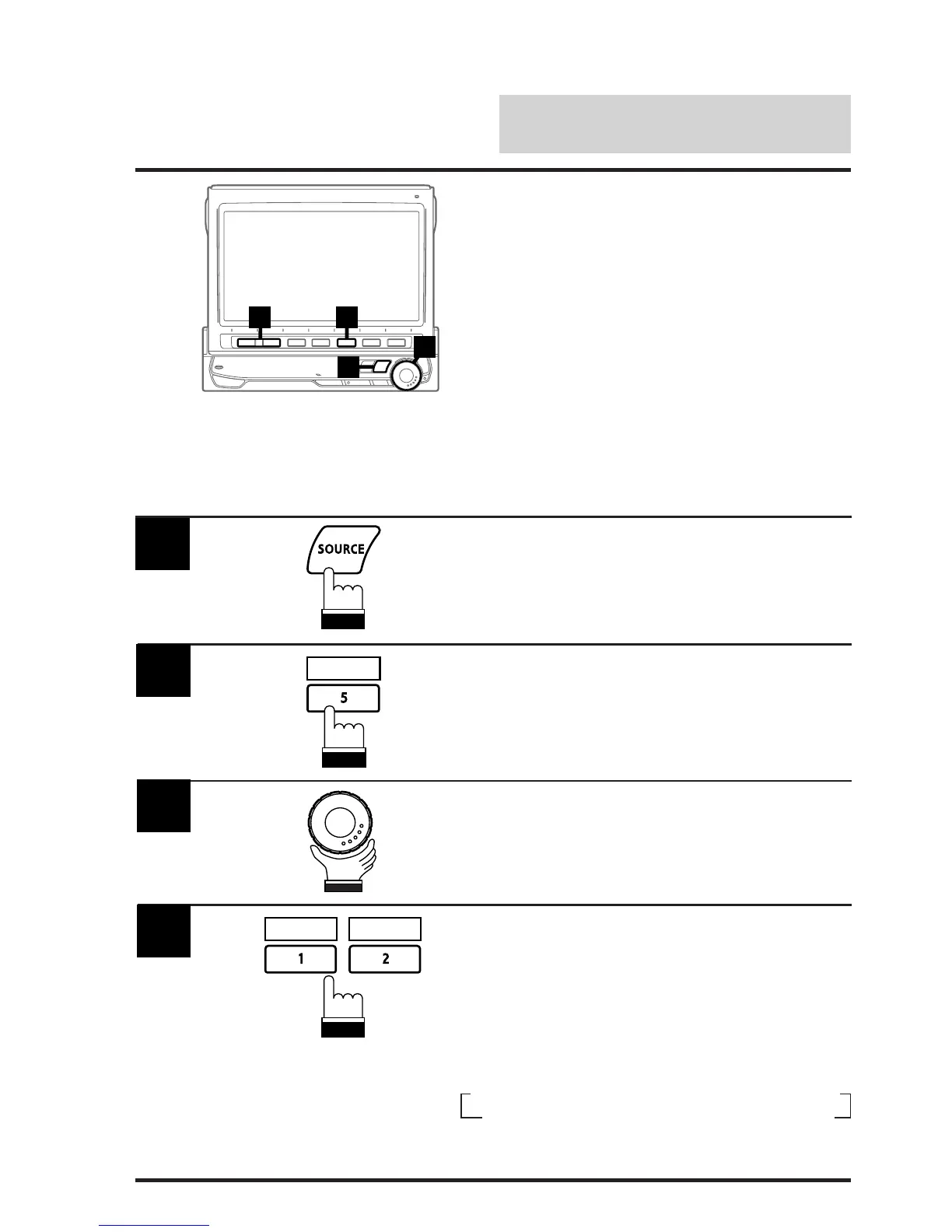
1
Press the SOURCE button.
The main menu appears on the display.
Press the 5 (DISPLAY) button to activate the
Display mode.
The Display mode screen appears.
2
DISPLAY
Rotate the rotary encoder and select "AUTO
B.GND."
The Function Guide is displayed.
3
Press the 2 (ON) button to turn on the Auto
Background Texture/color Scroll mode.
To turn off the Auto Background Texture/color
Scroll mode, press the 1 (OFF) button.
The background textures/colors scroll when the
ignition key is turned off once and turned back
on again as follows:
4
OFF ON
→
MARBLE
→
SKY
→
WOOD
→
GRAD.
→
METAL
C6 ← C5 ← C4 ← C3 ← C2 ← C1 ←
ABYSS ←



 To Next Page