malletKAT User Manual (ver.07-17-18)
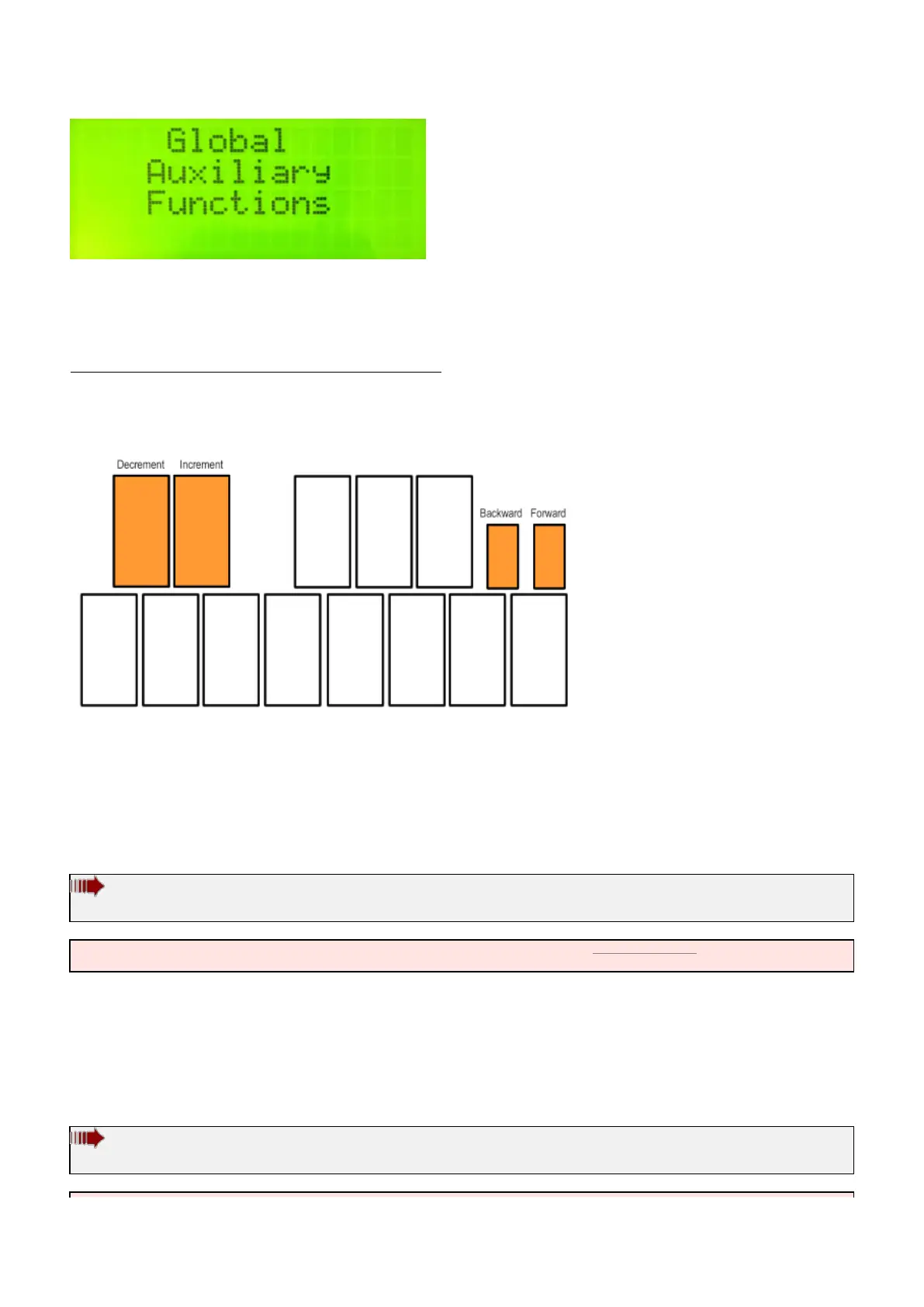
You can scroll through the various customizable settings for your malletKAT using the small
FORWARD/BACKWARD pads.
Changing Parameters:
Any editable parameters on the screen will be blinking. Change these parameters using the
INCREMENT/DECREMENT “black note” pads.
If there is more than one editable parameter on the screen, use the FORWARD/BACKWARD pads to reach them.
Global Auxiliary Screen Shortcuts:
Because there are so many Global Settings, they can be accessed by using numeric shortcuts that will skip
directly to that screen. Throughout this manual, more commonly accessed Global Auxiliary settings will be
indicated like this:
Global Auxiliary Shortcut #23
malletKAT Express
Auxiliary Editing Screens require pressing the Edit Footswitch and Sustain 1 pedal at the same time (See Section
4.1.1(https://alternatemode.com/online-docs/malletkat/#malletkat-express-accessing-editing-functions)
)
To use the shortcut, after hitting the Global Auxilliary pad, type in the shortcut number using the numeric “black
keys”.
All Global Auxiliary Screens are listed in this section in alphabetical order for your convenience.
Global Auxiliary Shortcut #83,84
malletKAT Express
82 / 109



 To Next Page