94 ARX 23-2 T4i, ARX 26-2 T4i
1/4
2/4
1
3/4
9V
15V
13V
11V
B3
B12
B2
B1
13
12
2.7 Machine operation and use
2.7.13 Calibration mode
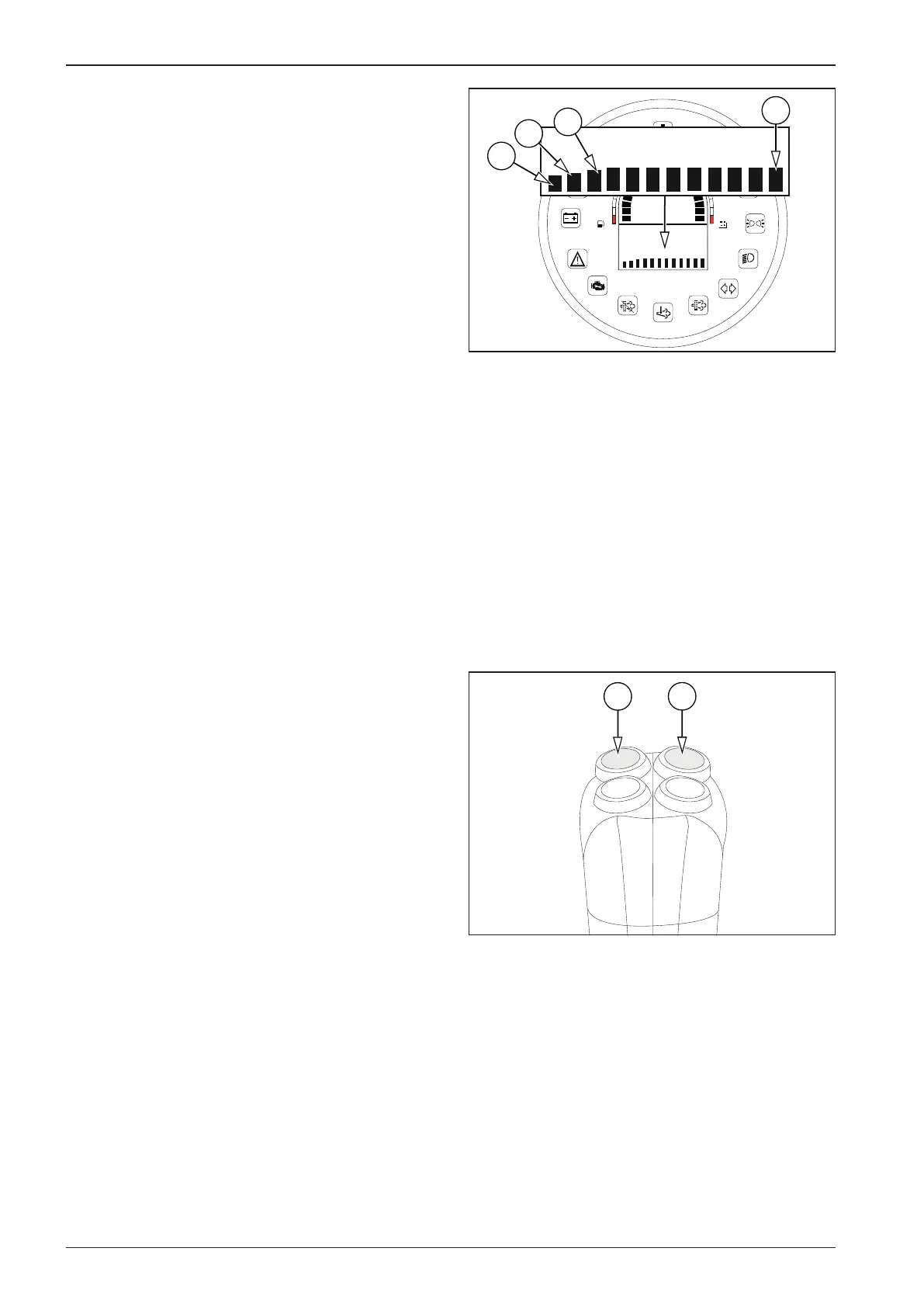
Tabs
B1 Ramp selection (rA SEL)
- selection of the Hard value
- selection of the Soft value
- return one level
B2 Fahrenheit/Celsius temperature unit selection (tEMP)
- selection of the Fahrenheit value
- selection of the Celsius value
- return one level
B3 Left lever selection (LEFtLu)
- selection of active lever
- selection of inactive lever
- return one level
B12 Save and exit (SAvE)
- Values saved
- Error saving values
Control
In the following text, the “OK button” means the vibration but-
ton (12). The “select button” means the sprinkling button (13).
These buttons only work on the right travel control.
Press the select button (13) to scroll through tabs B1 to B12 and
parameters of the given folders.
Use the OK button (12) to conrm your selection.






 To Next Page