95ARX 23-2 T4i, ARX 26-2 T4i
B
1/4
2/4
1
3/4
9V
15V
13V
11V
1/4
2/4
1
3/4
9V
15V
13V
21
B1
11V
1/4
2/4
1
3/4
9V
15V
13V
11V
B3
B12
B2
B1
OPERATING MANUAL
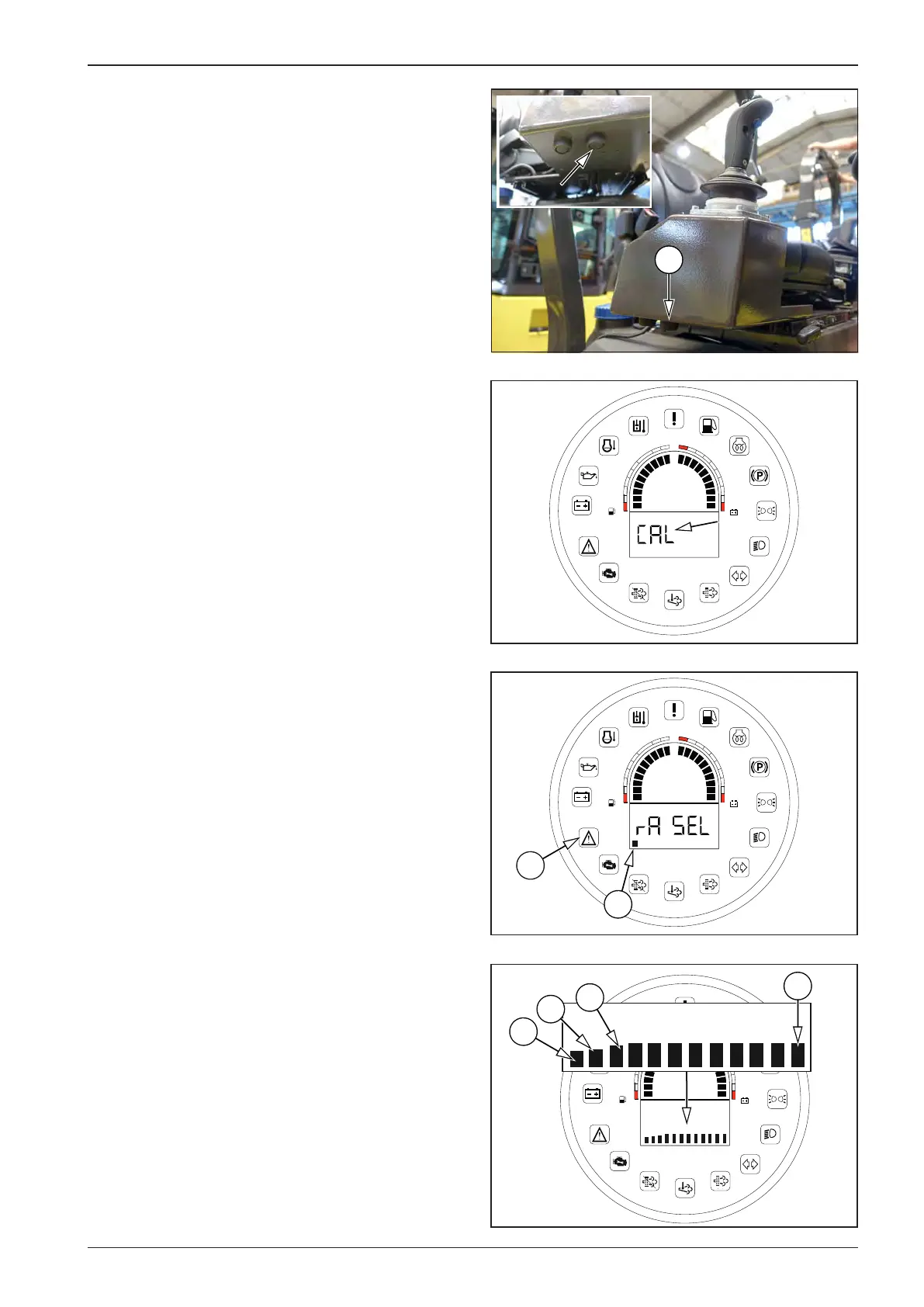
Calibration procedure:
Turn the key in the ignition box to the “I“ position.
Sit in the driver’s seat (activation of the seat switch).
Set the travel control to the parking brake position “P”.
Press the calibration button (B) for 5 seconds. While the button
is held down, the display shows the “CAL” status.
After 5 seconds, the display shows B1 and, at the same time, the
error message indicator lamp (21) starts ashing. The error mes-
sage indicator lamp (21) ashes for the duration of the calibra-
tion.
Use the select button (13) to select the tab and press OK (12) to
conrm. The display will show the current state of the set pa-
rameter (e.g. SOFT when choosing the ramp – B1).






 To Next Page