Page 26
EWCIE Technical Manual
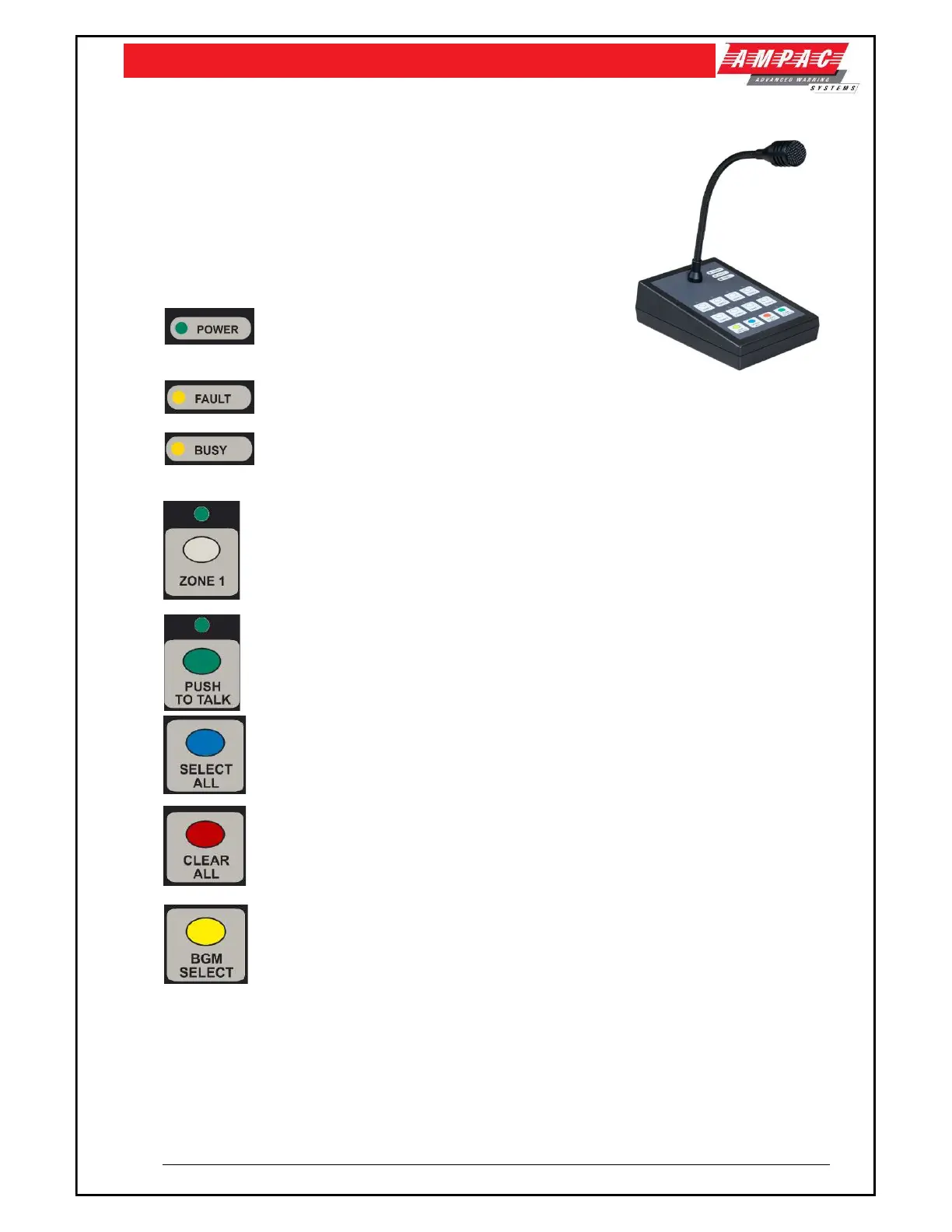
9 8 Zone Remote Paging Console
The 8 Zone Remote Paging Console allows remote paging to up to
eight Zones.
Additionally, the Paging Consoles provides a 3.5mm Audio jack so
that a background music source can be connected to the EWCIE
system.
9.1 Indicator and Controls
ON steady when power is available to the EWCIE,
otherwise OFF
ON steady when there is a EWCIE fault, otherwise OFF
ON steady when and System Messages, Alert or EVAC and emergency PTT paging is
present, otherwise OFF
The ZONE select buttons are used to select individual zones to page to.
The button is also used to select which zones background music is channelled to when
the BGM select button is pressed.
Selections are latched ON and the Green LED is ON steady
The PUSH TO TALK button is used to open the speech line once paging Zones have been
select. The button is momentary and requires the user to keep it pressed during paging.
The Green LED is ON steady when button is pressed.
The SELECT ALL button selects all eight zones for paging. The button is latching.
The CLEAR ALL button deselects any previously selected zones.
The BGM SELECT button allows the user to program which zones receive the
background music input. Selection is done by pressing and holding the BGM switch and
then selecting the applicable zone buttons.
Selected Zone indicators flash to indicate the zone has BGM.



 To Next Page