Page 50
EWCIE Technical Manual
12 Configuring the EWCIE using LoopMaster and FireFinder PLUS
ConfigManager
12.1 FireFinder PLUS ConfigManager
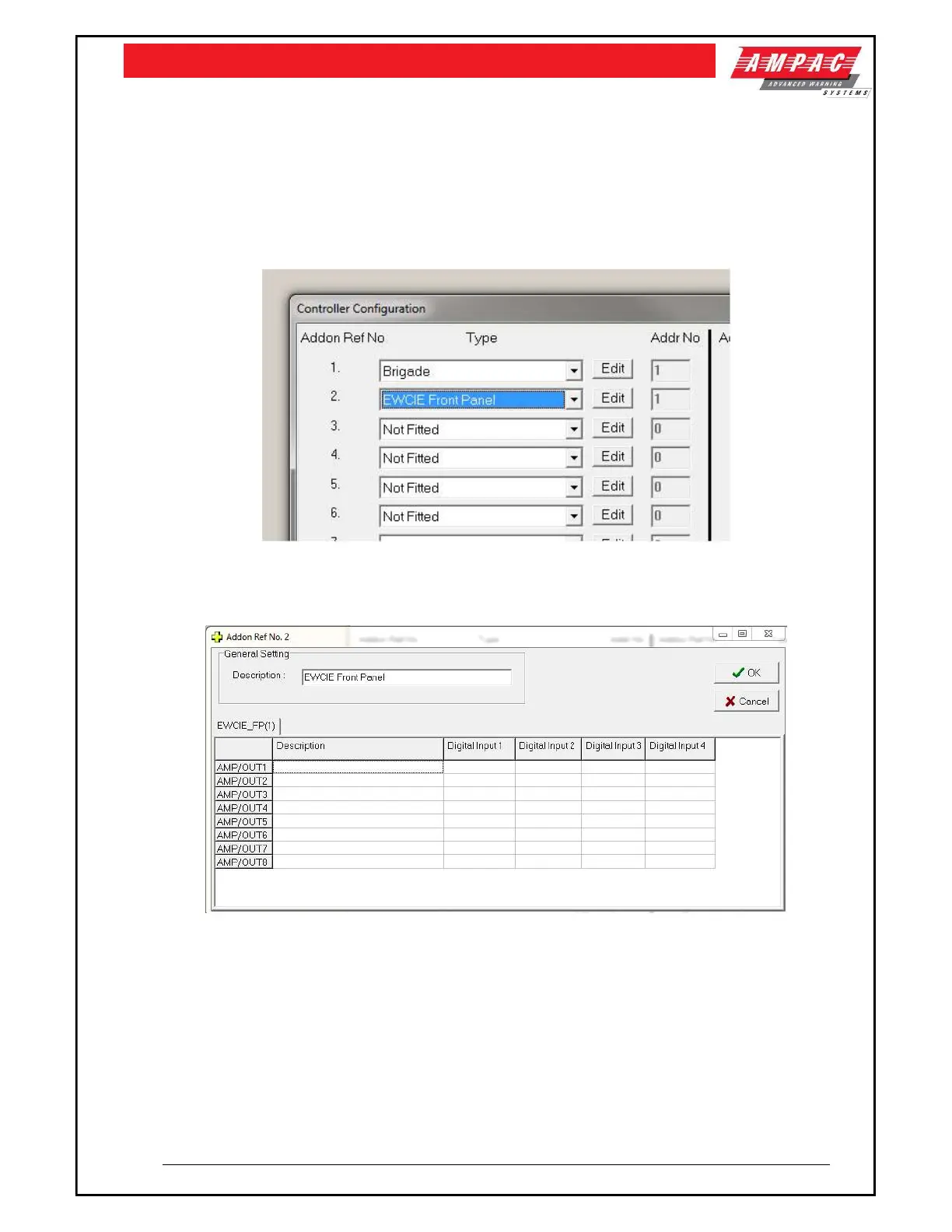
To add a EWCIE to the FireFinder PLUS, the following steps are required:
Add a EWCIE Front Panel to the Configuration
Depressing the Edit field, the following dialogue box is displayed
This dialogue box has the following fields:
Description string for the EWCIE Front Panel
Description string for each amplifier (up to eight)
Digital Input 1 is the condition to assert input #1 of the selected amplifier via the Add-On and
CAN bus (refer to section 5.2)
Digital Input 2 is the condition to assert input #2 of the selected amplifier via the Add-On and
CAN bus (refer to section 5.2)
Digital Input 3 is the condition to assert input #3 of the selected amplifier via the Add-On and
CAN bus (refer to section 5.2)
Digital Input 4 is the condition to assert input #4 of the selected amplifier via the Add-On and
CAN bus (refer to section 5.2)



 To Next Page