Page 55
EWCIE Technical Manual
Each amplifier can be programmed to be activated by a cause (the same as any other output in the
system).
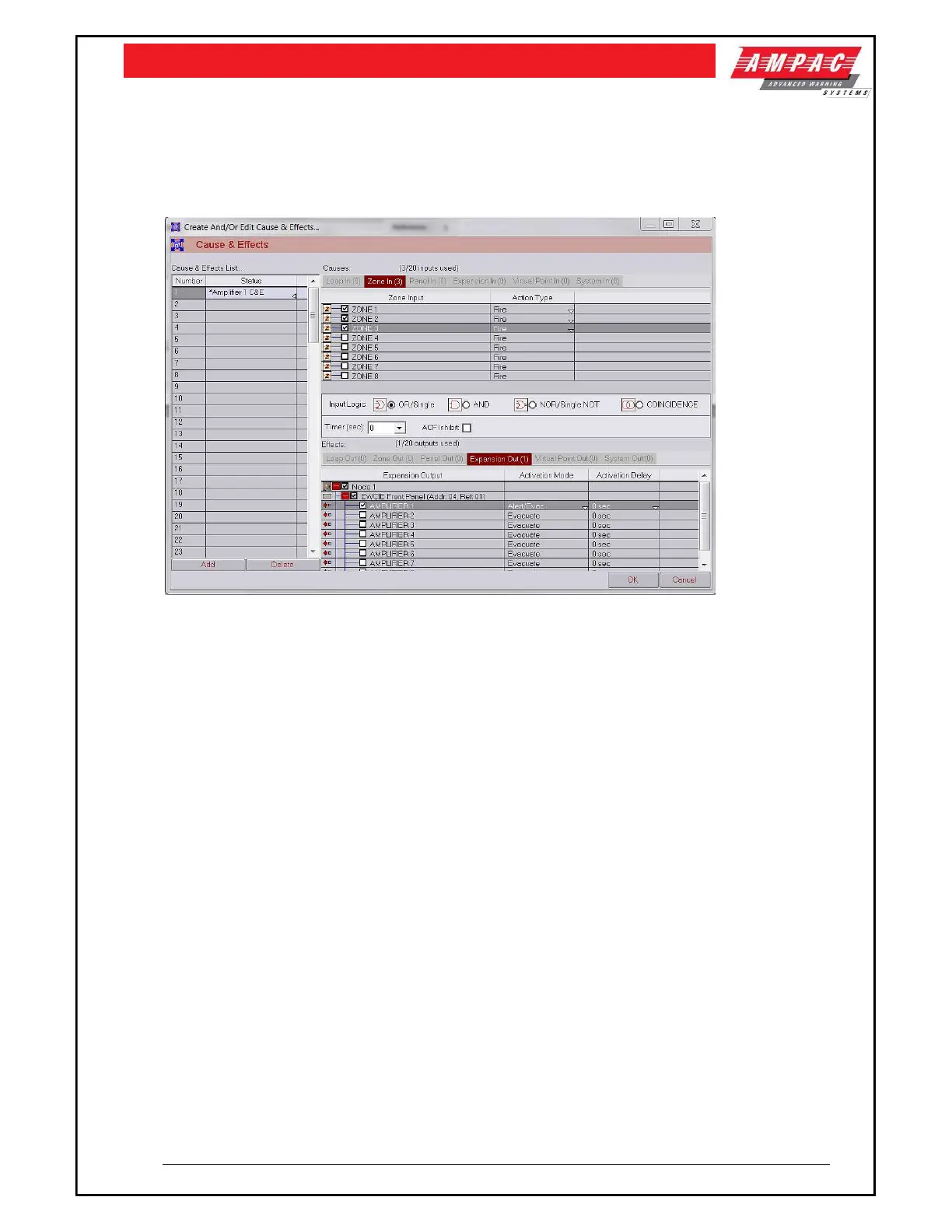
The following dialogue box shows an instance of a cause and effect.
Zones 1, 2 and 3 will cause Amplifier 1 to operate. The amplifier will activate the Alert and Evac
tones/messages according to the DIP switch settings (section 5.6)
The Timer field in the middle of the dialogue box is an activation delay that applies to all amplifiers.
The Activation delay in the table – applies individually to an amplifier. This individual activation delay
does allow phased evacuation sequences.
For the LoopSense to be able to control when the digital inputs are set to options other than the default,
it is necessary to set the DIP switch 5, 6 and 7 to (111) and provide additional hardwired outputs to
control the inputs.
These additional outputs will need to be programmed.
13 EvacUwiz Programming Tool
The EvacUwiz programming tool is a Windows configuration software and is used to construct a
configuration ‘file’, suitable for ‘programming’ the Evac-U series of OWS devices (amplifiers and/or tone
generators), and for the creation and editing of relevant sound libraries, as well as for real-time
interrogation and interaction of the OWS devices. Refer to MAN3084 OWS Programming Manual for
further details.



 To Next Page