LOOPSENSE EN54
USER MANUAL
SETUP
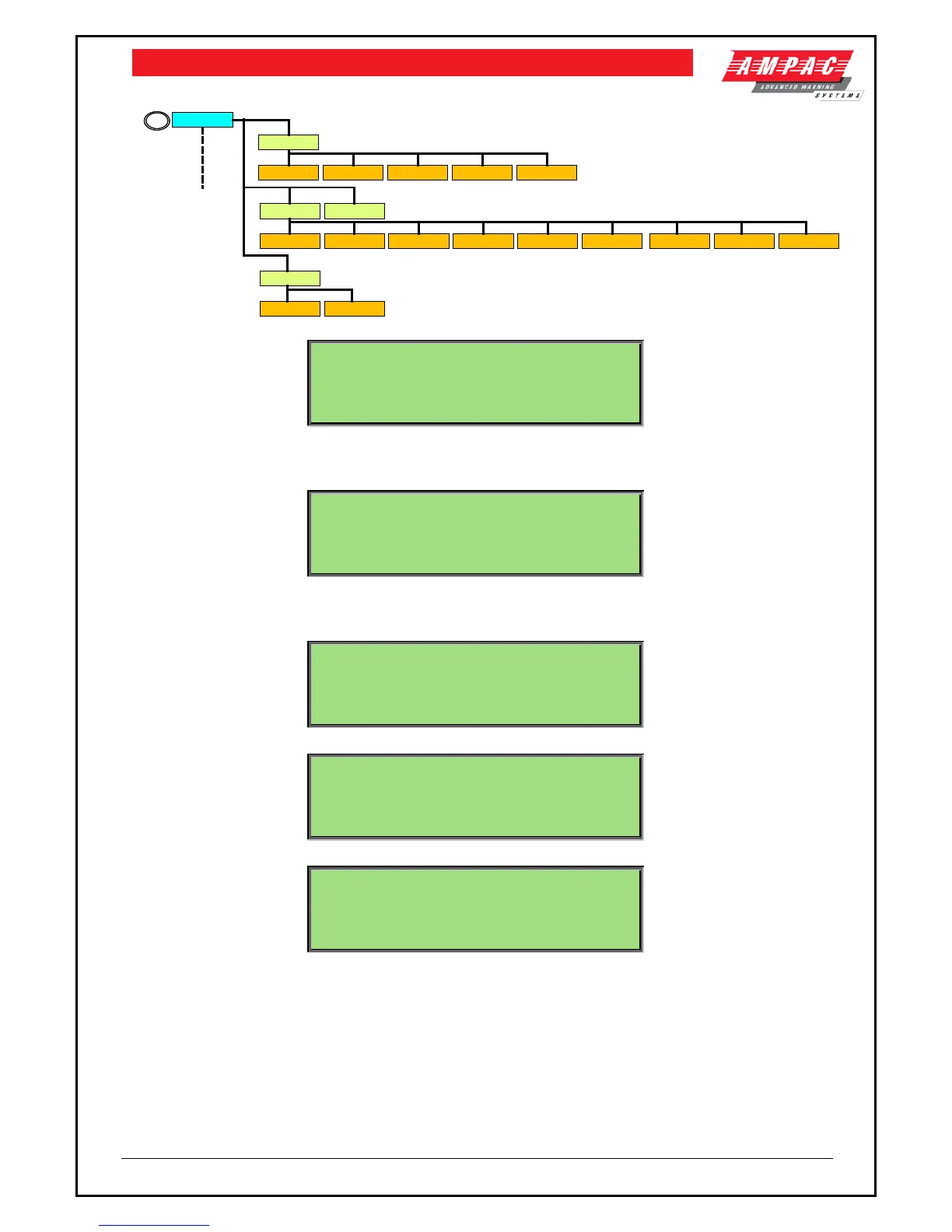
DATE AND TIME
DAY/NIGHT EARTH MON
PASSWORDS
1
2 3
4
ID1 ID2
1 2
SUNDAY MONDAY
1 2
TUESDAY
3
WEDNESDAY
4
THURSDAY
5
FRIDAY
6
SATURDAY
7
SET ALL
6
DISABLE
7
DATE FORMAT
1 2
DAYLIGHT SAVE ON/OFF
3
TIME
4
FORMAT
5
JKL
5
1►DATE AND TIME 3|EARTH MONITORING
2|DAY/NIGHT 4|PASSWORDS
This menu is only accessible at access level 3. If the active access level is less than 3 the user will
be prompted to enter password before allowing access to this menu.
7.5.1 Menu->Setup->Date and Time
1►DATE :01/01/2008 4|TIME :10:05:33
2|FORMAT:DD/MM/YYYY 5|FORMAT:24 HOUR
The date format can be changed by selecting 2, the time format can be changed by selecting 5 and
the daylight savings mode can be tuned on or off by selecting 3.
7.5.1.1 Menu->Setup->Date and Time->Date
CURRENT: 01/01/2008
NEW: _
7.5.1.2 Menu->Setup->Date and Time->Time
7.5.2 Menu->Setup->Day/Night
DAY/NIGHT MENU <disabled status>
1►SUNDAY 4|WEDNESDAY 7|SATURDAY
2|MONDAY 5|THURSDAY 8|SET ALL
3|TUESDAY 6|FRIDAY 9|DISABLE
Day/Night mode can be enabled or disabled by selecting 9. The <disabled status> shall toggle
accordingly as this is selected.



 To Next Page