AR2700 operating manual
23
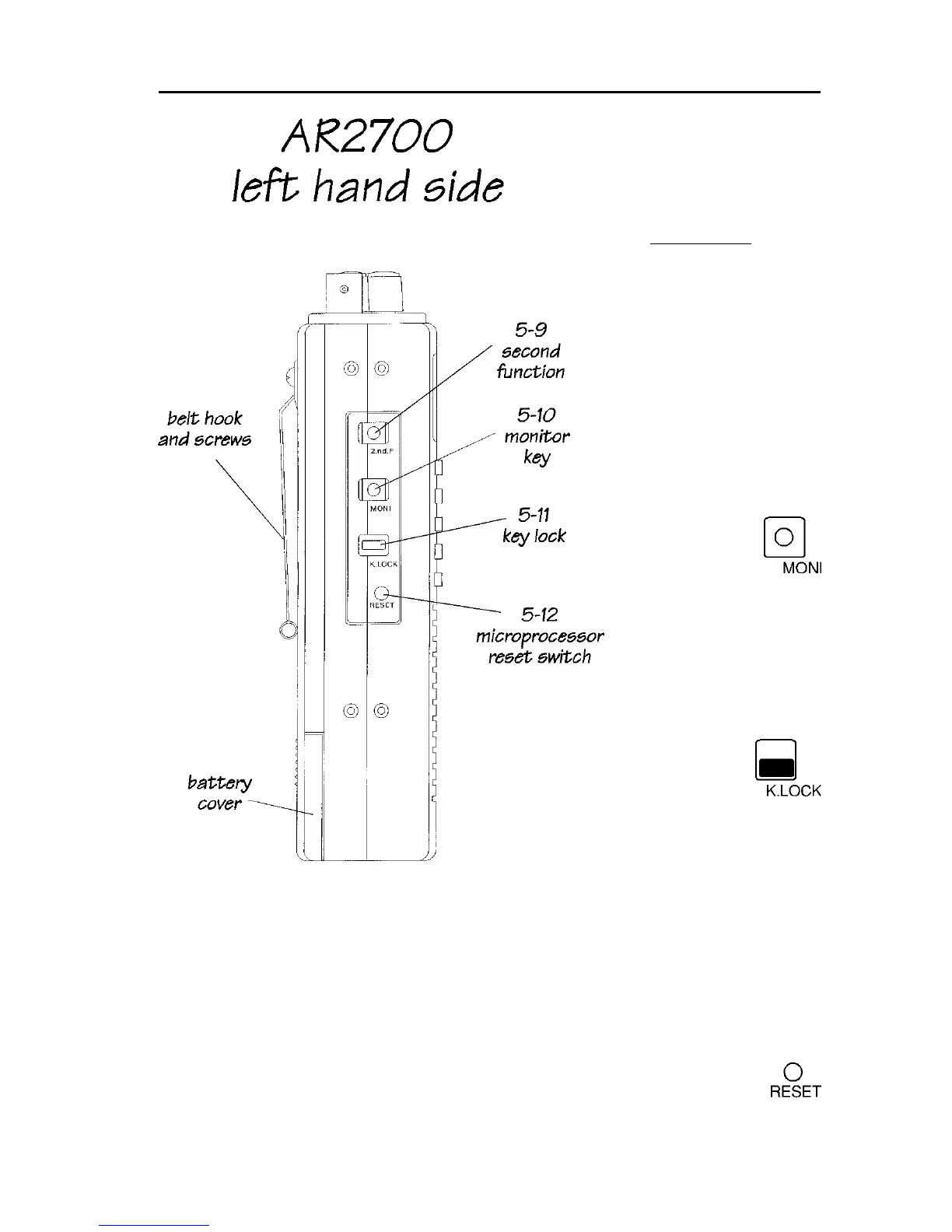
When the function key
is operated, a legend
“2ndF” appears in the
upper left of the LCD.
The function key should
be momentarily
pressed only (so that
the legend “2ndF”
appears in the top left
corner of the LCD)
before another numeric
key is pressed... do not
hold the function key
in while pressing
other keys.
5-10 [MONI] monitor
(squelch defeat) key
This key is
used to defeat
the squelch
(open it) to
allow the monitoring of
very weak or fluttering
signals.
5-11 [K.LOCK]
keypad lock key
The [K.LOCK]
slide switch
has two
positions and
is designed to prevent
accidental operation of
the keypad when
carrying the receiver in
a pocket or bag.
When the switch is in the down position the keylock is Off. When the switch is
slid upward position the keylock is On and the keypad and [DIAL] is disabled
(except for the [MONI] key). A special “KEY” graphical legend on the LCD
indicates when keylock is On.
5-12 RESET switch
Should you experience a programming / operational problem with the
AR2700, you may “soft” reset the microprocessor by momentarily
pressing the reset switch located on the left hand cabinet using a pointed



 To Next Page