HARDWARE INSTALLATION
20
Step 7. Re-check the SATA HDD LED and Fault LED Cable
Connections
Be sure that the proper failed drive channel information is dis-
played by the fault and activity (HDD) LEDs. An improper con-
nection will tell the user to ‘‘Hot Swap’’ the wrong drive. This will
remove the wrong disk (one that is functioning properly) from the
controller. This can result in failure and loss of system data.
Step 8. Power Up the System
Check the installation thoroughly, reinstall the computer cover, and
reconnect the power cord cables. Turn on the power switch at the
rear of the computer (if equipped) and then press the power button
at the front of the host computer.
Step 9. Congure Volume Set
The SATA RAID controller congures RAID functionality through the
McBIOS RAID manager. Please refer to Chapter 3, McBIOS RAID
Manager, for the detail regarding conguration. The RAID control-
ler can also be congured through the McRAID storage manager
software utility with ArcHttp proxy server installed. For this option,
please refer to Chapter 6, Web Browser-Based Conguration.
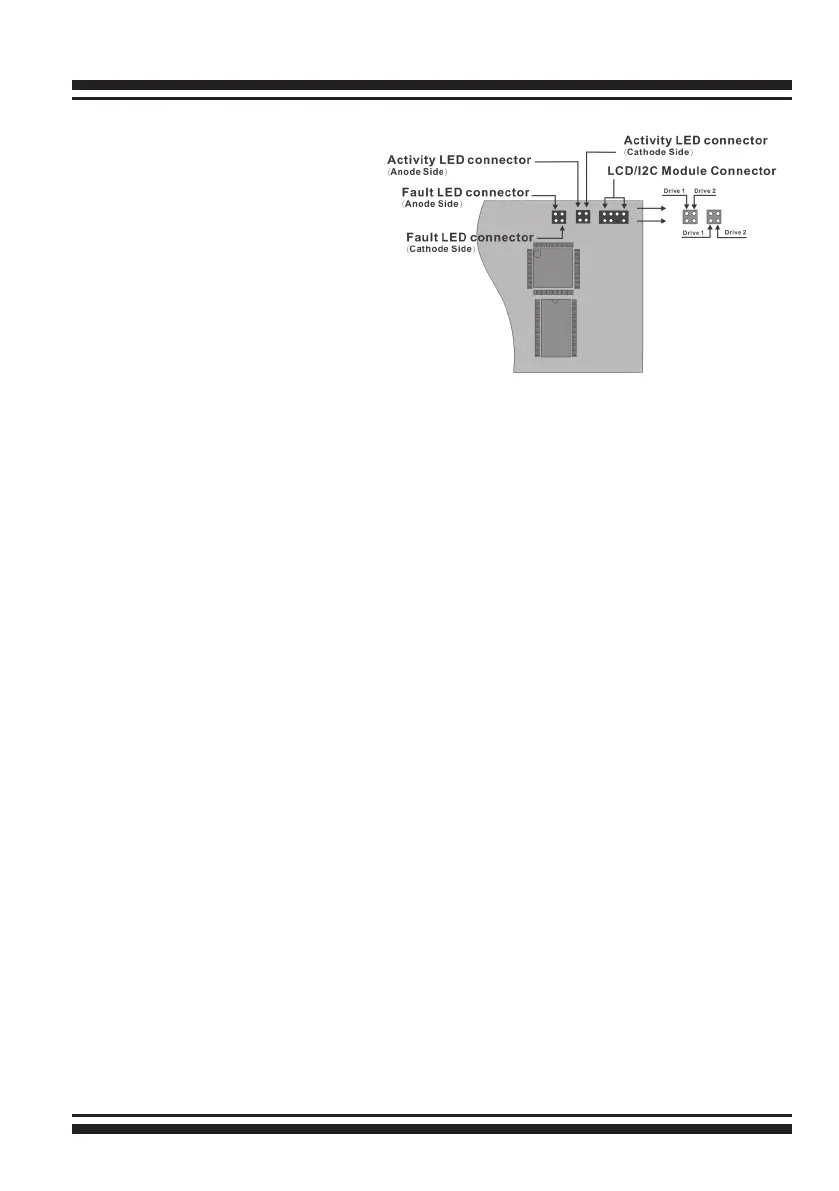
Figure 2-5, ARC-1200
Individual LED indica-
tors connector, for each
channel drive.



 To Next Page