Introduction P44x/EN IT/E33
MiCOM P441/P442 & P444
Page 13/24
To restore the default values to the settings in any protection settings group, set the ‘Restore
defaults’ cell to the relevant group number. Alternatively it is possible to set the ‘Restore
defaults’ cell to ‘All settings’ to restore the default values to all of the relay’s settings, not just
the protection groups’ settings. The default settings will initially be placed in the scratchpad
and will only be used by the relay after they have been confirmed. Note that restoring
defaults to all settings includes the rear communication port settings, which may result in
communication via the rear port being disrupted if the new (default) settings do not match
those of the master station.
3.6 Front panel user interface (keypad and LCD)
When the keypad is exposed it provides full access to the menu options of the relay, with the
information displayed on the LCD.
The ', (, ", # and $ keys which are used for menu navigation and setting value changes
include an auto-repeat function that comes into operation if any of these keys are held
continually pressed. This can be used to speed up both setting value changes and menu
navigation; the longer the key is held depressed, the faster the rate of change or movement
becomes.
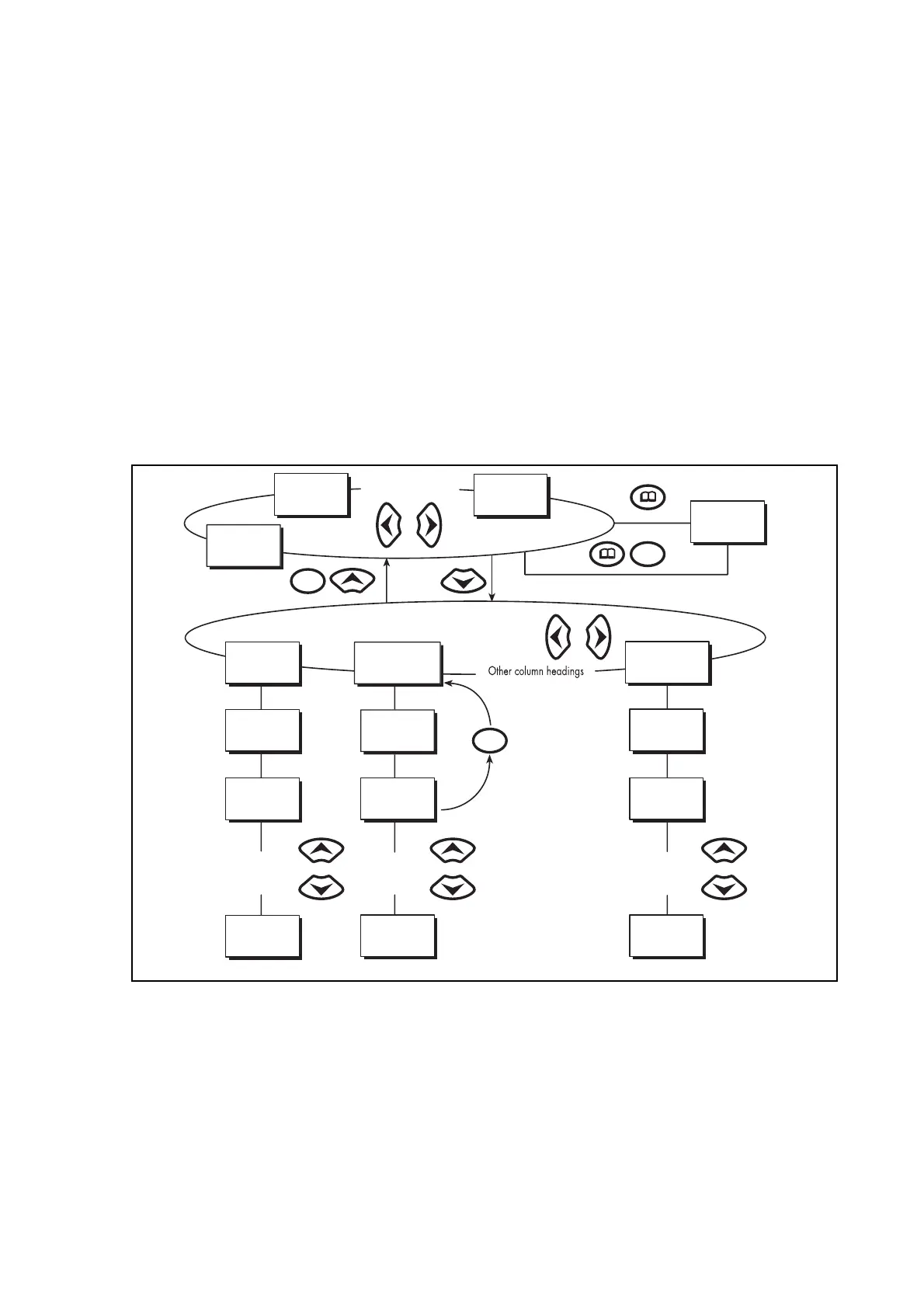
System
frequency
Date and time
3-phase voltage
Alarm messages
Other default displays
Column 1
System data
Column 2
View records
Column n
Group 4
Overcurrent
Data 1.1
Language
Data 2.1
Last record
Data 1.2
Password
Data 2.2
Time and date
Data 1.n
Password
level 2
Data 2.n
C - A voltage
Data n.n
I
> char angle
Data n.2
I
>1 directional
Data n.1
I
>1 function
Other setting
cells in
column 1
Other setting
cells in
column 2
Other setting
cells in
column n
ote: The C key will return
to column header
from any menu cell
P0105ENa
FIGURE 4 - FRONT PANEL USER INTERFACE


 To Next Page