P44x/EN AD/E44 Update Documentation
Page 10/82
MiCOM P441, P442 & P444
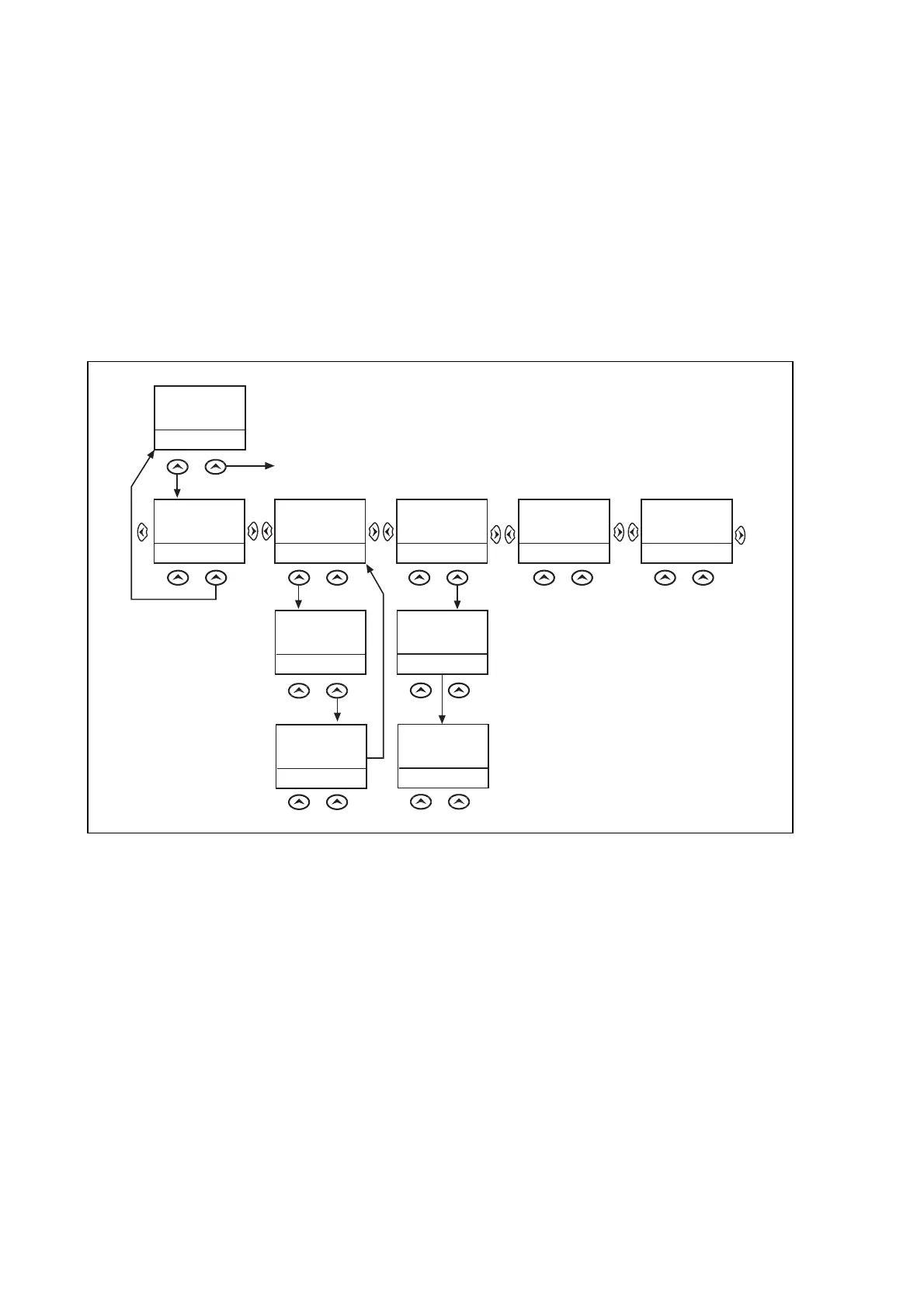
3.6.3.2 Control inputs – user assignable functions
The number of control inputs (user assignable functions – USR ASS) represented in the
hotkey menu is user configurable in the “CTRL I/P CONFIG” column. The chosen inputs can
be SET/RESET using the hotkey menu.
For more information refer to the “Control Inputs” section in the Application Notes
(P44x/EN AP).
3.6.3.3 CB control*
The CB control functionality varies from one Px40 relay to another. For a detailed
description of the CB control via the hotkey menu refer to the “Circuit breaker control” section
of the Application Notes (P440/EN AP).
HOT KEY MENU
EXIT
MiCOM
P140
HOTKEY
CB CTRL
<USR ASSX
STG GRP>
SETTING GROUP 1
SELECT
<MENU
USR ASS1>
NXT GRP
CONTROL INPUT 1
ON
<STG GRP
USR ASS2>
EXIT
CONTROL INPUT 2
ON
<USR ASS1
USR ASSX>
EXIT
CONTROL INPUT 2
ON
<USR ASS2
MENU>
EXIT
SETTING GROUP 2
SELECT
<MENU
USR ASS1>
NXT GRP
SETTING GROUP 2
SELECTED
<MENU
USR ASS1>
CONTROL INPUT 1
ON
<MENU
USR ASS2>
CONTROL INPUT 1
EXIT
<MENU
USR ASS2>
OFF
Confirmation
screen
displayed for
2 seconds
Confirmation
screen
dispalyed for
2 seconds
(See CB Control in Application Notes)
Default Display
NOTE: <<EXIT>> Key returns
the user to the Hotkey
Menu Screen
P1246ENa
HOTKEY MENU NAVIGATION


 To Next Page