Update Documentation P44x/EN AD/E44
MiCOM P441, P442 & P444
Page 75/82
NOTA: No recommended setting is given for the Permissive mode since it is
anticipated that “Latched” operation will be selected. However, if
“Default mode” is selected, the “IM# FrameSyncTim” setting should be
set greater than the minimum settings listed above. If the “IM#
FrameSyncTim” setting is set lower than the minimum setting listed
above, there is a danger that the relay will monitor a correct change in
message as a corrupted message.
A setting of 25% is recommended for the communications failure
alarm.
9.10.4.2
InterMiCOM Statistics & Diagnostics
It is possible to hide the channel diagnostics and statistics from view by setting the “Ch
Statistics” and/or “Ch Diagnostics” cells to “Invisible”. All channel statistics are reset when
the relay is powered up, or by user selection using the “Reset Statistics” cell.
9.10.5 TESTING InterMiCOM Teleprotection
9.10.5.1
InterMiCOM Loopback Testing & Diagnostics
A number of features are included within the InterMiCOM function to assist a user in
commissioning and diagnosing any problems that may exist in the communications link.
“Loopback” test facilities, located within the INTERMICOM COMMS column of the relay
menu, provide a user with the ability to check the software and hardware of the InterMiCOM
signalling. By selecting “Loopback Mode” to “Internal”, only the internal software of the relay
is checked whereas “External” will check both the software and hardware used by
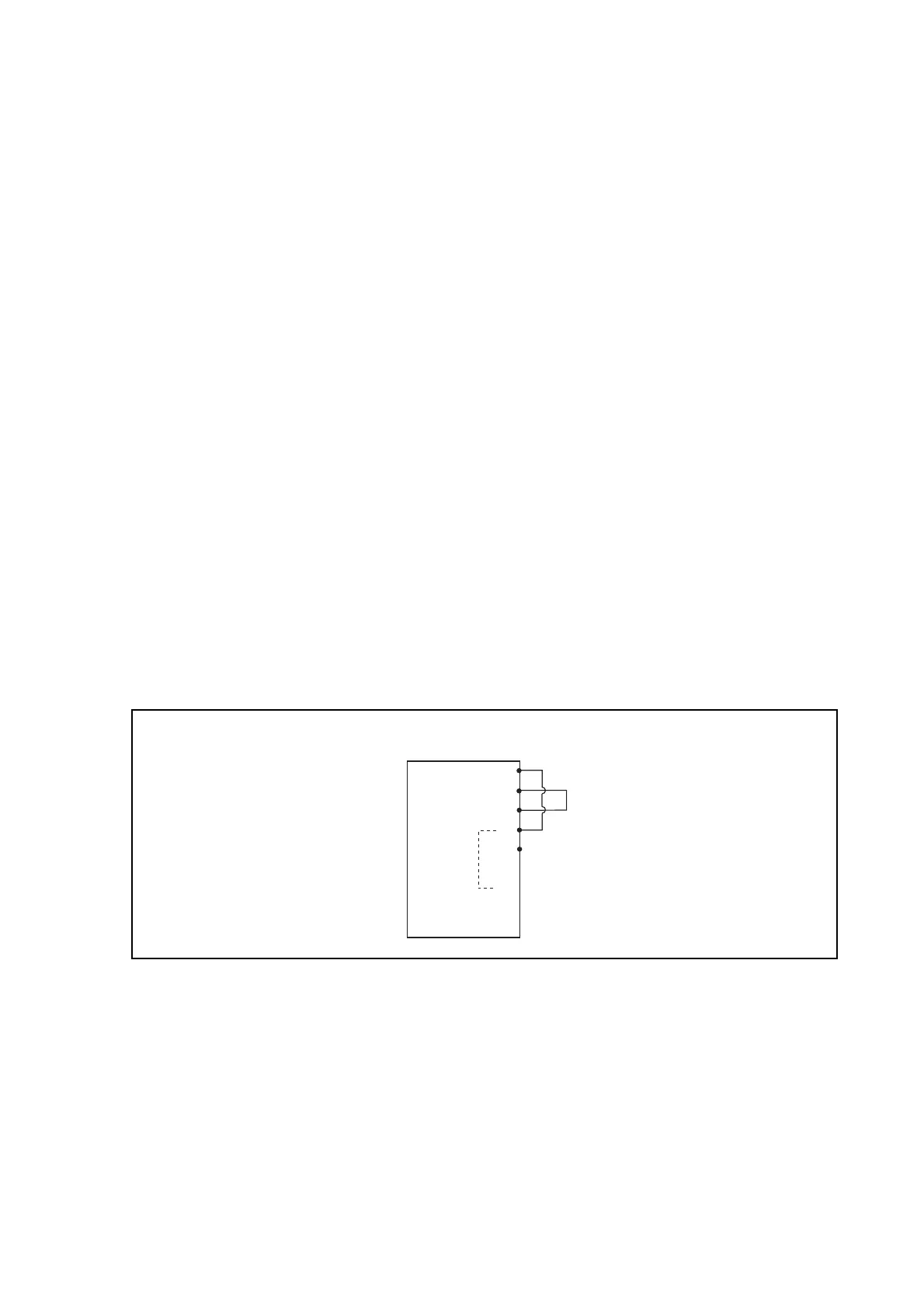
InterMiCOM. In the latter case, it is necessary to connect the transmit and receive pins
together (pins 2 and 3) and ensure that the DCD signal is held high (connect pin 1 and pin 4
together). When the relay is switched into “Loopback Mode” the relay will automatically use
generic addresses and will inhibit the InterMiCOM messages to the PSL by setting all eight
InterMiCOM message states to zero. The loopback mode will be indicated on the relay
frontplate by the amber Alarm LED being illuminated and a LCD alarm message, “IM
Loopback”.
Px40 Relay with
InterMiCOM
1
2
3
4
5
6
7
8
9
DCD
RxD
TxD
DTR
GND
RTS
-
-
-
-
-
-
P1343ENa
Connections for External Loopback mode
Once the relay is switched into either of the Loopback modes, a test pattern can be entered
in the “Test Pattern” cell which is then transmitted through the software and/or hardware.
Providing all connections are correct and the software is working correctly, the “Loopback
Status” cell will display “OK”. An unsuccessful test would be indicated by “FAIL”, whereas a
hardware error will be indicated by “UNAVAILABLE”. Whilst the relay is in loopback test
mode, the “IM Output Status” cell will only show the “Test Pattern” settings, whilst the “IM
Input Status” cell will indicate that all inputs to the PSL have been forced to zero.
Care should be taken to ensure that once the loopback testing is complete, the “Loopback
Mode” is set to “Disabled” thereby switching the InterMiCOM channel back in to service.
With the loopback mode disabled, the “IM Output Status” cell will show the InterMiCOM
messages being sent from the local relay, whilst the “IM Input Status” cell will show the
received InterMiCOM messages (received from the remote end relay) being used by the
PSL.


 To Next Page