14
Sound & Vision - additional installation
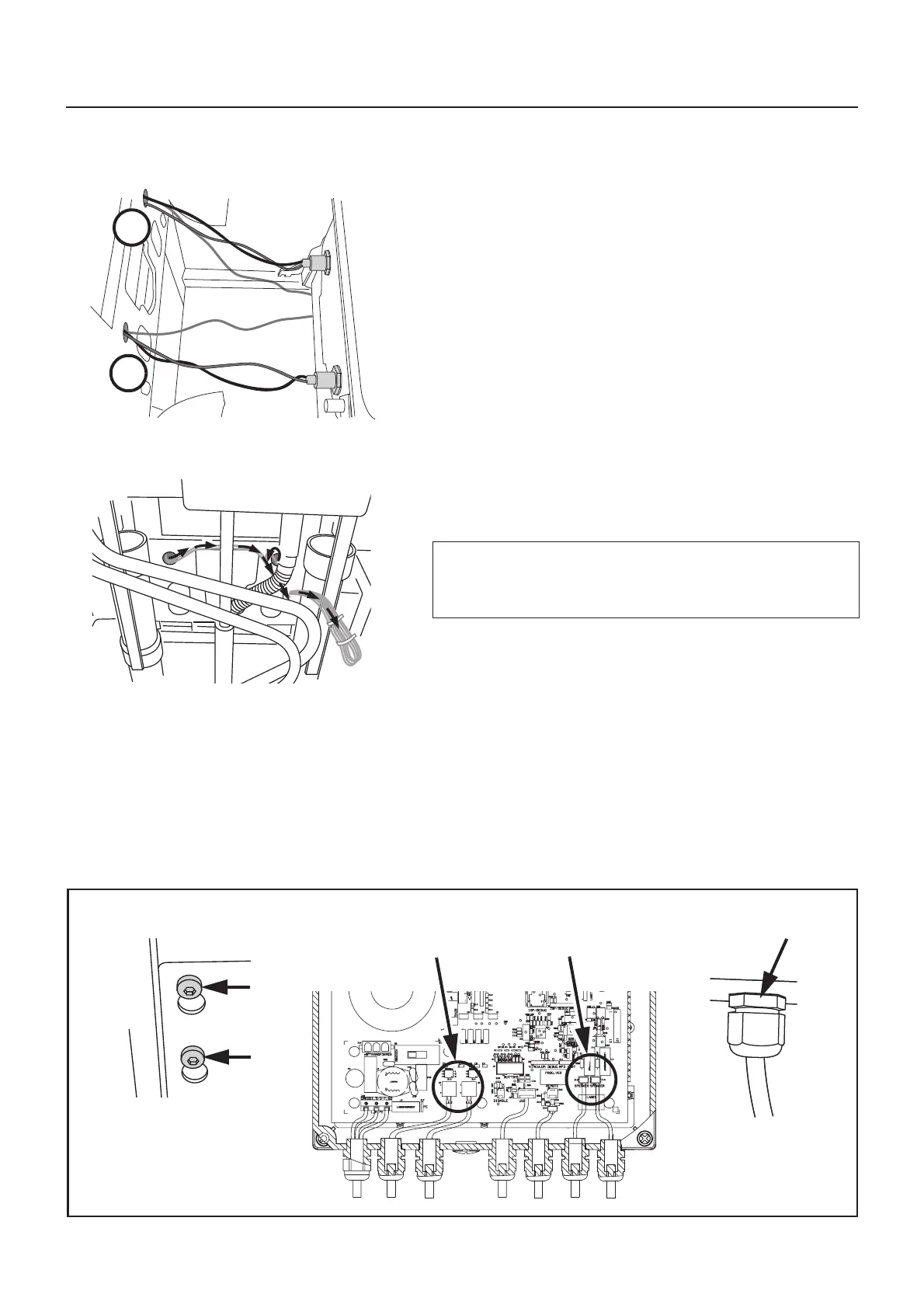
1 Bundle together and draw the left side LED, speaker and
earth cabling through the left side panel hole A.
(See fig. 1)
Bundle together and draw the right side LED, speaker
and earth cabling through the right side panel hole B.
(See fig. 1)
Carry out: Refer to steps 1, 2 and 3 in chapter “Mounting
of bathtub”.
2 Neatly tie the cables. Run left side cables across to meet
with right side cables.
Now tie all 6 cables together and run across to PEX
piping. Connect LED and speaker connections to S&V
power board, bundle and tie off excess cabling.
(See fig. 2)
(See next step for connecting components).
•
•
3 Shut off mains power to panel. Loosen the 2 screws
securing the S&V power box.
Remove lid from power box and connect components as
follows:
Speakers to J13 and J14 (left or right speaker can be con-
nected to either point).
LED to J7 and J8 (left or right LED can be connected to
either point).
Correctly fasten cable glands, reassemble lid and re-
secure the power box to the panel. (See fig. 3)
CAUTION
To protect the PCB from static electricity (ESD);
Ground yourself before proceeding.
J7, J8
LED
J13, J14
Speakers











 To Next Page