15
Product Description/Functions
Sleep Mode
The Maxi Move is equipped with a power-saving feature
which places the machine in “sleep mode” when not
used for a short time. The unit is put into sleep mode in
two stages:
1) After two minutes of inactivity (where no buttons
are pressed on either the control handset or control
panel), the handset’s display will go into sleep
mode. The display can be taken out of sleep mode
by pressing any button on the handset or the control
panel. There will be a three second delay after
which the unit is fully ready for use.
2) After six minutes of inactivity, the entire unit will
placed into sleep mode and will restart only when a
button is pressed either on the control handset or
control panel. There will be a three second delay
after which the unit is fully ready for use.
Usage Counter
The usage counter is a feature found on the control
handset which shows the accumulated amount of time
(in hours) that the lift’s mast has been raised or lowered.
Initially, the display will show “0.0” at the very top of the
screen (right above the larger digits for the scale),
indicating 0 hours of use. The measurement will increase
in increments of 0.1 whenever an additional six minutes
have been accumulated. Note that the counter is
recording only during the movement of the mast.
Keeping the unit turned on, using the powered DPS or
adjusting the width of the legs will not affect the usage
counter.
The maintenance symbol serves as a reminder of
the annual maintenance requirements for the product. It
will appear on the handset display when the usage
counter reaches 175 hours. This target represents the
average time a lift will be used during one year.
However, based on the use of the unit, the maintenance
symbol can appear sooner or later than a year.
When the maintenance symbol appears, the unit will still
be safe to use, but the annual maintenance should be
performed as soon as it is reasonably possible.
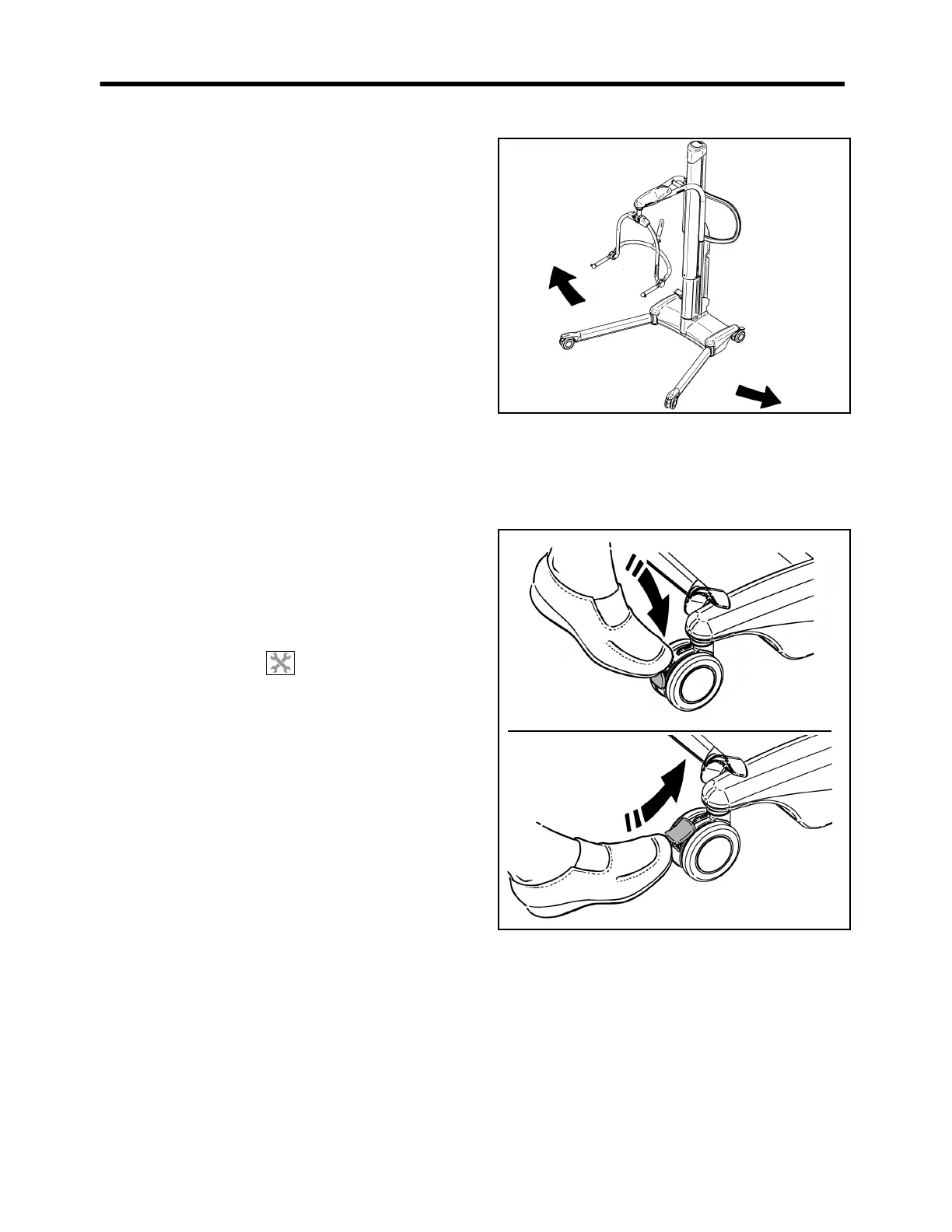
Adjustable Width Chassis Legs
(See Fig. 12) To open the chassis legs, press the “legs
open” button on either the control handset or control
panel. When the button is released, movement will stop
and the chassis legs will remain securely in position.
Always transfer patients with the chassis legs in the
closed position.
Fig. 12
Chassis Castor Brakes
(See Fig. 13) The chassis rear castors have brakes which
can be foot operated to keep the Maxi Move in position.
Fig. 13
Jib and Spreader Bars/Stretcher Frame
(Consult Fig. 3) Your Maxi Move is equipped with a
quick connection device that allows you to use multiple
attachments, such as loop/DPS spreader bars, stretcher
frames, etc. See the section entitled “Using your Maxi
Move” for full instructions on installing or changing
attachments.



 To Next Page