34
(continued next column)
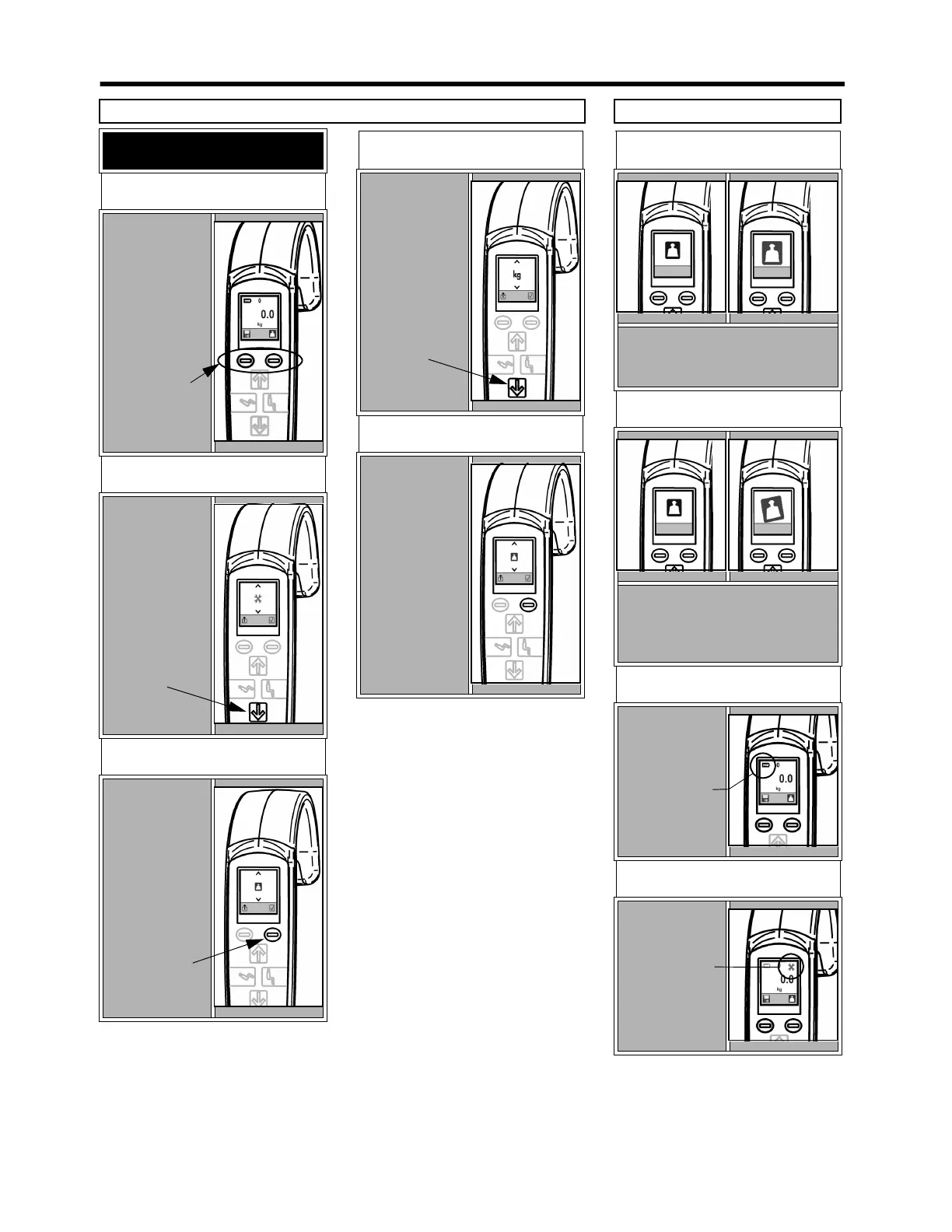
AT START-UP
STEP 1
To display the
Hoist Status
Screen, press
both operating
buttons at the
same time.
STEP 2
To access the
configuration
screen, press the
down button on
the handset.
The first screen
displayed will
be the Weight
Unit screen.
STEP 3
Press the save
button to keep
the displayed
measurement on
screen. Press the
save button
again to go back
to normal use.
STEP 4
To switch
between kg and
lb, press the
down button.
STEP 5
To save settings
and return to
normal use,
press the enter
button.
OVERLOAD WARNING
The display will show alternating
large and small scale symbols.
Lower the patient immediately.
TILT WARNING
The display will alternate the scale
symbol with a larger tilt symbol.
Relocate to a level floor and try
weighing again.
LOW BATTERY
The top left
hand corner of
the display will
show a low
battery symbol.
Recharge
batteries as soon
as possible.
OTHER WARNINGS
The display will
show crossed
wrenches on the
top right corner.
Contact an
ARJO
technician for
service.
Scale - Handset Instructions Mini-Guide
CHANGING THE UNITS OF MEASURE
Operating
buttons
Down button
Enter button
Down button
(FOR EUROPEAN SCALES ONLY)



 To Next Page