EasyManua.ls Logo

Arjo MAXI MOVE - Page 33

Arjo MAXI MOVE
50 pages
Print Icon
To Next Page IconTo Next Page
To Previous Page IconTo Previous Page
Loading...
33
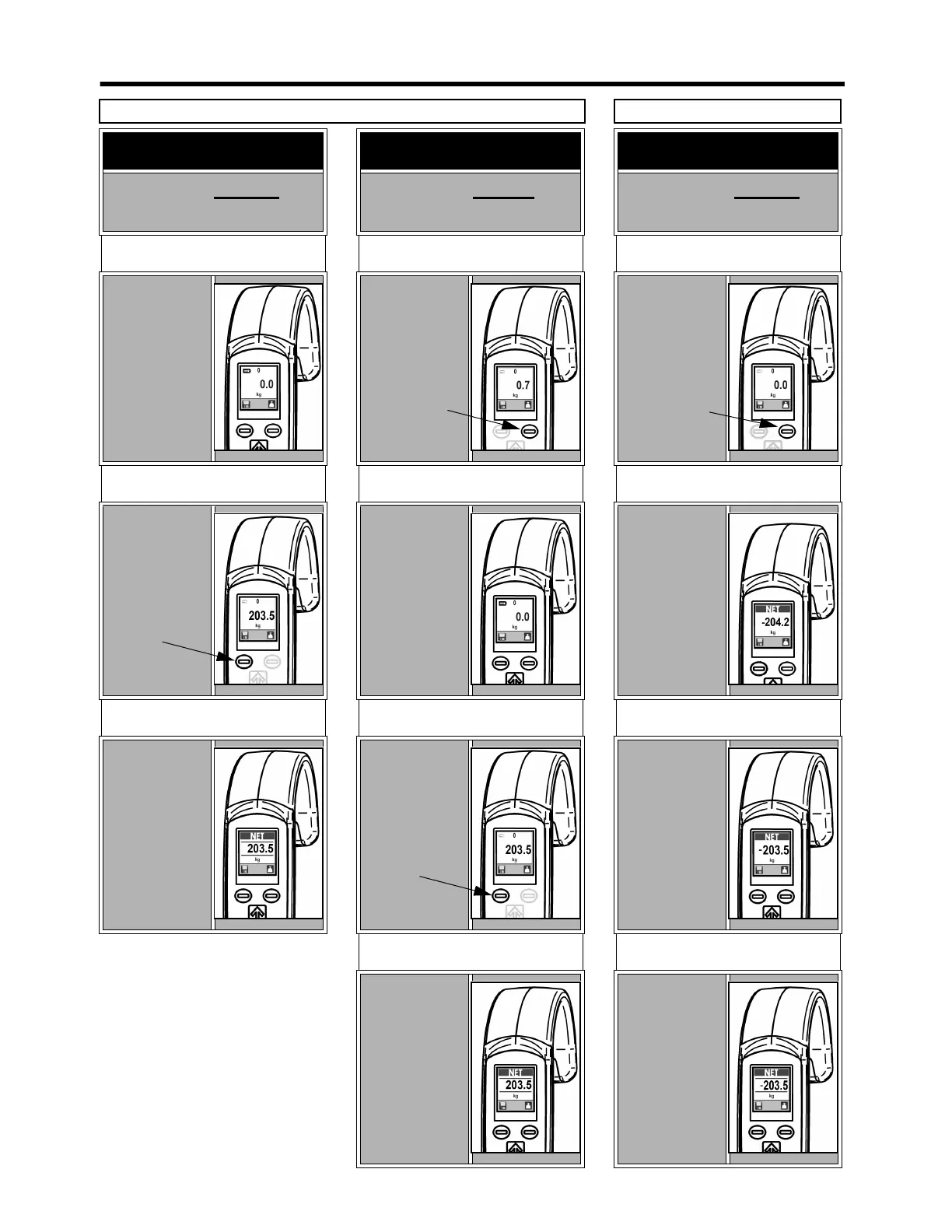
AT START-UP
With sling already on
the spreader bar
STEP 1
The unit has
already zeroed
automatically,
and the weight
of the sling has
been taken into
account.
STEP 2
Weigh the
patient. The
number on the
display is the
patient’s actual
weight.
TO SAVE DATA
Press the save
button to keep
the displayed
measurement on
screen. Press the
save button
again to go back
to normal use.
AT START-UP
With sling not yet on
the spreader bar
STEP 1
Add the sling to
the spreader bar.
The display will
show the weight
of the sling.
STEP 2
Press the scale
button to tare.
Now the display
will show a zero
weight.
STEP 3
Weigh the
patient. The
number
displayed will
be the patient’s
actual weight.
TO SAVE DATA
Press the save
button to keep
the displayed
measurement on
screen. Press the
save button
again to go back
to normal use.
DURING A TRANSFER
With patient already on
the lift
STEP 1
Press the scale
button to obtain
a zero reading
on the display.
STEP 2
Complete the
transfer and
remove the
patient from the
lift. The reading
on the display
will become a
negative
number.
STEP 3
Install the sling
back onto the
spreader bar.
Ignore the
minus sign. The
reading on the
display is the
patient’s actual
weight.
TO SAVE DATA
Press save
button to keep
weight on
screen. Press
save button
again to go back
to normal use.
METHOD A
METHOD B
Scale - Handset Instructions Mini-Guide
Save
button
Scale
button
Scale
button
Save
button

Table of Contents

Other manuals for Arjo MAXI MOVE

Related product manuals