43
Whenever the Maxi Move floor lifts with scale are sold in
Europe, the conformity of the scale with the requirements
of the Council Directive 90/384/EEC as ammended, are
established by tests referred to in EN45501-8.2. This
verification of conformity is valid only for the location of
use, since the gravity has been adjusted prior to delivery of
the unit and sealed by the calibration and gravity counter on
the scale marking.
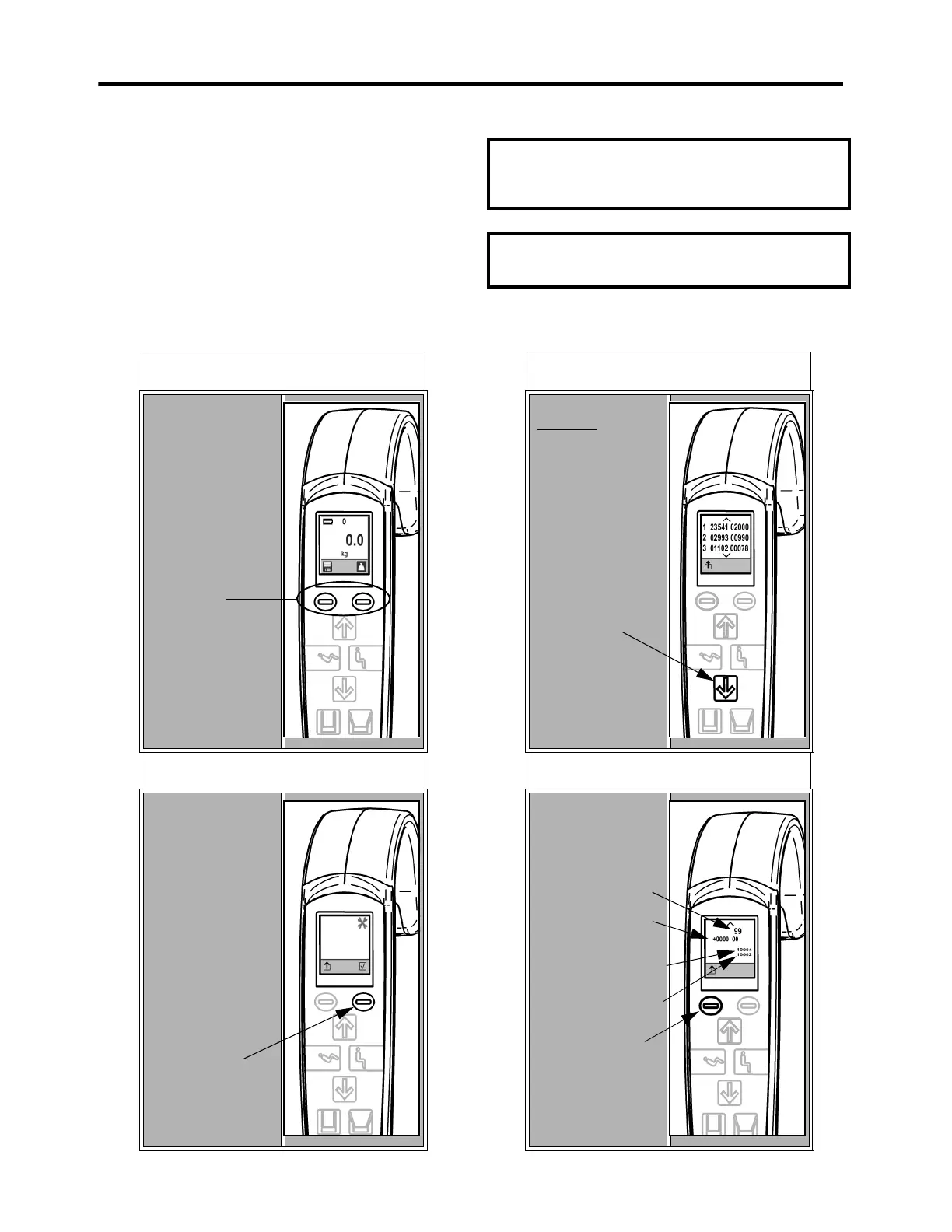
A two-digit gravity code is assigned to the scale according
to the geographical location where it will be used. This
code can be viewed by following the step outlined below.
NOTE: When the preset code is 99, it means that
the scale has been adjusted to the exact latitude
and altitude corresponding to the specific
geographical location where it will be used.
NOTE: Gravity codes cannot be changed using
the operating menu. Contact your Arjo
representative for more information.
STEP 1
To display the Hoist
Status Screen, press
both operating
buttons at the same
time.
STEP 2
Once in the Hoist
Status screen, press
on the enter button.
STEP 3
Press the down button
three times to find the
Gravity Codes
settings.
STEP 4
To return to normal
scale function, press
the exit button.
Viewing the Gravity Code Configuration
Appendix - Scale Gravity Code Configurations
Operating
buttons
Enter button
Down button
Gravity code
Elevation and
latitude (only
for code 99)
Calibration counter
value
Gravity counter
value
Exit button



 To Next Page