31
If the sling was not already hung on the lift at start-
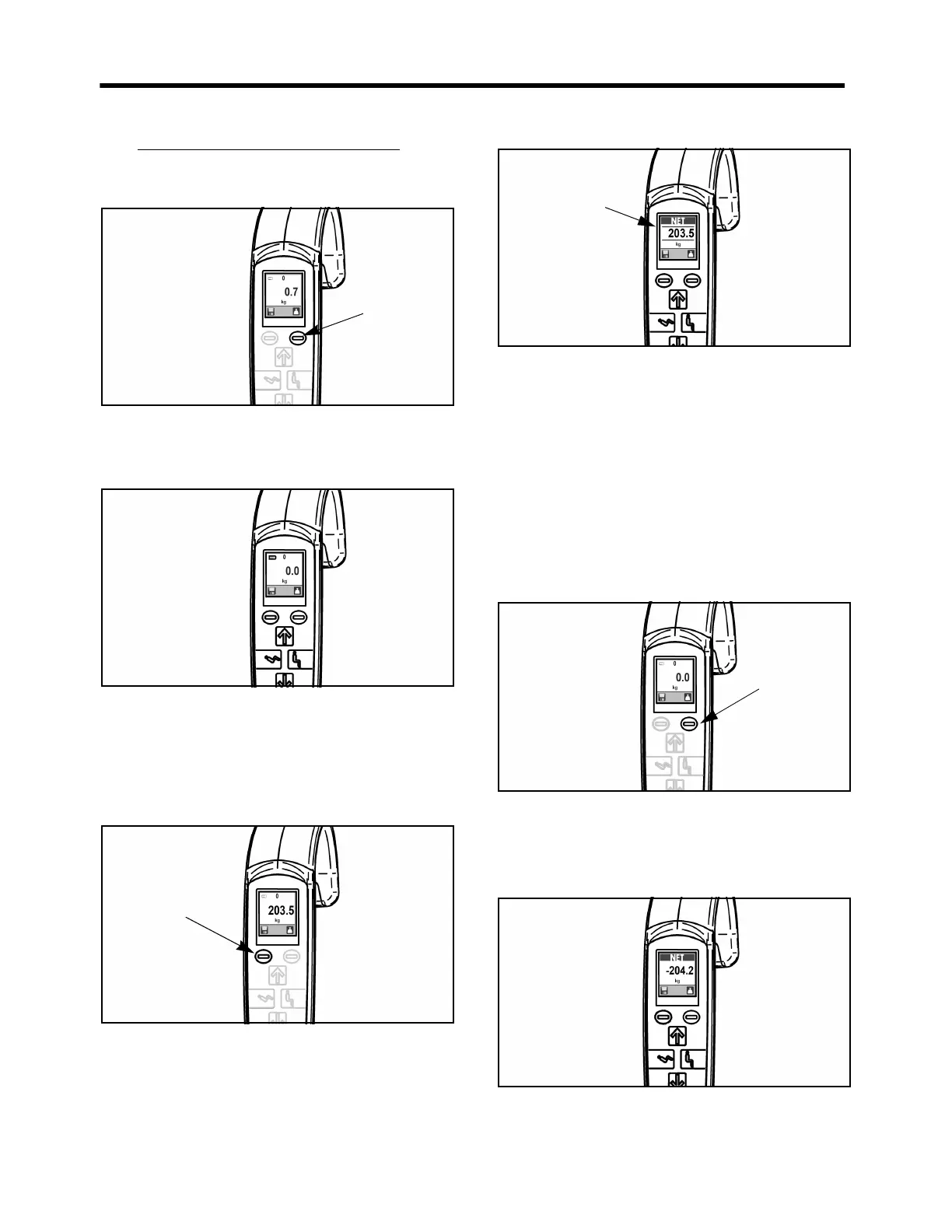
up, install the sling. The scale will now show the
weight of the sling on the screen (see Fig. 58).
Fig. 58
3. Press the “scale” button to zero the scale. Now the
display will show a zero weight (see Fig. 59).
Fig. 59
4. Lift the patient until obstructions are cleared, such
as the bed, chairs, the floor, etc. Allow the weight
reading to stabilize.
Do not press the button again; the number displayed will
be the patient’s weight (see Fig. 60).
Fig. 60
5. Press the save button if the net weight needs to be
kept in memory. Horizontal bars will appear above
and below the digits on the screen to show that the
save function is activated. “Save” will stay active
until the save button is pressed again (see Fig. 61).
Fig. 61
Method B - Weighing with the
Patient Already Suspended in the
Sling
If the patient is already on the lift, and a weight
measurement is needed, ensure that the patient is
suspended free and clear of any obstructions such as the
bed, chairs, the floor, etc.
1. Press the scale button to obtain a zero reading on
the display (see Fig. 62).
Fig. 62
2. Complete the transfer of the patient and remove the
patient from the lift. The scale will display a
negative number (see Fig. 63).
Fig. 63
Horizontal bars
show that Save
mode is on
Scale



 To Next Page