Ethernet
Installation Configuration Usage Troubleshooting Glossary
Extended Battery Installation and Replacement
Use this procedure to install or replace the backup battery.
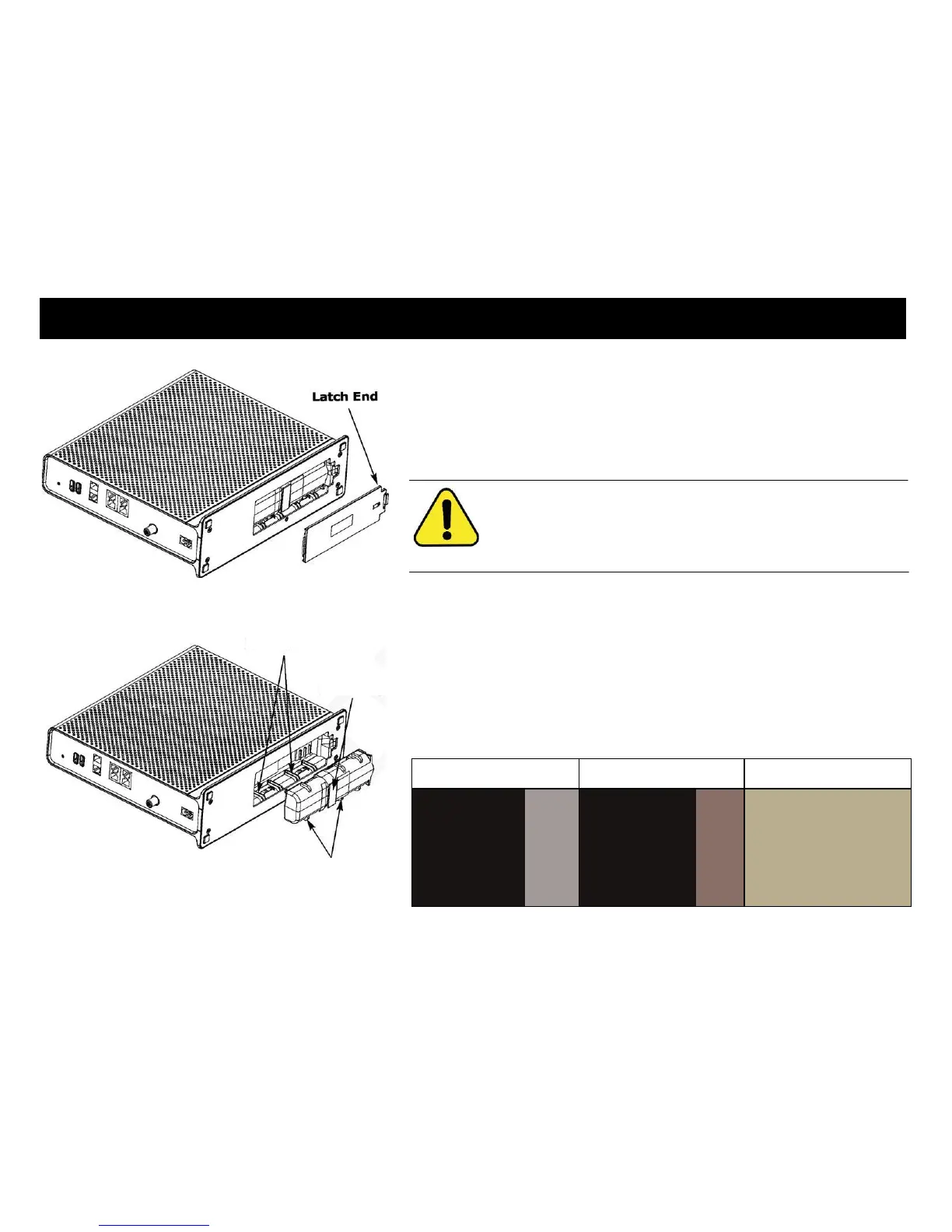
1 Press down and pull back on the latch holding the battery door (on the bot-
tom of the Telephony Gateway). Pull the door toward you. Set the door
aside in a safe place.
CAUTION
Risk of equipment damage
Improperly inserting the battery may damage the battery connector
in the Telephony Gateway. Carefully follow the instructions in the
next step to avoid damage.
2 Hold the battery pack so that the guides on the battery align with the slots
on the Telephony Gateway and slide the battery into the bay. The diagram
on the left shows the proper orientation.
Note: Batteries will not insert completely into the Telephony Gateway if
not oriented correctly. The battery should slide into the bay without
significant force. Line up the slots in the battery bay with the guides on
the battery and apply even pressure on both ends of the battery.
Xfinity TG1682 Telephony Gateway User's Guide 15















 To Next Page