4.2. Multi Presets
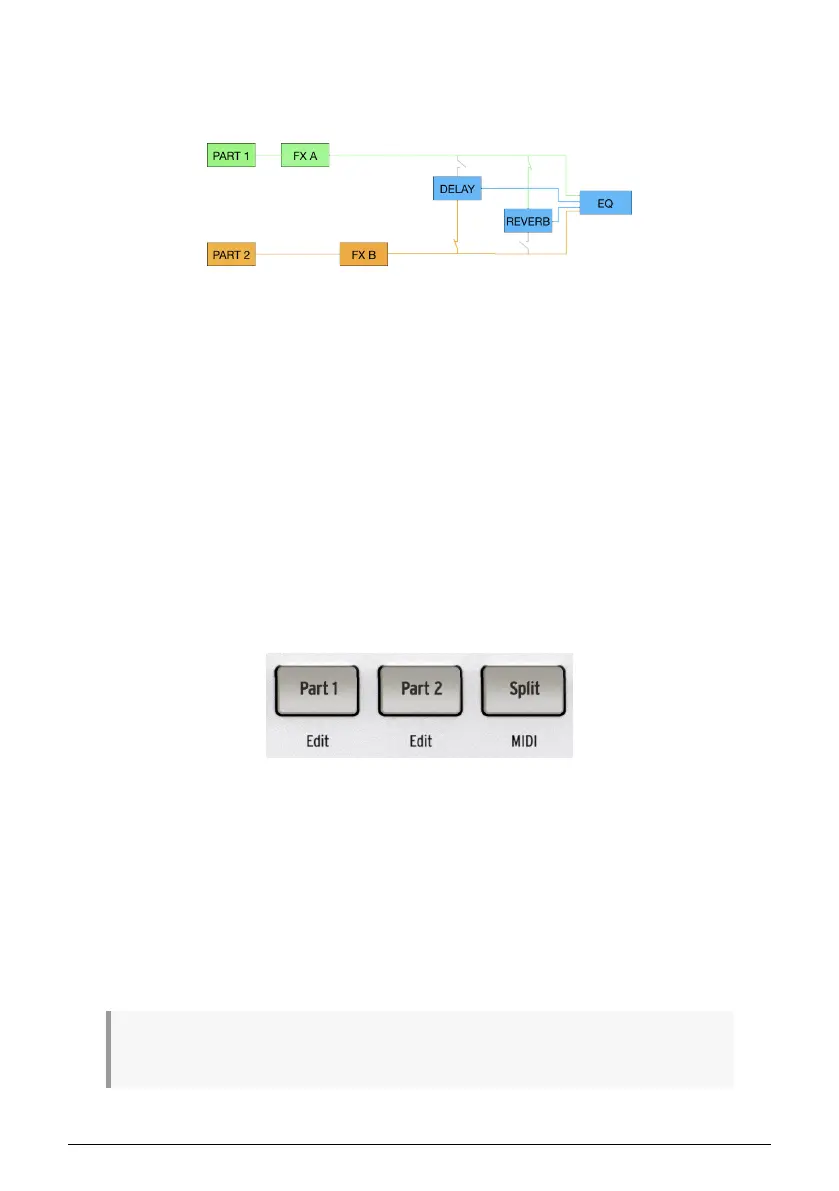
A Multi Preset contains two Instruments, which may be split or layered. Its signal flow is as
follows:
Parts 1 and 2 and their respective Instruments feed one insert effect or the other. The output
of each insert effect can then be sent to the delay, reverb, or both. Four outputs are summed
into the master EQ: Part 1 and its insert effect (pre delay and reverb), Part 2 and its insert
effect (pre delay and reverb), Delay output, and Reverb output.
An important difference from a single Preset is that the parts have to share the two available
insert effects.
• If Part 1 is using FX-A, then Part 2 only has FX-B available.
• If Part 1 is using FX-B, then Part 2 only has FX-A available.
• If either Part is using both FX-A and FX-B, then the remaining Part either gets
none, or both can be routed through the same FX chain. See the Effects [p.34]
chapter for more.
This limitation does not apply to the Delay and Reverb, as they are send-based, meaning
you can send whatever amount (level) of either Part to both as you see fit.
4.2.1. The Part Buttons
The Part 1 and Part 2 buttons select which part in a Multi is affected when you perform other
operations such as loading a Preset or turning the Macro [p.32] knobs. For now, it’s most
important to know how they affect loading a Preset.
• If neither Part 1 nor Part 2 is selected and you load a new Preset, the entire Preset
is replaced. This means that a Single will override a Multi and Part 2’s Instrument
will disappear.
• If Part 1 or Part 2 is selected, only the Instrument for the selected Part will be
replaced.
• Hold Shift and press the Part button to change only that part while keeping
everything else about the Preset steady.
♪ The latter method is useful if, for example, you have a great synth bass locked down but are still
searching for the right lead or pad to use with it in a Multi.
28 Arturia - User Manual AstroLab - PRESET ARCHITECTURE AND EDITING















 To Next Page