5. MACROS AND INSTRUMENT EDITING
Macros are one of AstroLab’s most powerful features. They let you control multiple aspects
of a Preset’s sound with a single knob twist.
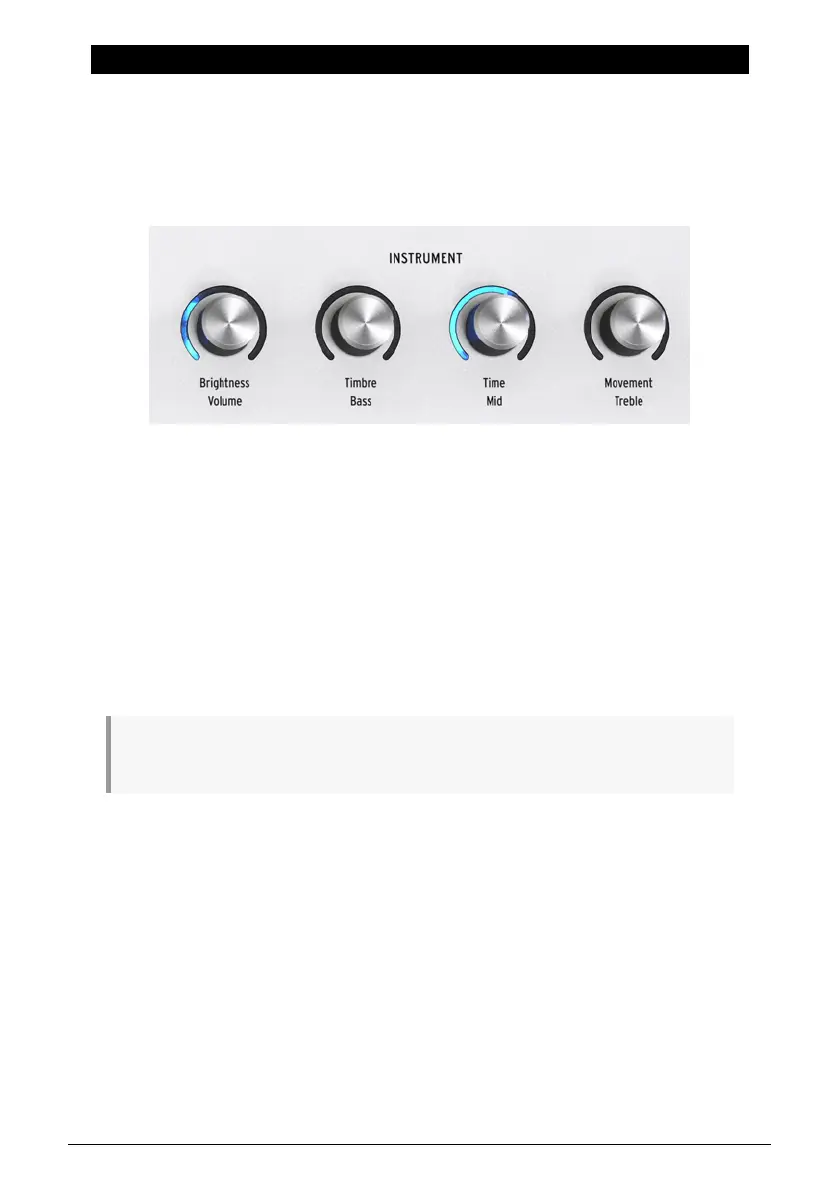
The four Macro knobs are Brightness, Timbre, Time, and Movement, which will be familiar
names if you’ve worked with Analog Lab or any V-Collection Instrument. If not, don’t worry.
AstroLab’s Presets are pre-programmed with musically useful control changes in each of
these categories.
These four areas of sound transformation are non-technical and informal, but generally we
use them to do the following:
• Brightness: Covers settings that tend to affect the treble or high harmonic content
of the sound, such as the filter cutoff on a synth Instrument or higher drawbars
on an organ.
• Timbre: Complementary to brightness, this can change the sound in a different
way, or usually several at once. Examples include filter resonance, changing or
blending oscillator waveforms, adding PWM or waveshaping, and much more.
• Time: Usually parameters related to the envelopes of a sound, such as attack,
decay, and release.
• Movement: Adding modulation or evolving sequences — anything that makes the
sound
move
.
♪ The MIDI Continuous Controller (CC) messages sent by the Macro knobs are, left to right: 74, 71, 76,
and 77.
5.1. Macros in a Single Preset
Start getting familiar with the Macro knobs by selecting a single Preset and listening to how
the sound changes as you turn the knobs. Your knob movement will appear in blue, and the
display will show the value of the Macro knob you’re turning.
32 Arturia - User Manual AstroLab - MACROS AND INSTRUMENT EDITING











 To Next Page