You can define up to three users on your Eurit 22, with each user being allocated their own
Multiple Subscriber Number (MSN A, B, C). Your telephone will ring when a call is received for
one of the defined numbers.
c3
When the telephone leaves the factory no users are defined and your Eurit 22
will ring for all incoming
calls.
0
In order to be able
to
use the full
range
of Eurit 22 functions,
at
least
one
user
must be defined!
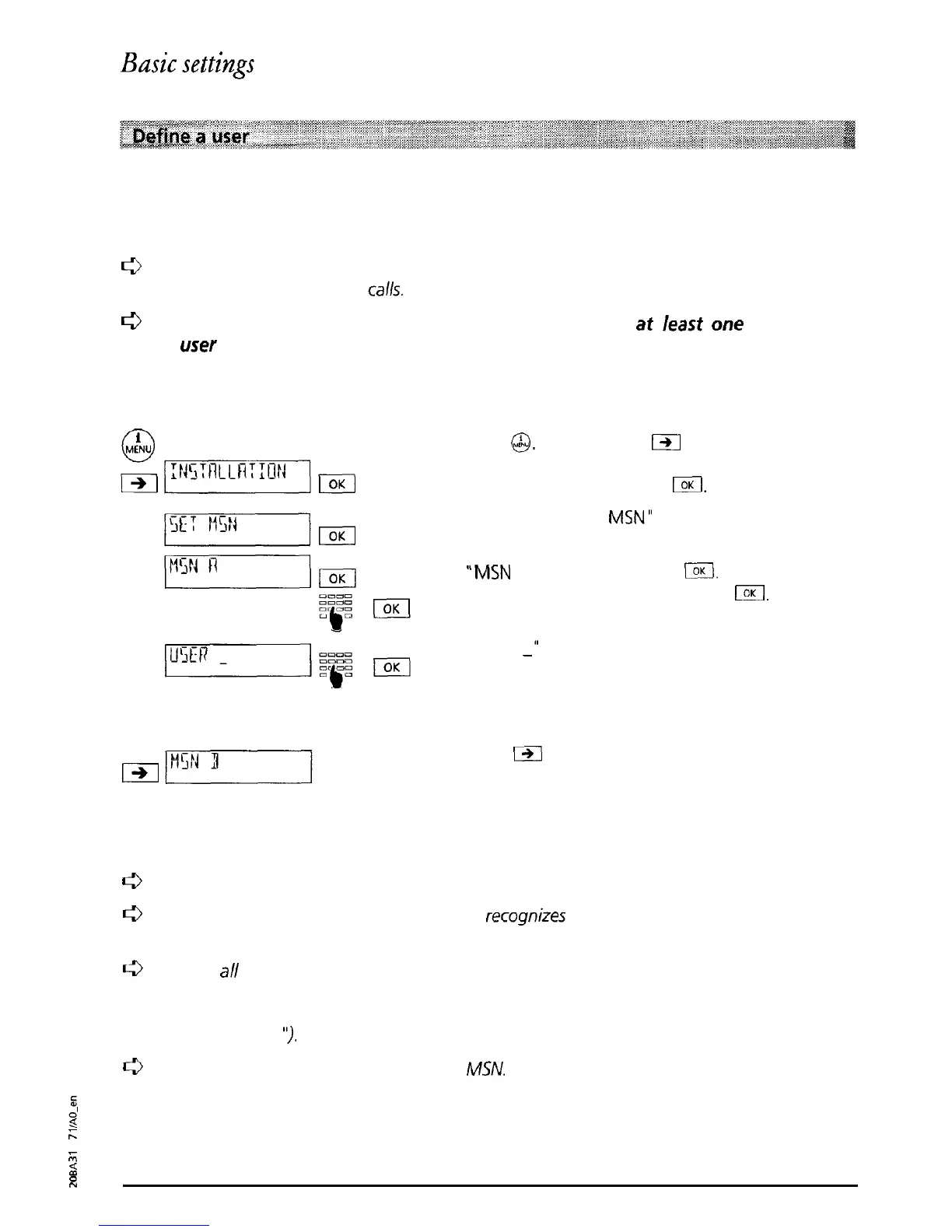
In order to define a user proceed as follows:
Press
@.
and then press
IZI
as often as necessary
until “INSTALLATION” is displayed. Confirm the
menu selection by pressing
l3Kl.
The message ‘SET
MSN”
is displayed. Confirm by
pressing I.
“MSN
A” is displayed. Press
m.
Enter the number
for MSN A and confirm by pressing
IOK
“USER
_‘I
is displayed. Using the dialling keypad,
enter the name associated with MSN A and
confirm by pressing I.
Correct entry is indicated by a short signal tone.
Press
m
to change to the menu for defining
MSN B.
MSN B and C can be defined by repeating the
procedure described for MSN A.
r3
Caution: always enter MSN without prefix!
c3
When a
call
is received your
Eurit
22
recognizes
for which user it is and indicates this by
different
ringing
melodies
(see “Ringing tone”
and
“Incoming calls”).
c3
With
a//
outgoing calls, the
Multiple
Subscriber Number of the active user is
sent
to the
called party If you do not want the Multiple Subscriber Number for
a
particular user
to
be displayed on the called party’s telephone, you can suppress this (see “Suppress line
identification
I’).
0
A user can be deleted by deleting his
MSN.
$
2
A
F
2
10



 To Next Page