Operation with
a
PBX
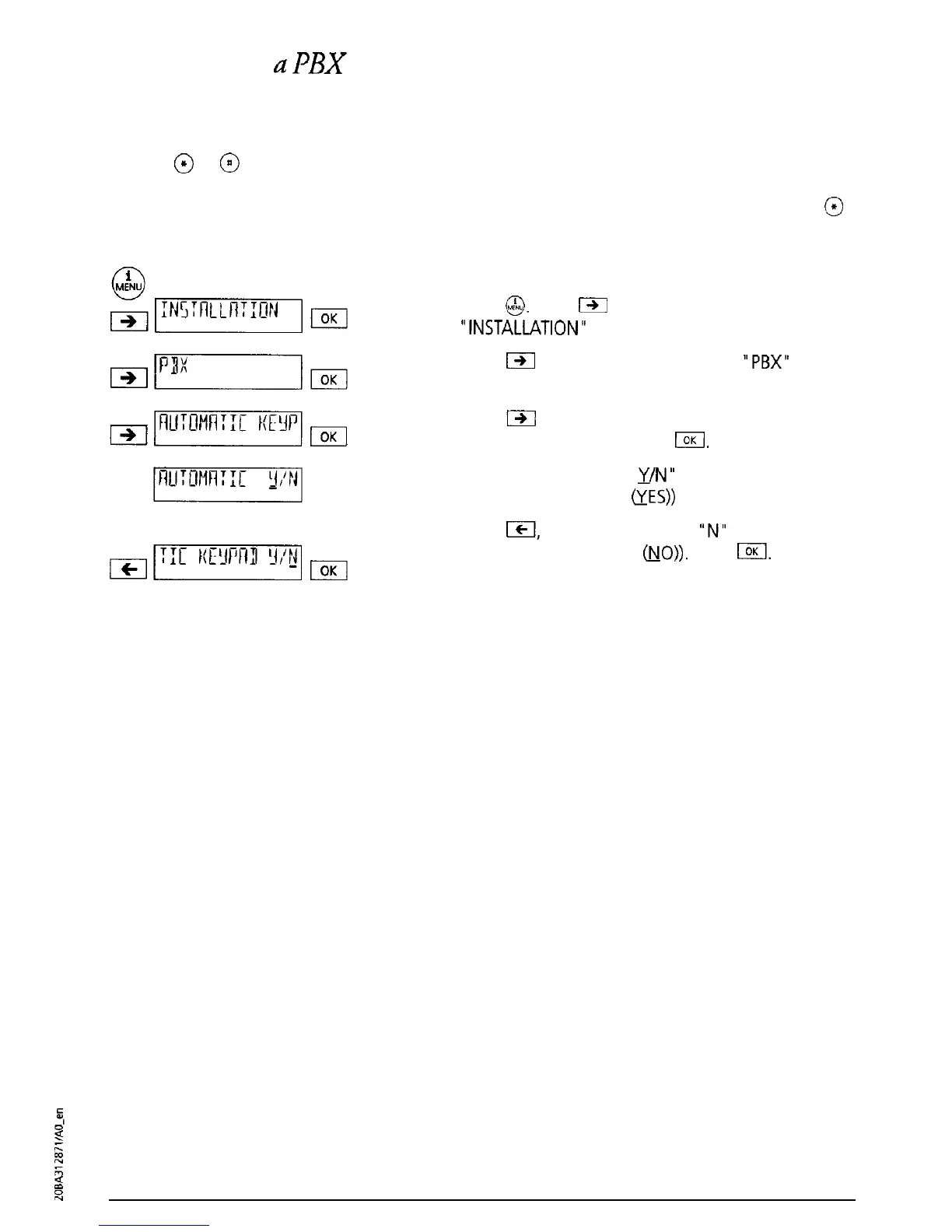
Automatic keypad send
If either
@
or
@
is the first key pressed, an automatic switchover is made to keypad signalling
(“Automatic keypad send” ON). With some systems (e.g. systems on which automatic exchange
line allocation is activated) you must set “Automatic keypad send” OFF so that, for example,
@
can be used to connect internally:
Press
G&J.
Press
191
as often as necessary until
“INSTALLATION”
is displayed. Press I.
Press
m
as often as necessary until
“PBX”
is
displayed. Press I.
&nuncmqm
Press
m
as often as necessary until “AUTOMATIC
KEYPAD” is displayed. Press
IOK
“AUTOMATIC KEYPAD
41/N”
(Factory setting:
Automatic Keypad ON
&ES))
is displayed.
Press
ICI,
The cursor jumps to
“N”
(Transfer using
disconnect is set to OFF
&IO)).
Press
[.
A short
confirmation signal tone sounds.
40



 To Next Page