Operution
with
u
PBX
Call transfer by going on-hook
During an enquiry call you can connect the other two parties (call transfer) by replacing the
handset (going on-hook).
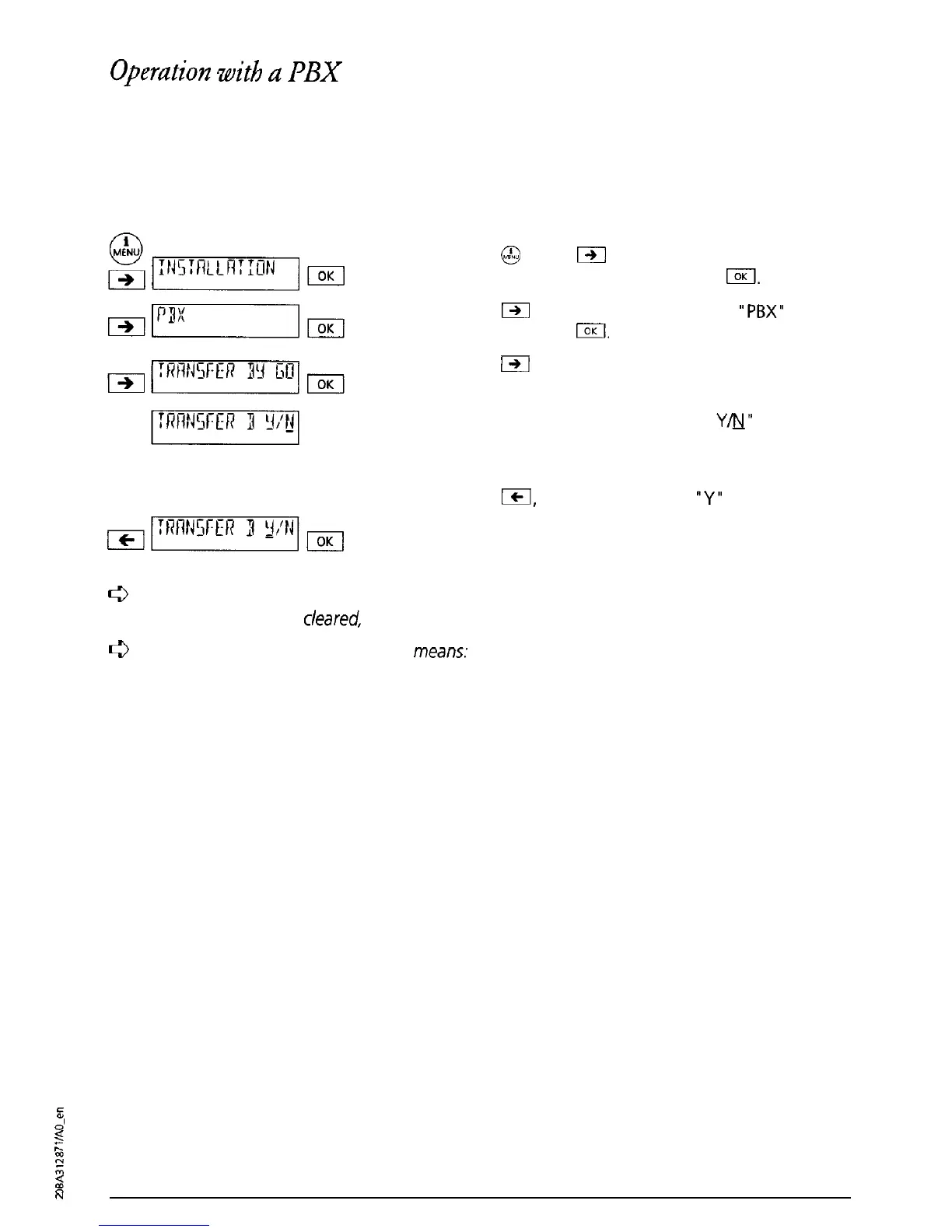
To program this function proceed as follows:
Press
@
. Press
I-)I
as often as necessary until
“INSTALLATION” is displayed. Press
I.
Press
m
as often as necessary until
“PBX”
is
displayed. Press
IOK
Press
m
as often as necessary until “TRANSFER
BY GOING ON-HOOK” is displayed. Press I.
“TRANSFER BY GOING ON-HOOK
Y&J”
is displayed
(Factory setting: Call transfer by going on-hook is
set to OFF (NO)).
Press
ICI,
The cursor jumps to
“Y”
(call transfer by
going on-hook ON). Press I. A short confirma-
tion signal tone sounds.
f3
“Transfer by going on-hook OFF” (factory setting)
means:
When the handset is rep/aced
the current call is
cleared,
the call on hold is signalled.
0
‘Transfer by going on-hook ON”
means:
When the handset is replaced the call is
transferred.
2
;;
k
3
N
38



 To Next Page