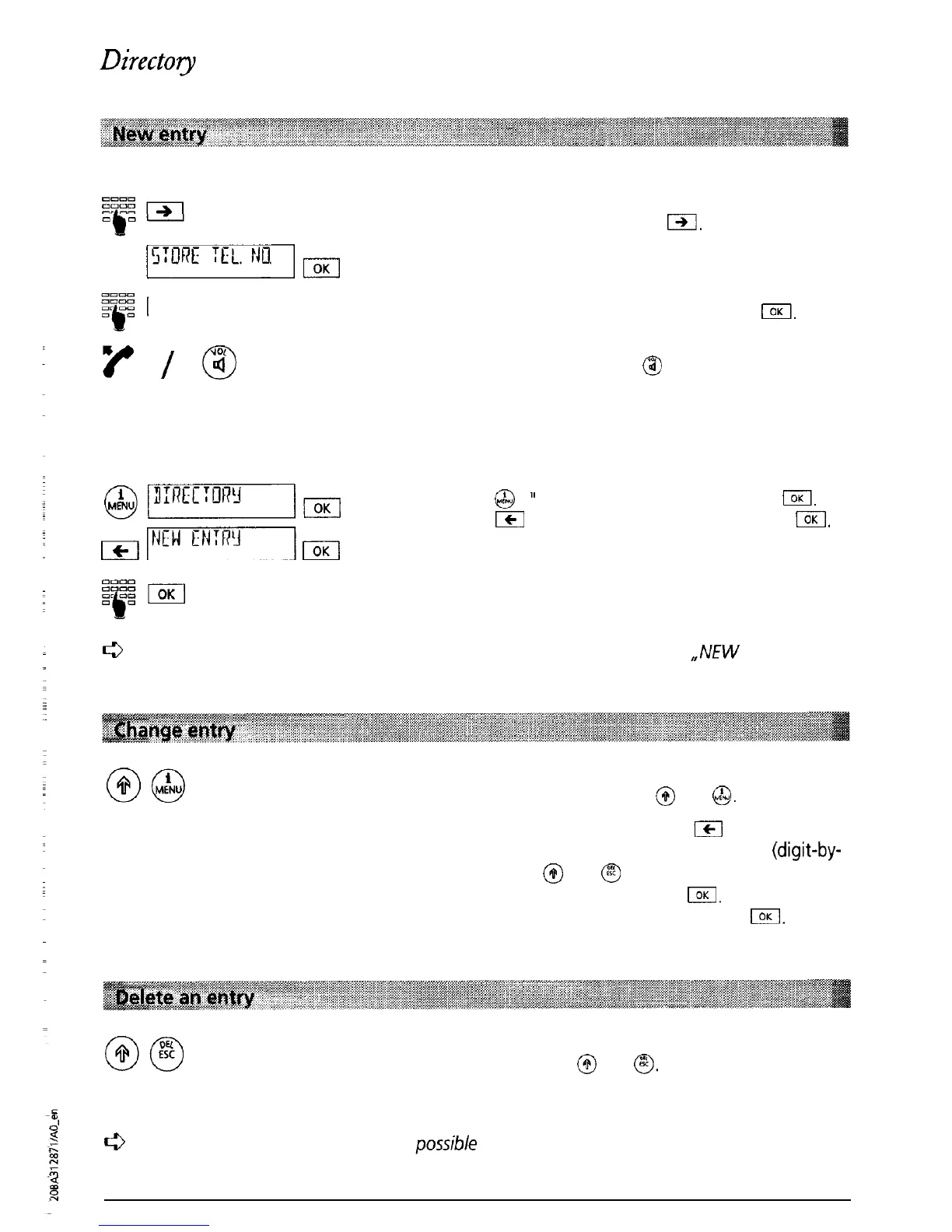
To enter a number in your directory while dialling:
Enter the number and press
I.
js:oncqEIO.
“STORE TEL NO” is displayed. Confirm by pressing
I.
El
Enter the name and confirm by pressing
I.
/@
Lift the handset or press
@
to dial the number.
You can also enter new numbers in your directory using the “Directory” menu:
@[3:ncc:onrm
Press
@
.
”
DIRECTORY” is displayed. Press
IOK
&NriTN’“:n’lm
Press
ICI
.
“NEW ENTRY’ is displayed. Press
IOK
Enter the number and name and confirm by
pressing I.
e
If you have 40 numbers/names stored in your directory (memory full), ,,NEW ENTRY” is
no longer displayed.
Search for the entry you wish to change.
When it is displayed press
@
and
@.
The number is displayed. Press
ICI
to change the
position of the cursor, delete the number
(digit-by-
digit) using
@
and
@
or overwrite the existing
digits and confirm by pressing
I.
The name is
displayed; change the name and press
I.
The
changed entry is displayed.
Select the entry that you wish to delete. When it is
displayed press
@
and
@.
The entry is deleted and
disappears from the display.
c3
For
reasons
of security, it is only
possible
to delete one entry at
a
time. If you wish to
delete the whole directory contents, you must delete each entry separately until
“EMPTY” is displayed.
25



 To Next Page