Operation with
u
PBX
Call transfer using disconnect
This setting is dependent on your PBX. You can check whether or not you need to program this
setting:
Connect
the other two parties
during
an enquiry
call
by pressing
m
as often as
necessary until “CALL TRANSFER” is displayed and confirming by pressing
I.
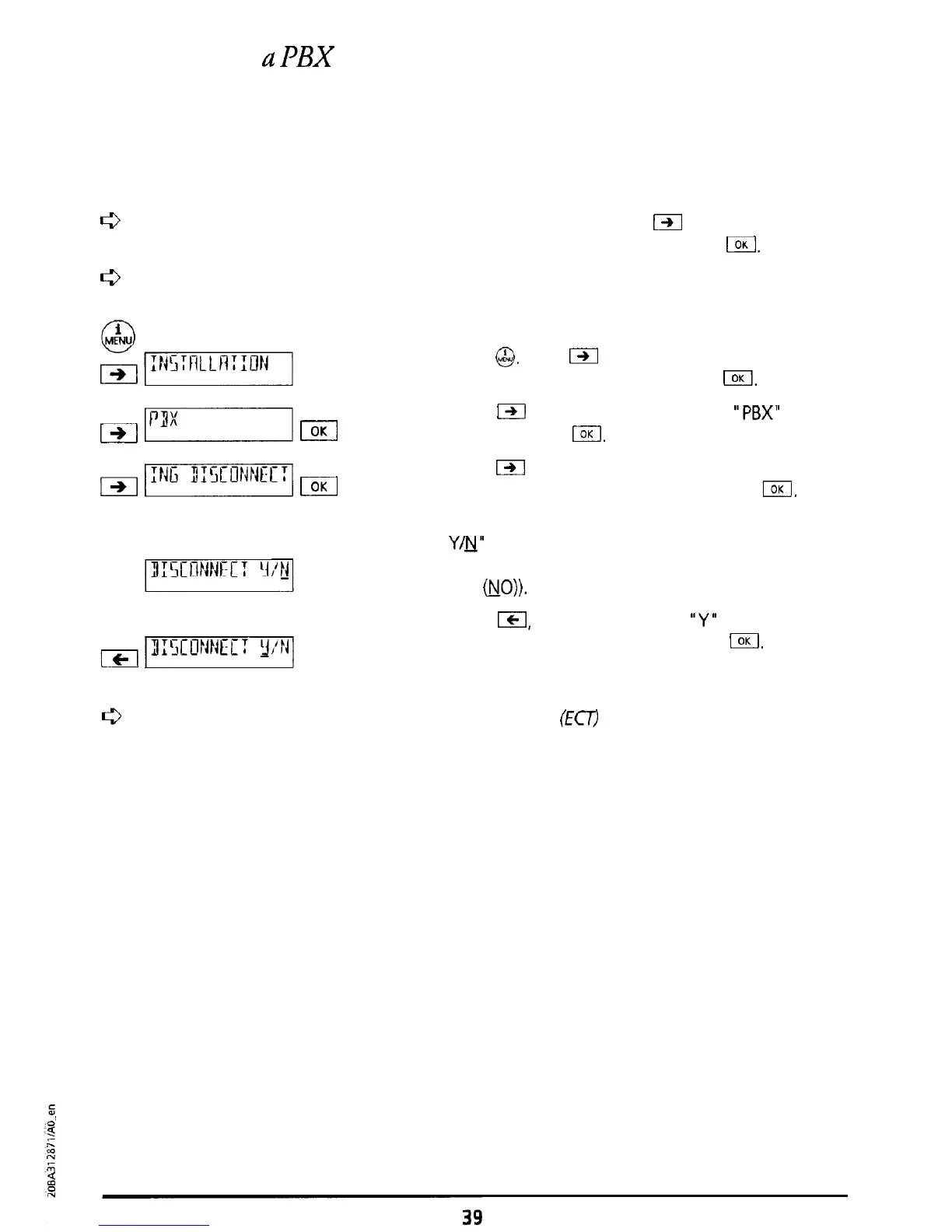
If it is not possible to transfer the call then you must activate “Transfer using disconnect”.
El
Press
@.
Press
m
as often as necessary until
“INSTALLATION’ is displayed. Press
I.
I
Press
IZI
as often as necessary until
“PBX”
is
displayed. Press
I.
I
Press
W
as often as necessary until “TRANSFER
USING DISCONNECT” is displayed. Press
IOK
The message “TRANSFER USING DISCONNECT
Y/u”
is displayed.
(Factory setting: Transfer using disconnect is set to
OFF
&IO)).
El
Press
ICI,
The cursor jumps to
“Y”
(Transfer using
disconnect is set to ON (YES)). Press
1.
A short
confirmation signal tone sounds.
Normally when used on a PBX, Explicit Call Transfer
(Em
is used (a Euro protocol). When
“Transfer using disconnect is set to ON”, the Euro protocol is switched off. Ask your
system manufacturer or check the details in your PBX operating handbook.



 To Next Page