Extendedfeutures
You can park a call, for up to 3 minutes, and carry on the call on another telephone. It is even
possible to unplug the telephone once the call is parked and to plug it in at another socket on
the same
ISDN
connection to continue the conversation.
You can park a call automatically or manually:
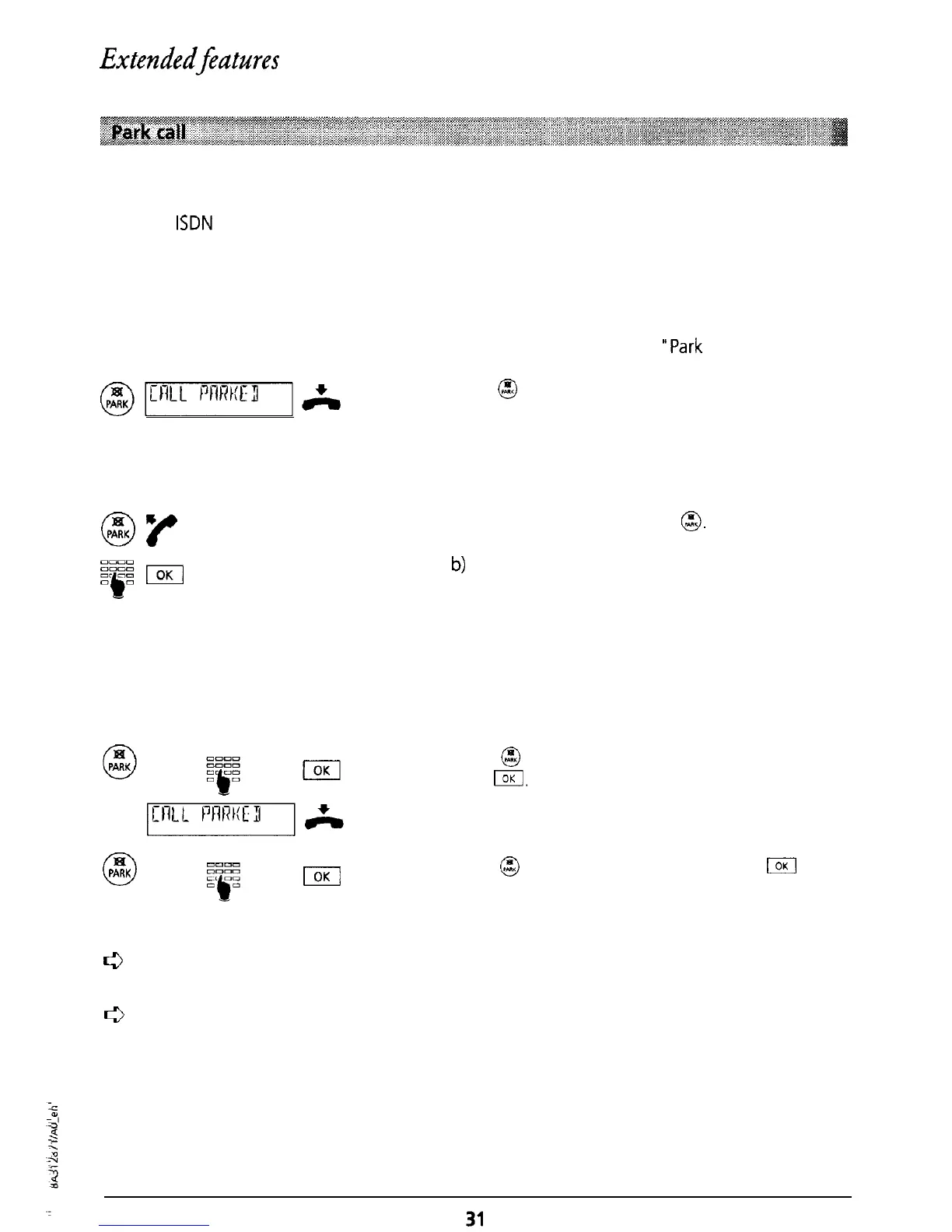
Automatic parking
The call is parked automatically. The programmed park code is used (see
‘Park
code”).
@l:“1L]&
Press
@
during the call. “CALL PARKED” is
displayed and you can now replace the handset.
Resume call
On the other telephone press
@.
Lift the handset.
a) The call is automatically retrieved or
b)
Enter the programmed park code and confirm
by pressing I.
Manual parking
If you have not programmed a park code, you can enter a (temporary) park code each time you
park or retrieve a call.
Press
@
during the call and enter your park code.
Press
lOKl.
The message “CALL PARKED” is displayed. Replace
the handset.
18[
0
PARK
I
Press
@
and enter your park code. Press
I
and
the call can be retrieved.
r3
A call can be parked for a maximum of three minutes. If the call is not retrieved within
this time the connection is cleared.
c3
You
can
also forward a call using speed dialling (see “Speed dialling”).



 To Next Page