Conguring the Unit via its Web Interface
System
ENC 1201 Version 1.0 Page 25
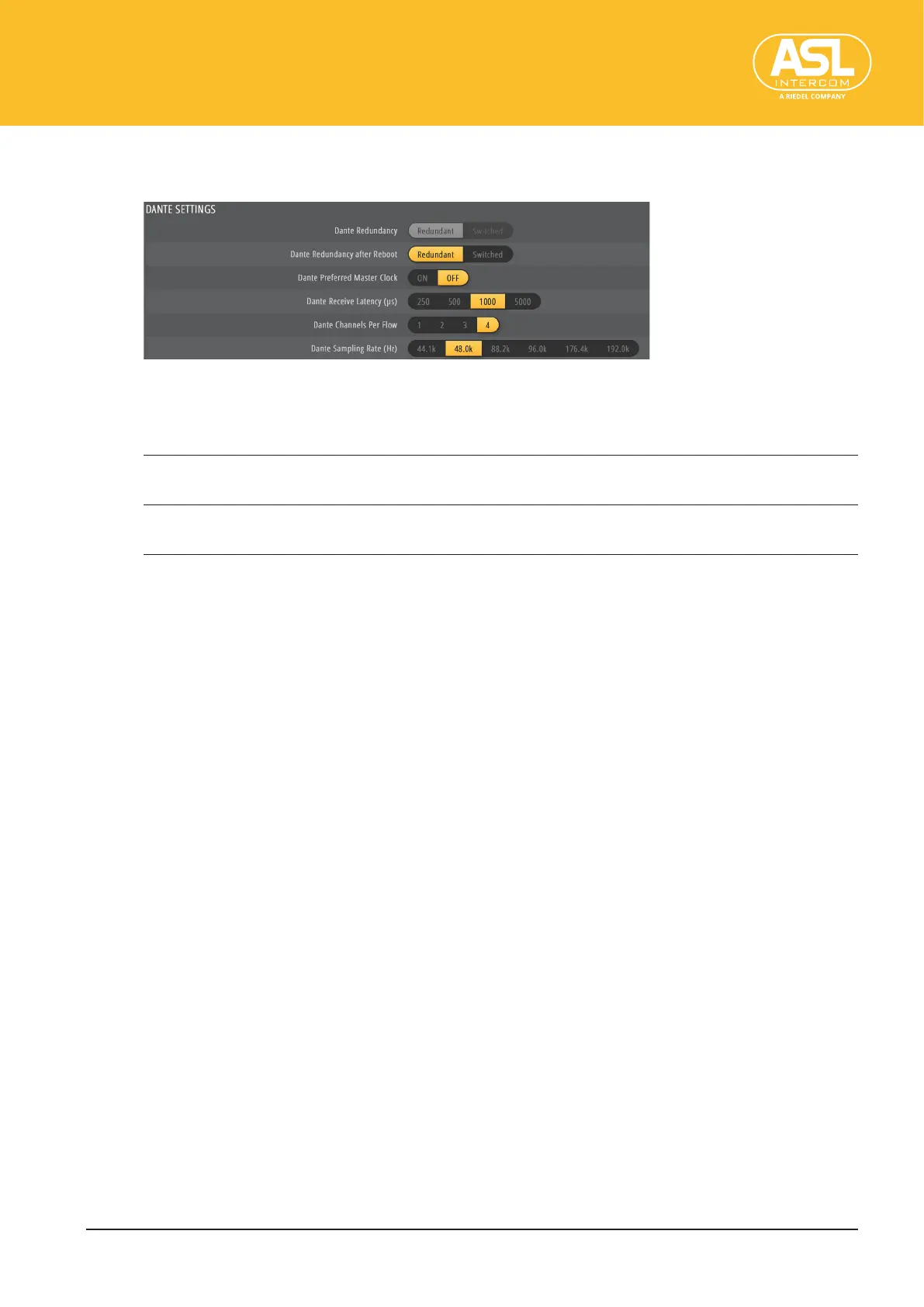
DANTESETTINGS
This section is dedicated to Dante-related settings.
DanteRedundancy
This line indicates whether the two network adapters are used in Switched or Redundant
mode. See below for how to change this setting.
Redundant The ENC 1201 duplicates Dante audio trac to both Ethernet ports, allowing
the implementation of a redundant network via the SECONDARY port.
Switched Both Ethernet ports act as standard switch ports, allowing daisy-chaining
through the ENC 1201.
DanteRedundancyafterReboot
This is where you can specify whether the two Ethernet ports are to be used in Switched
or Redundant mode.
After changing this setting, remember to save your conguration (see “Save Cong”,
p.17) and to reboot the unit (see “Reboot”, p.18).
DantePreferredMasterClock
By default, Dante automatically selects the clock source for all devices. If the physical
conguration of your network tends to change, or if some devices are not available on a
permanent basis, specifying a device that you know will always be there may be a safer
bet, though.
If you want the ENC 1201 to act as the master clock source, set this parameter to “ON”.
Note:
• If two or more devices on the network are dened as Preferred Masters, the one with the lowest
MAC address will provide the master clock.
DanteReceiveLatency(µs)
Dante latency is not dependent upon circumstances—it is well known and consistent
within the system all of the time. Each Dante receiver introduces a specic, user-adjust-
able amount of latency before playing out audio to account for any delay variation on
the network or end device. This guarantees that all devices play out in perfect sync. This
parameter allows you to select the minimum latency to be applied to the incoming Dante
data stream.
The following settings are available: 250 µs, 500 µs, 1000 µs, 5000 µs.
If two connected devices use dierent latency settings, Dante automatically switches to
the setting of the device that uses the higher minimum latency value.


 To Next Page