16
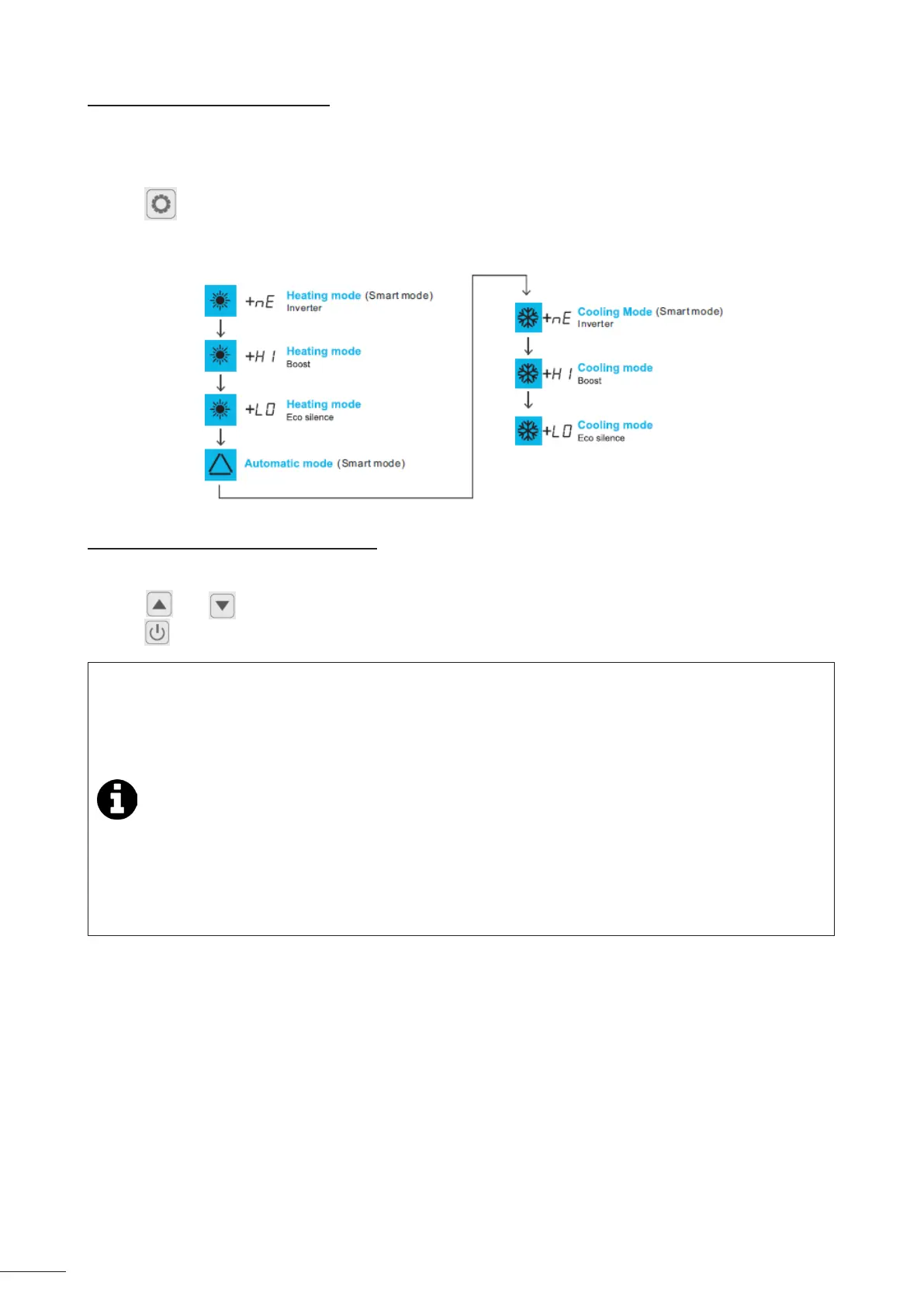
2.4.4 Choosing an operang mode
The operang mode can be adjusted depending the heang/cooling need for the pool, see “2.2.1 Mode details” for
more details about operang modes. To change the operang mode :
• Unlock the keypad: the main menu is displayed.
• Press to change the operang mode.
The dierent operang modes appear in the following order:
2.4.5 Adjusng the temperature setpoint
• Unlock the keypad : the main menu is displayed.
• Press and to set and modify the temperature setpoint, press SET to conrm the value.
• Press to conrm.
• When the setpoint temperature is exceeded by 1°C, the heat pump stops heang/cooling the water.
Then, the heat pump automacally regulates the pool water temperature (independant to the chosen
mode).
• The heat pump runs again to reach out the setpoint when there is a gap of 1°C between the pool water
temperature and the setpoint water temperature.
• Example: the setpoint temperature is 25°C and the pool water temperature has reached 26°C in heang
or cooling mode. The heat pump stops.
- In cooling mode, the appliance will automacally run again if the pool water temperature is higher
than 26°C.
- In heang mode, the appliance will automacally run again if the pool water temperature is lower
than 24°C.
• If heang priority is not acvated, the heat pump waits for the next ltraon pump cycle to run.




 To Next Page