SECTION 2
INSTALLING THE PRINTER
15
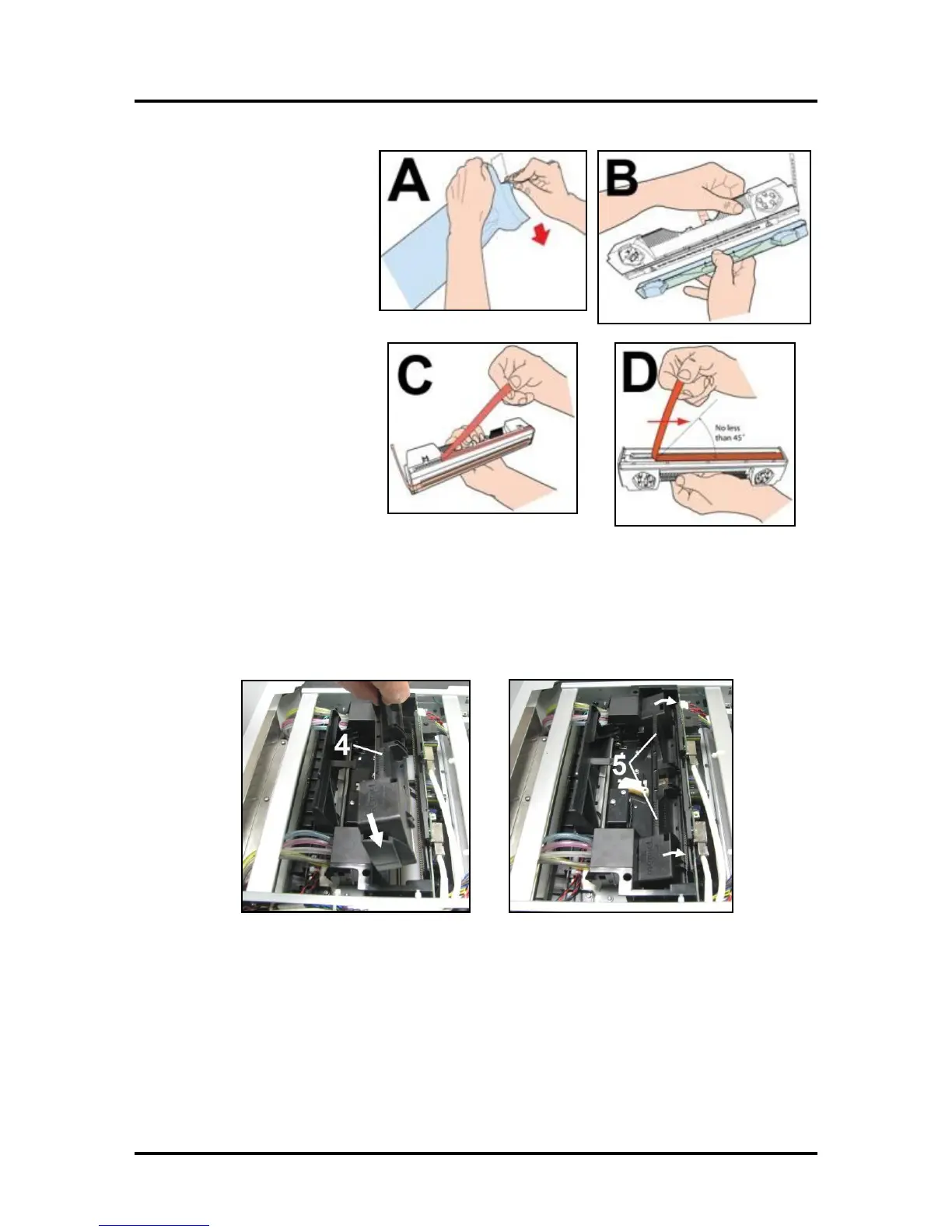
2. [A] Carefully remove the
Printhead Cartridge
from the foil packaging.
Tear at notch or cut end
with scissors.
[B] Remove the
protective plastic cover.
Hold the Printhead by the
handle and unclip the
cover from the Printhead.
[C] Remove protective
strip from the Printhead
Electrical Contacts.
DO NOT allow removed
strip to touch the electrical
contacts.
[D] Remove protective
strip from the Printhead
Nozzles. Hold the Printhead
by the handle. Pull the strip tab and slowly peel the strip from
the Printhead.
DO NOT pull the strip at less than a 45° angle from the Printhead surface.
DO NOT allow removed strip to touch the Printhead Nozzles.
3. Carefully insert the Cartridge into the compartment at an angle [4], with the Printhead surface
facing down and the Ink Nozzles facing the Ink Hoses. Once it is seated, gently tilt the Cartridge
back until it snaps into an upright position [5]. DO NOT FORCE the Cartridge into position.



 To Next Page