SECTION 1
GETTING ACQUAINTED
5
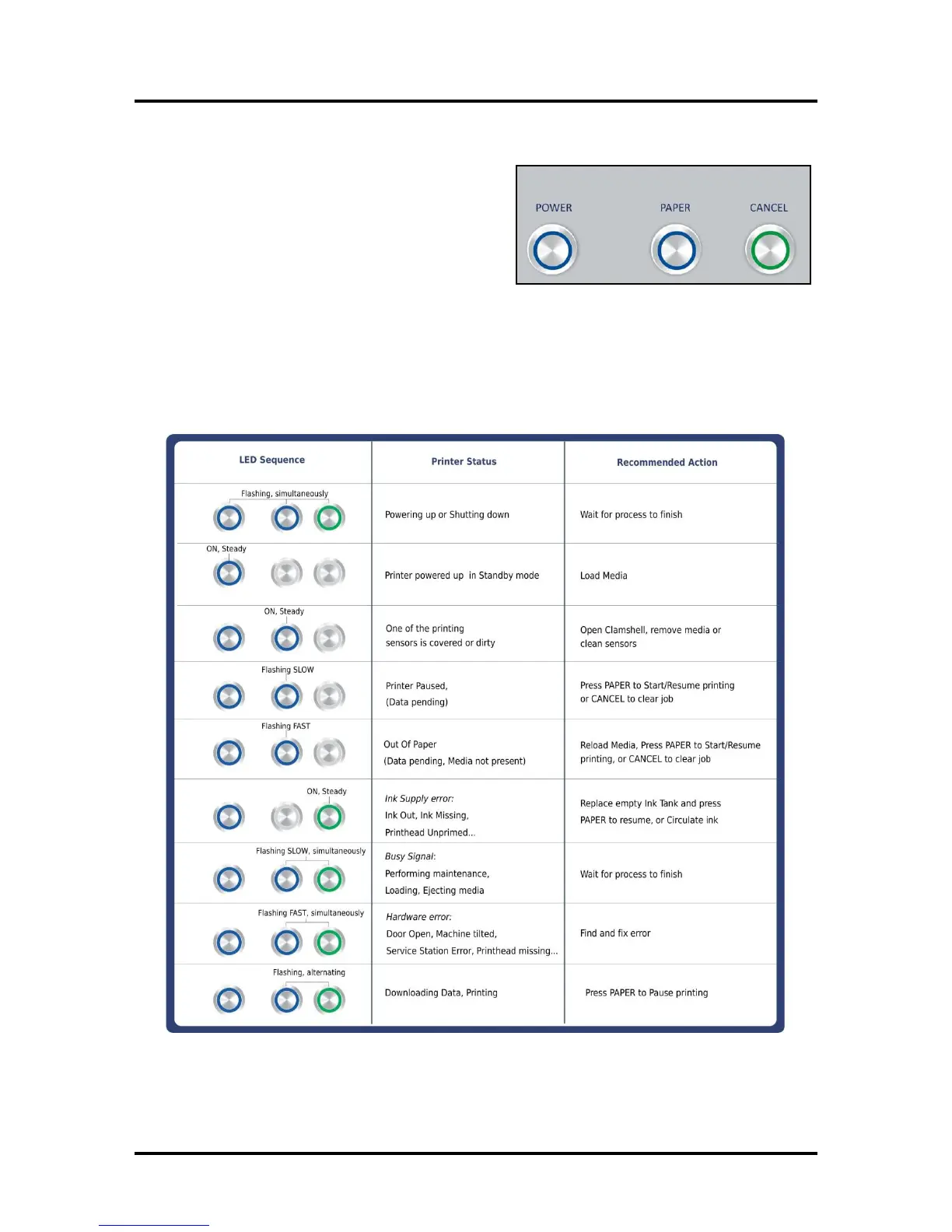
Control Panel Button/LED Indicators
The Control Panel has 3 buttons with LED indicators.
POWER (ON/OFF) – Turns Printer power ON and OFF.
Turn off power for cleaning and maintenance
PAPER (STOP JOB/RESUME) – Stops Paper Feed or
Resumes Printing.
Press to Stop Paper Feed Immediately. Printer
will clear media in Printer and stop.
Press to Resume Printing. Restart printing after a paper feed error (such as a paper jam or
running out of paper).
CANCEL (CANCEL JOB) – Cancels a Job.
Press to Cancel a Job. Once the Printer has stopped, pressing this button clears job from Printer
and Print Queue in Driver. NOTE: Cancelled Jobs must be reloaded before printing can resume.
MORE TROUBLESHOOTING GUIDES on page 54.
FOR A LARGER CHART TO MOUNT ON THE PRINTER, SEE END OF THIS MANUAL.



 To Next Page