5-32 Chapter 5: Software support
5.3.8 ASUS Q-Fan Plus
The ASUS Q-Fan Plus feature allows you to set the appropriate performance level
After installing AI Suite from the bundled Support DVD, launch the utility by double-
clicking the AI Suite icon on the Windows
®
taskbar and click the Q-Fan Plus button
on the AI Suite main window.
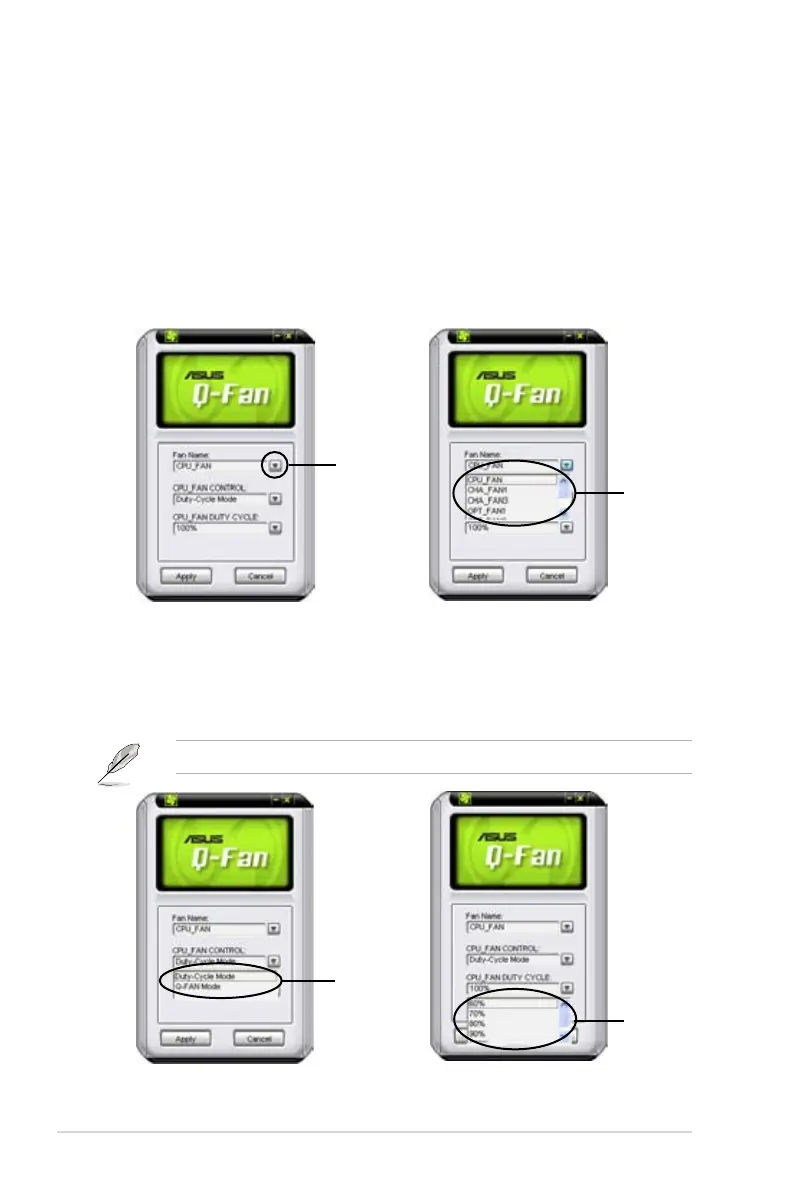
Click the Fan Name drop-down list button to display the fans and select a fan from
the list.
Drop-down
list button
Select a
fan control
mode
Click Apply at the bottom to save the setup.
Click the Fan Control drop-down list button to select a fan control mode:
• Duty-Cycle Mode: You can determine the duty cycle percentage for each fan.
• Q-FAN Mode: The fans will automatically adjust their speeds according to
component temperature.
Power fan is supported by Duty-Cycle Mode only.
Select a fan
Select a fan
duty cycle


 To Next Page