Chapter 2: Hardware Information
2-30
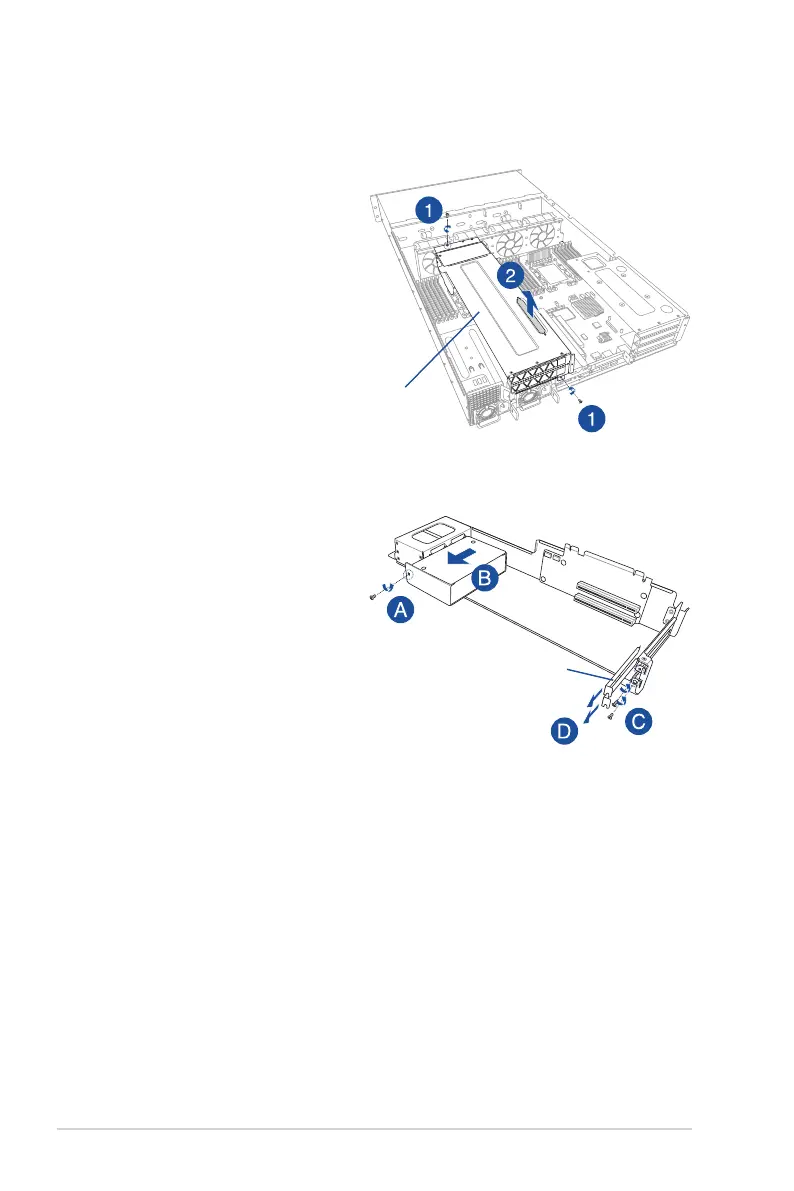
To install a passive GPU (FH/FL) card to the riser card bracket 3:
1. Remove the two screws that
secure the riser card bracket 3 to
the chassis.
2. Lift the strap and then pull it up
to detach the riser card bracket
3 from the PCIE4 slot on the
motherboard.
Riser card bracket 3
3. Place the riser card bracket 3 on
aatandstablesurfaceinthe
orientation as shown.
4. Remove the screw that secures
the GPU air duct to the riser card
bracket 3 (A), then remove the
GPU air duct (B).
5. Remove the screws from the
metal cover (C), then remove the
metalcover(D)fromtheriser
card bracket 3.
6. Prepare the GPU card and the
GPU power cable.
Metal cover














 To Next Page