5-43
RS720Q-E9-RS8 Series
5.10 Boot menu
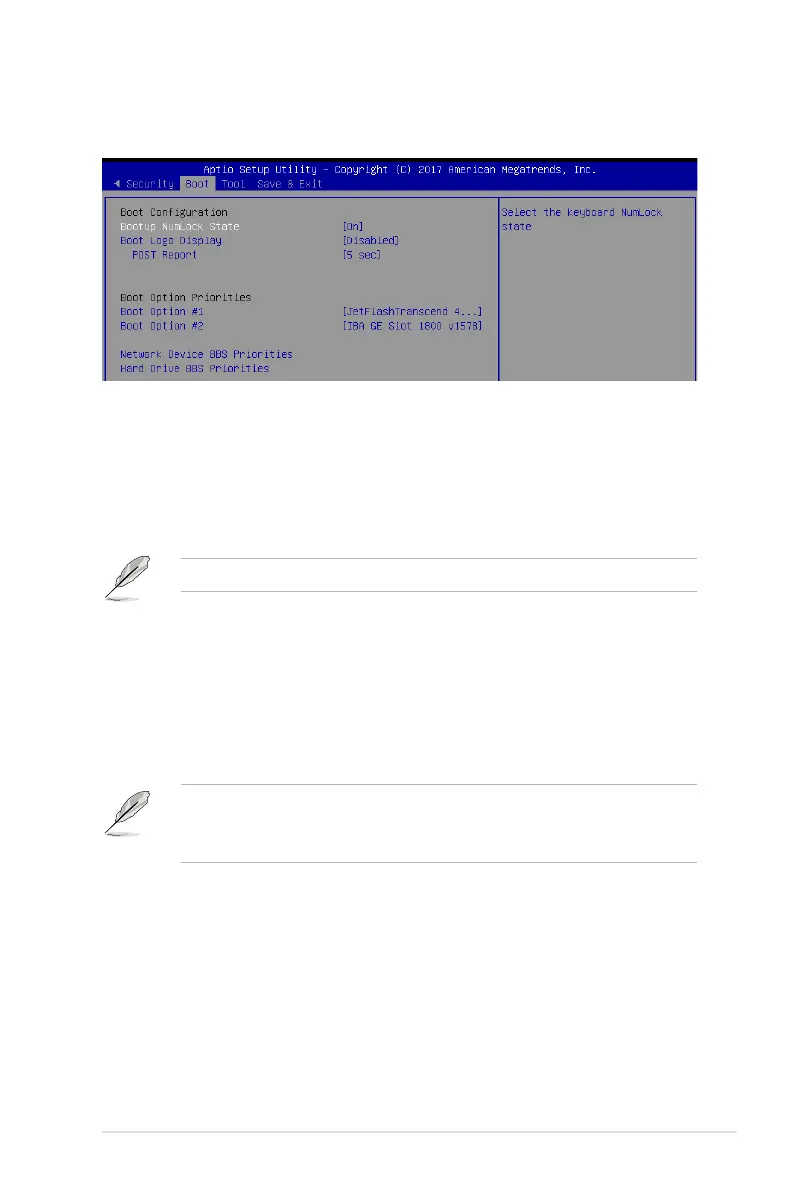
The Boot menu items allow you to change the system boot options.
Bootup NumLock State [On]
Allowsyoutoselectthepower-onstatefortheNumLock.
Congurationoptions:[Off][On]
Boot Logo Display [Disabled]
Allows you to enable or disable the full screen logo display feature.
Congurationoptions:[Auto][FullScreen][Disabled]
The following item appears only when
Boot Logo Display
is set to
[Disabled]
.
POST Report [5 sec]
Allows you to set the desired POST Report waiting time from 1 to 10 seconds.
Congurationoptions:[1sec]~[10sec][UntilPressESC]
Boot Option Priorities
These items specify the boot device priority sequence from the available devices. The
number of device items that appears on the screen depends on the number of devices
installed in the system.
• Toselectthebootdeviceduringsystemstartup,press<F8>whenASUSLogo
appears.
• ToaccessWindowsOSinSafeMode,pleasepress<F8>afterPOST.
Network Device BBS Priorities / Hard Drive BBS Priorities
These items allow you to set the booting order of the devices.


 To Next Page
 Loading...










