Switch
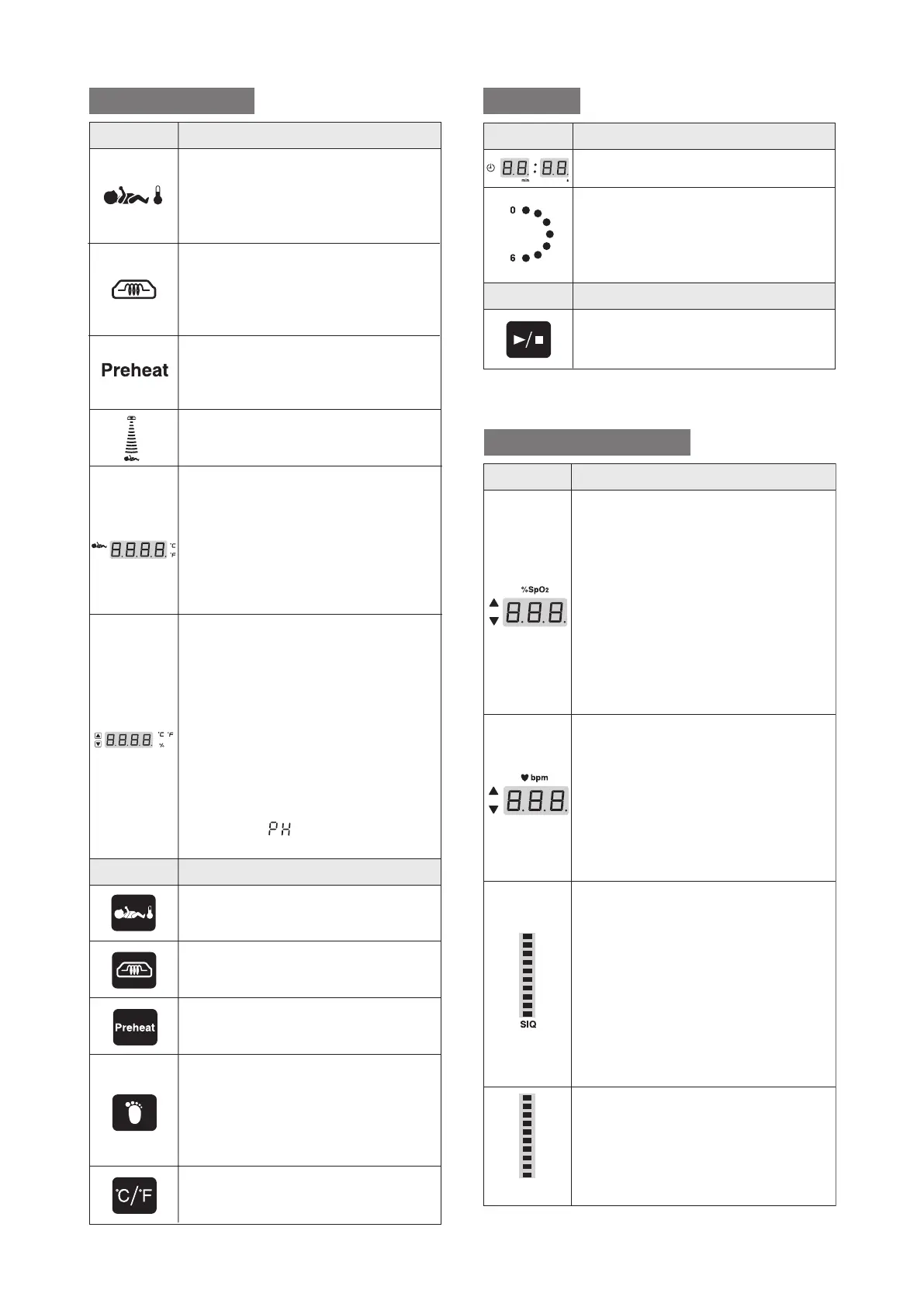
Operation mode indicator (servo control mode)
The servo control mode indicator is
on in servo control operation. (It
flashes when the skin temperature is
being set.)
Operation mode indicator (manual control mode)
The manual control mode indicator is
on in manual control operation. (It
flashes when the heater output is
being set.)
Preheat indicator
Comes on when the preheating
function is on (only in the manual
control mode).
Heater output indicator
Indicates the heater output level
(1~100%) with a bar graph.
Skin temperature display
1) Displays the infant's skin tempera-
ture detected by the skin temperature
1 probe.
2) Displays the infant's skin tempera-
ture detected by the skin temperature
2 probe while the skin temperature 2
selector switch is being pressed.
Setting display
1) Displays a set skin temperature in
servo control operation. In this case,
the "ºC" indicator on the upper right
of the display is on. (The display
flashes when the skin temperature is
being set.)
2) Displays the heater output in
manual control operation. In this
case, the "%" indicator on the lower
right of the display is on.
3) Displays " " in preheating.
Servo control mode switch
Press this switch to select servo
control operation.
Manual control mode switch
Press this switch to select manual
control operation.
Preheat switch
Press this switch in the manual
control mode to start preheating.
Skin temperature 2 selector switch
While this switch is being pressed,
the infant's skin temperature detected
by the skin temperature 2 probe is
displayed on the skin temperature
display.
C/F selector switch
Press and hold this switch for one
second to toggle between ºC and ºF.
to p.25
Switch
Timer display
Displays up to 60 minutes 00 seconds.
Second counter
Counts up 6 seconds twice every 30
seconds. The lamps come on one by
one from 0 to 6, indicating
0, 1, 2...6
seconds.
Timer switch
Press this switch to start/reset the
timer.
to p.39
Temperature
Timer
Function
Symbol
Function
Symbol
SpO2 display
Displays a detected SpO2. If an SpO2
sensor is not connected or if an SpO2
sensor is not attached properly to the
infant, it will be indicated on this
display. When the SpO2 upper alarm
limit or the SpO2 lower alarm limit is
being set, the selected setting is
displayed here. If the SpO2 lower
alarm limit should be set lower than
85%, the "<85%" indicator on the
upper left of the display will come on.
Pulse rate display
Displays a detected pulse rate. If an
SpO2 sensor is not connected or if an
SpO2 is not attached properly to the
infant, it will be indicated on this
display. When the pulse rate upper
alarm limit or the pulse rate lower
alarm limit is being set, the selected
setting is displayed here.
SIQ bar graph
Indicates the timing of pulses and
the quality of input signals. The bar
rises and falls in time with a pulse.
The height of each bar is in
proportion to the quality of the input
signal concerned.
The more reliable a measured value
is, the higher the bar becomes. The
less reliable a measured value is, the
lower the bar becomes.
Blip bar
Rises and falls in time with a pulse.
to p.32
Pulse oximeter
Function
Symbol
(Masimo)
(Nellcor)



 To Next Page