22
Safety Precautions/Notes on Waterproof and Dustproof Properties
Draining Water After Wetting the Product
As some parts of this product are not watertight, if you use the product after it
gets wet, water remaining in those parts might wet your clothes or bag, or the
sound might become hard to hear.
Follow the steps below to drain water.
❶
Carefully wipe away all water on the product with a lint-free, clean, dry cloth.
❷
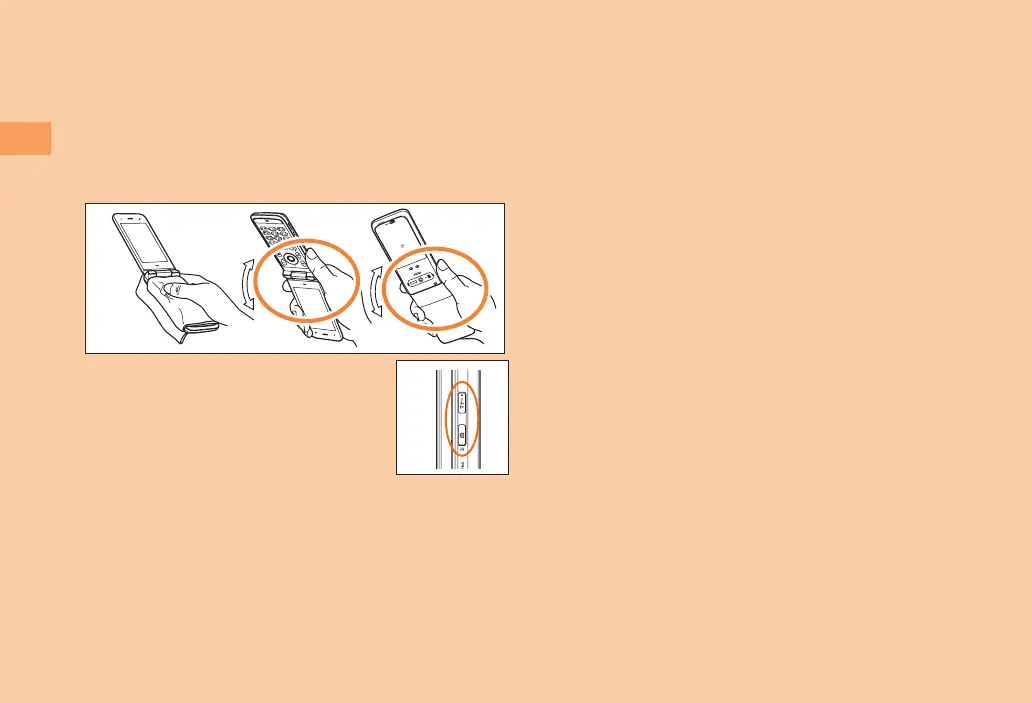
Shake the product 20 times each in the direction of the arrow as shown in the
figure.
* Makesureitissafearoundyoubeforeshaking.Holdfirmlyanddonotletthe
productflyoutofyourhand.
❶
❷
❸
Cover the side keys with a lint-free, clean, dry cloth,
press each keys for 2-3 times.
❹
Wipe away any water came out from the product with a
lint-free, clean, dry cloth.
❸
❺
Put the product on the lint-free, clean, dry cloth, leave the product for thirty
minutes or more at room temperature to dry.
Precautions on Charging
The supplied and optional accessories are neither waterproof nor dustproof. Be
sure to check the following points before and after charging.
• Never charge the battery if the main unit is wet. Doing so might cause electric
shock or short circuit resulting in fire or a fault.
• Check that the main unit is not wet. If you are charging the battery just after
the product gets wet, drain water well and wipe remaining water off with a
clean dry cloth before placing it in the desktop holder or opening the external
connection terminal cover.
• If you charge the battery with the external connection terminal cover open, be
sure to tightly close the cover when charging is finished. We recommend using
the desktop holder to charge the battery to prevent water or dust from entering
from the external connection terminal.
• Do not touch the specified charging equipment (sold separately) or desktop
holder with wet hands. Doing so might cause electric shock.
• Do not splash water over the specified charging equipment (sold separately)
and desktop holder when using them. Do not use them near water such as in
a bathroom, shower room, kitchen or washroom. Doing so might cause fire,
electric shock or a fault. Do not bring them into a bathroom, etc. even when you
are not charging with them.



 To Next Page