42
Character Input
Character Input
Character Entry Modes
When a character entry screen is displayed, you can select
a character entry mode if you press & (Char).
Menu Items
: Kanji conversion mode
: Double-byte katakana mode
: Double-byte alphanumeric mode
: Double-byte number mode
: Double-byte symbol mode
: Character code mode
: Single-byte katakana mode
: Single-byte alphanumeric mode
: Single-byte number mode
: Single-byte symbol mode
Use a to select a character entry mode and then
press c (OK).
Entering Alphanumeric Characters
You can use the keys 1 to 0 to enter characters.
More than one character is assigned to each key.
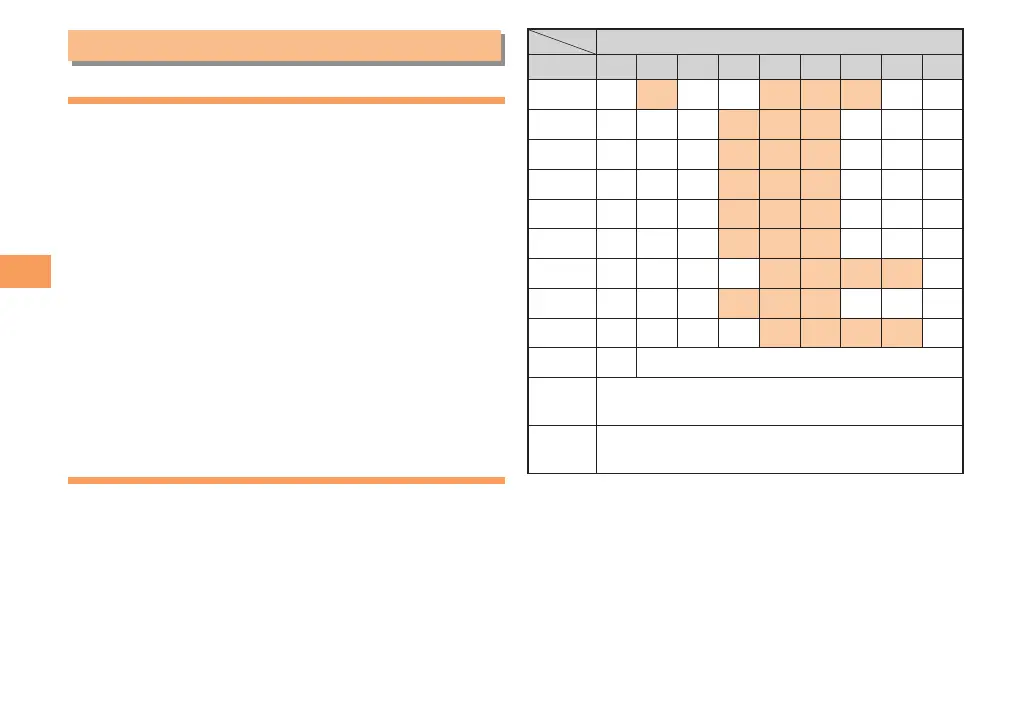
The following table shows the key assignment for entering
characters.
Number of Times to Press the Key
Key 123456789
1
.
@−_/:
〜
1
2
abcABC2
3
de fDEF3
4
ghiGHI4
5
j k l JKL5
6
mn oMNO6
7
pqrsPQRS7
8
tuvTUV8
9
wx y zWXYZ9
0
0
Inputs symbols
*
Inputs symbols (switches an unconfirmed
character between uppercase and lowercase).
#
Adds a line break and displays characters in
the opposite order.
When you change your e-mail address, you cannot use
the characters in
for the account name (part of the
address to the left of @).



 To Next Page