25
Getting Ready
• Be sure to close the cover of the external connection
jack when charging is finished.
• Do not pull or twist the cover of the external connection
jack forcibly.
• When charging with the common AC adapter 01/02
(sold separately), use the 18pin microUSB conversion
adapter 01(sold separately) to make the connection to
the PT003.
• The charging times increase if use the common AC
adapter 01/02 (sold separately).
• Be sure to use the common AC adapter 02/03 (sold
separately) when charging overseas.
Charging the Battery Pack
The battery pack is not fully charged at the time of purchase.
Be sure to charge the battery pack before using the cell
phone for the first time.
• An AC adapter is not included. Purchase a specified AC
adapter (sold separately).
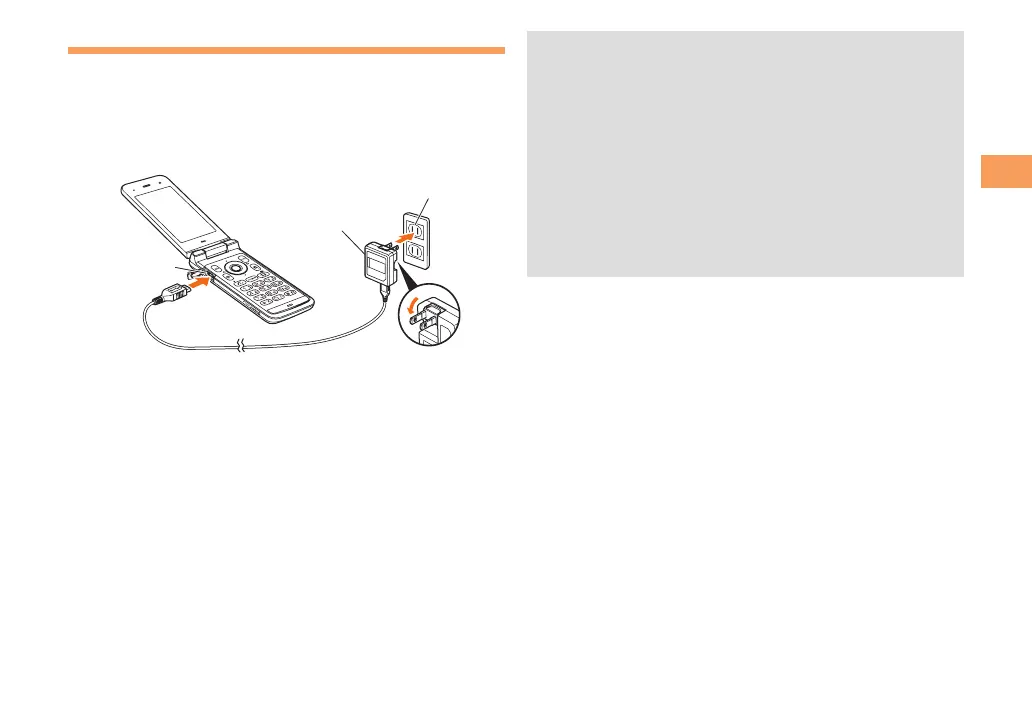
External
connection jack
1
Common
AC adapter 03
100 V AC
power outlet
2
Connect a specified AC adapter to the cell
phone with the battery pack attached.
• Open the cover of the external connection jack. Check
the shape of the connector of the AC adapter, and
plug it straight into the external connection jack.
Unfold the power plug of the AC adapter and
plug it into a 100 V AC power outlet.
Confirm that the charge indicator lights.
• Charging: The charge indicator lights.
• Charging finished: The charge indicator goes out.



 To Next Page