62
EZ Navi
EZ Navi Walk for When You Go Out
Displays various useful menu items for when you are out.
There are two menu modes: the Full Mode menu for those
who want to use all the convenient functions including the
latest features, and the Simple Mode menu with limited
functions allowing you to use the service with simple
operation.
The following table describes the Full Mode menu.
(Free Word)
Search for information about
a facility, shop, station, etc. by
entering its name or a part of its
address.
(Total Navigation/Map)
Find the most preferable
combination of transportation
(trains, airplanes, buses and taxis),
and check out maps of your current
location and places you like to go.
(Connection/Timetable)
Search for train connections,
timetables and other public
transportation information.
(Shop/Facility/Event)
Search for local stores, facilities
or events.
(Road/Traffic Information)
Check out road traffic information
in real time.
(Useful Menu)
View information on services that
are available on PCs, and use
advanced functions of EZ Navi
Walk that you can enjoy.
(Setting/Membership
Registration/Information)
Configure various settings, sign
up as a member or check out
various useful information.
• Some of the menu options require a monthly charge.
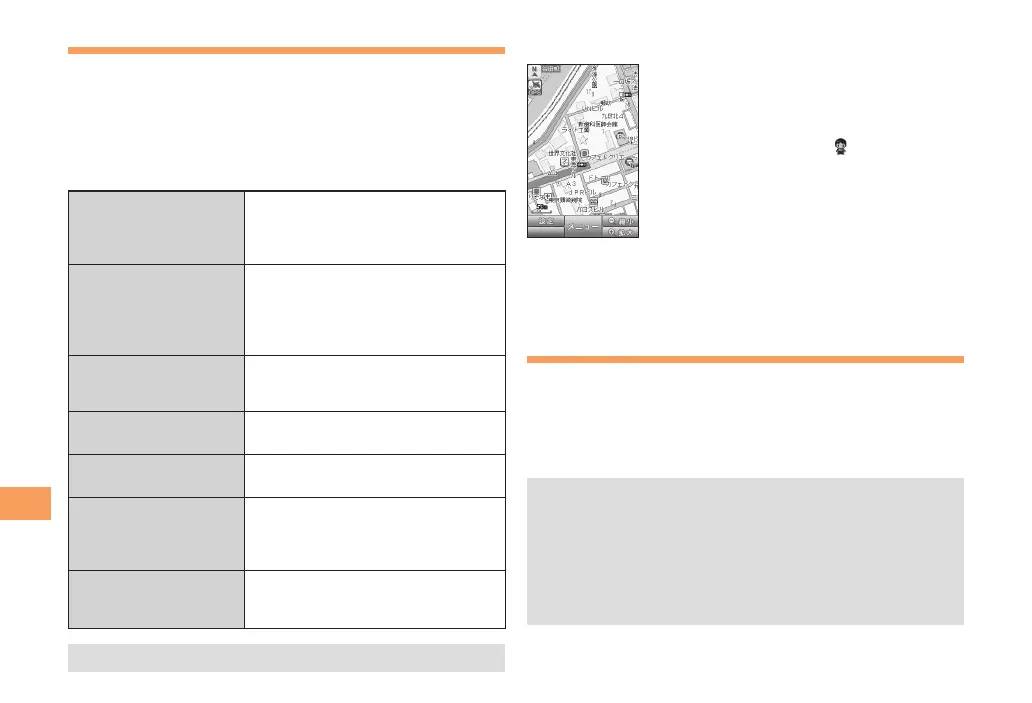
The Map of Your Current Location
★ represents your initial location. As you
start moving, changes of your location are
tracked by continuous positioning and
indicated in real time by
.
The
現在地の地図
(The Map of Your Current Location)
option displays the current map in real time.
Evacuate Navi to Guide You Home or to
Nearby Evacuation Areas during Disasters
Nearby public evacuation areas or the direction to your
home can be determined using the map data pre-installed
on the PT003 (
避難所マップ
[Evacuate Area Map] ).
Other useful contents can be downloaded from the
災害時
ナビ
(Evacuate Navi) section of the EZweb site.
• Some contents require a monthly charge.
• Use the information on the screen as a reference and
always follow the instructions of police, fire and other
municipal authorities.
• When using Evacuate Navi, checking your current
position may take more time than usual depending on
the status of the GPS satellites.



 To Next Page